JavaScript Loops
Repeat tasks efficiently with loop constructs.
for/whilefor...ofbreak/continueTable of Contents
JavaScript Loops Tutorial (Complete Guide)
Loops let you repeat a block of code efficiently instead of writing it multiple times. They are essential for iterating arrays, processing data, and automating repetitive work.
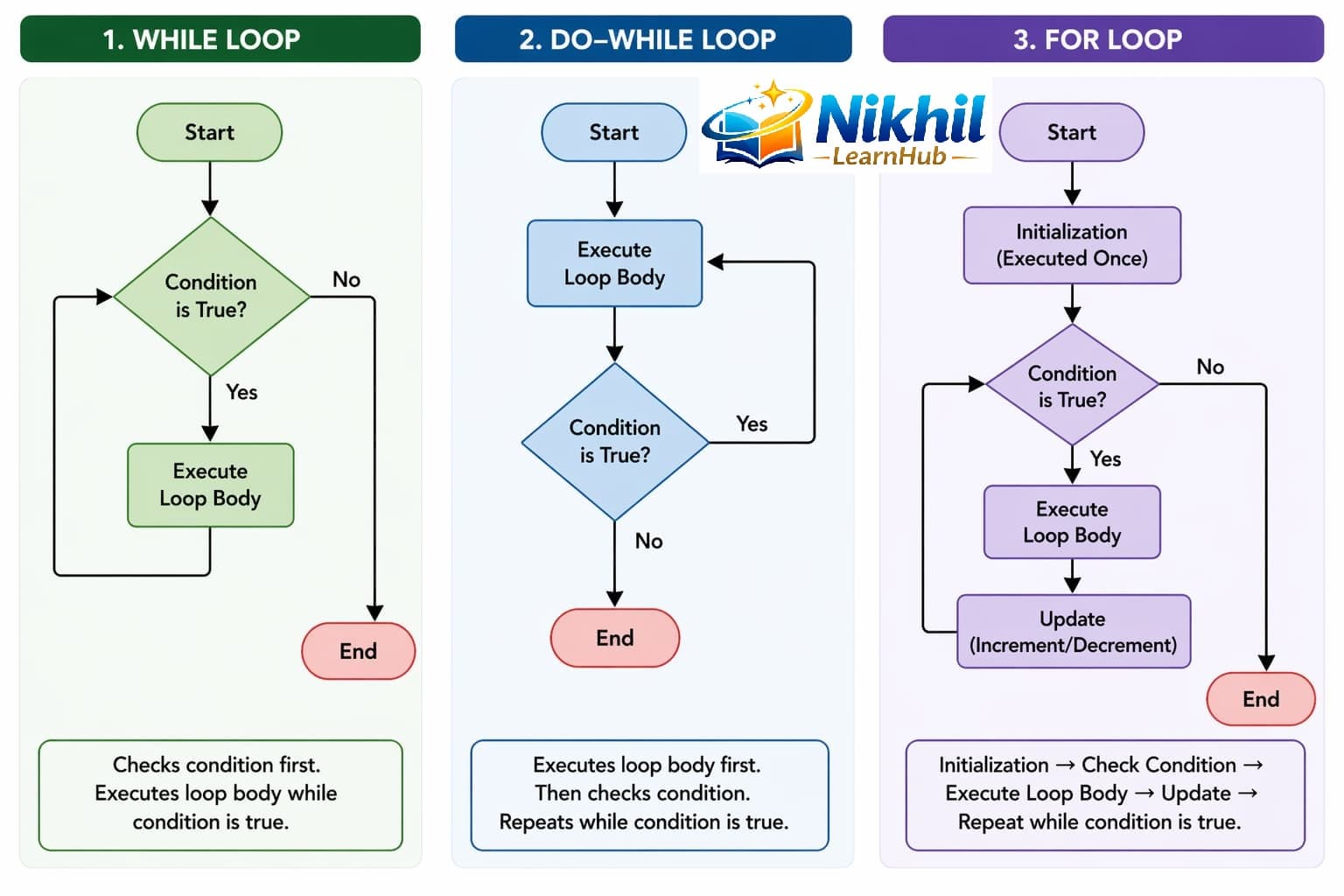
1. for Loop (Most Common)
Use for when you know how many times the loop should run.
for (let i = 1; i <= 5; i++) {
    console.log("Number:", i);
}
Here, the loop starts at i = 1, runs until i <= 5, and increments each time.
2. while Loop (Condition-Based)
Use while when the number of iterations is not fixed.
let i = 1;

while (i <= 5) {
    console.log("Number:", i);
    i++;
}
3. do...while Loop (Runs at Least Once)
This loop executes at least once, even if condition is false initially.
let i = 1;

do {
    console.log("Number:", i);
    i++;
} while (i <= 5);
4. for...of Loop (Array Values)
Use for...of to loop through values in arrays or iterable objects.
let fruits = ["Apple", "Banana", "Mango"];

for (let fruit of fruits) {
    console.log(fruit);
}
5. for...in Loop (Object Keys)
Use for...in to loop through object properties.
let person = {
    name: "John",
    age: 25
};

for (let key in person) {
    console.log(key + ": " + person[key]);
}
7. Loop Control Statements
break (Stop Loop)
for (let i = 1; i <= 5; i++) {
    if (i === 3) break;
    console.log(i);
}
// Output: 1, 2
continue (Skip Iteration)
for (let i = 1; i <= 5; i++) {
    if (i === 3) continue;
    console.log(i);
}
// Output: 1, 2, 4, 5
8. Real-Life Example
let numbers = [10, 20, 30, 40];
let sum = 0;

for (let num of numbers) {
    sum += num;
}

console.log("Total:", sum);
9. Common Mistakes
- Infinite loop due to missing update step:
let i = 1;
while (i <= 5) {
    console.log(i);
    // missing i++
}- Using
for...infor arrays (not recommended). Usefor...offor array values.
10. When to Use What
- Use
forwhen you know the count. - Use
whilewhen condition controls execution. - Use
do...whilewhen at least one run is needed. - Use
for...offor arrays. - Use
for...infor objects.
Related Topics
Control Flow, Switch Statement, and Functions together cover most program flow and iteration patterns.
10 Loops Interview Q&A
1Difference between for and while?easy
Answer: for suits known count, while suits condition-driven unknown count.
2When use do-while?easy
Answer: When loop body must run at least once.
3for...of vs for...in?medium
Answer: for...of iterates values; for...in iterates keys.
4What does break do?easy
Answer: Immediately exits nearest loop.
5What does continue do?easy
Answer: Skips current iteration and moves next.
6How to avoid infinite loops?medium
Answer: Ensure loop condition changes toward termination.
7Why avoid heavy nested loops?medium
Answer: They increase complexity and can hurt performance.
8Can you iterate objects with for...of directly?hard
Answer: Not plain objects unless converted (Object.keys/entries).
9Best loop for arrays in modern JS?easy
Answer: for...of or array methods depending use case.
10Loop + function combo benefit?easy
Answer: Reusable logic and cleaner code structure.
10 Loops MCQs
1
Which loop guarantees one execution?
Explanation: do...while checks condition after first run.
2
for...of iterates:
Explanation: for...of gives values from iterable.
3
break inside loop:
Explanation: break exits nearest loop.
4
continue does:
Explanation: continue skips current cycle.
5
Best for known count:
Explanation: for loop fits counted iterations.
6
for...in is mainly for:
Explanation: for...in traverses keys.
7
Infinite loop usually caused by:
Explanation: loop condition never changes to false.
8
Which loop checks condition first?
Explanation: while checks before first run.
9
Nested loops are useful for:
Explanation: nested loops traverse rows/cols.
10
Next topic after loops here:
Explanation: learning path proceeds to functions.