JavaScript Objects
Represent real-world entities using key-value pairs.
propertiesmethodsdestructuringTable of Contents
JavaScript Objects Tutorial (Beginner -> Practical)
Objects are one of the most important data structures in JavaScript. They allow you to store data in key-value pairs, making them ideal for representing real-world entities like users, products, or settings.
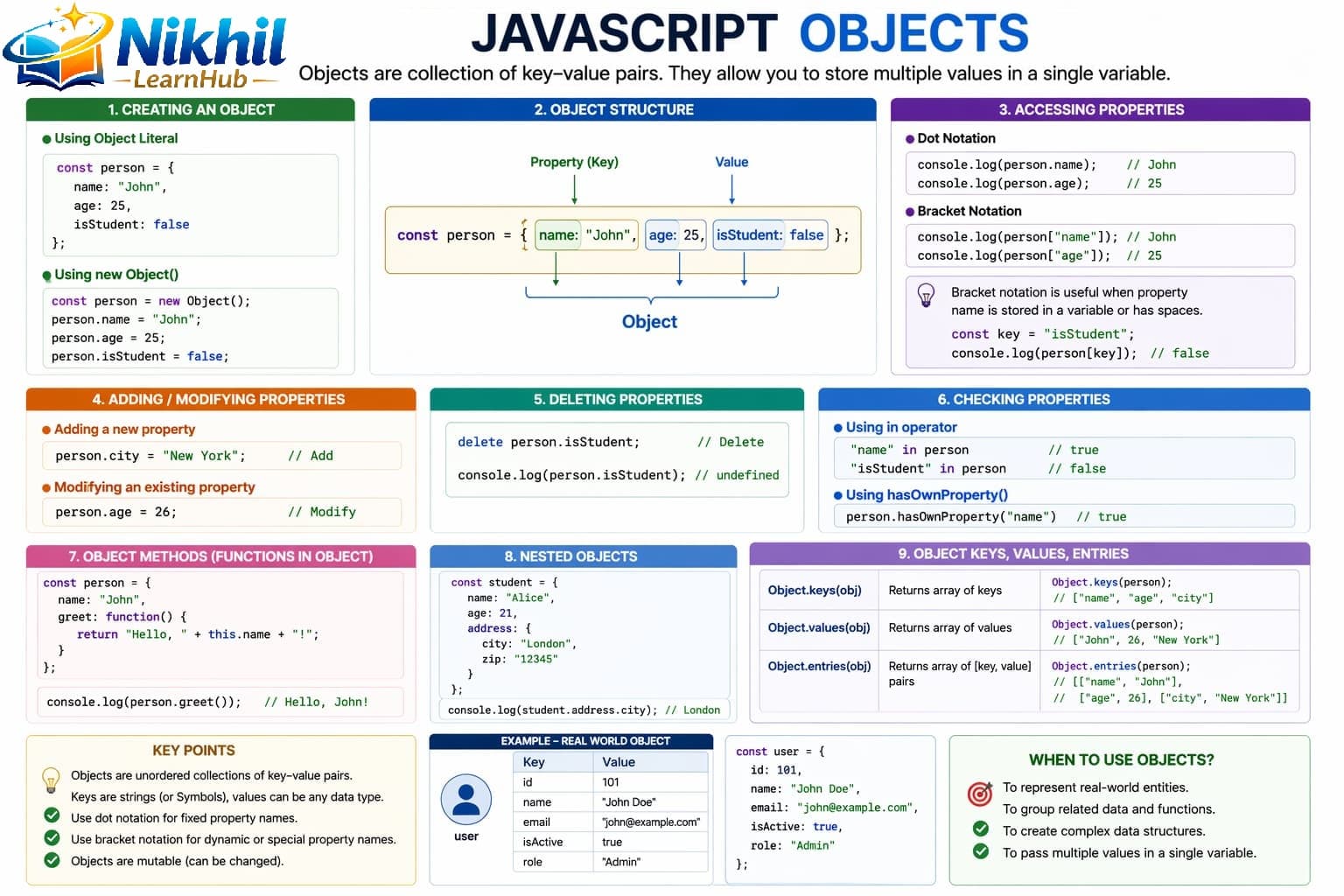
1. What is an Object?
An object groups related data and behavior.
let person = {
    name: "John",
    age: 25,
    isStudent: false
};

console.log(person);
Here, name, age, isStudent are keys and their assigned data are values.
2. Accessing Object Properties
Dot Notation
console.log(person.name);
console.log(person.age);
Bracket Notation
console.log(person["name"]);Bracket notation is useful when the key is dynamic.
3. Modifying Object Properties
person.age = 30;          // update
person.city = "Delhi";    // add new property

console.log(person);
4. Deleting Properties
delete person.isStudent;5. Object Methods (Functions inside Objects)
let person = {
    name: "John",
    greet: function() {
        console.log("Hello " + this.name);
    }
};

person.greet();
this refers to the current object.
6. Looping Through Objects
let person = {
    name: "John",
    age: 25
};

for (let key in person) {
    console.log(key + ": " + person[key]);
}
7. Nested Objects
Objects inside objects.
let student = {
    name: "Ravi",
    marks: {
        math: 90,
        science: 85
    }
};

console.log(student.marks.math);
8. Object vs Array
| Feature | Object | Array |
|---|---|---|
| Structure | Key-value pairs | Indexed list |
| Access | obj.key | arr[index] |
| Use Case | Real-world data | Collections |
9. Visual Understanding
Objects store data in named key-value format, which makes them readable and useful for entity-style data.
10. Real-Life Example
let product = {
    name: "Laptop",
    price: 50000,
    inStock: true
};

if (product.inStock) {
    console.log(product.name + " is available");
}
11. Important Methods
let person = { name: "John", age: 25 };

console.log(Object.keys(person));   // ["name", "age"]
console.log(Object.values(person)); // ["John", 25]
console.log(Object.entries(person));// [["name","John"],["age",25]]
12. Best Practices
- Use meaningful property names.
- Prefer dot notation unless keys are dynamic.
- Avoid deeply nested objects unless necessary.
- Keep objects structured and readable.
13. When to Use Objects
Use objects when you need to represent user profiles, product details, API data, or configuration settings.
Related Topics
Arrays, Functions, and DOM Basics rely heavily on object structures in day-to-day JavaScript.
10 Objects Interview Q&A
{...obj}."key" in obj or obj.hasOwnProperty("key").