C Arrays - Complete Guide
Master C arrays including 1D and 2D arrays with detailed syntax, practical examples, memory representation, and programming best practices.
1D & 2D Arrays
Complete coverage
Memory Representation
Visual understanding
Matrix Operations
Real-world applications
1. Introduction to Arrays
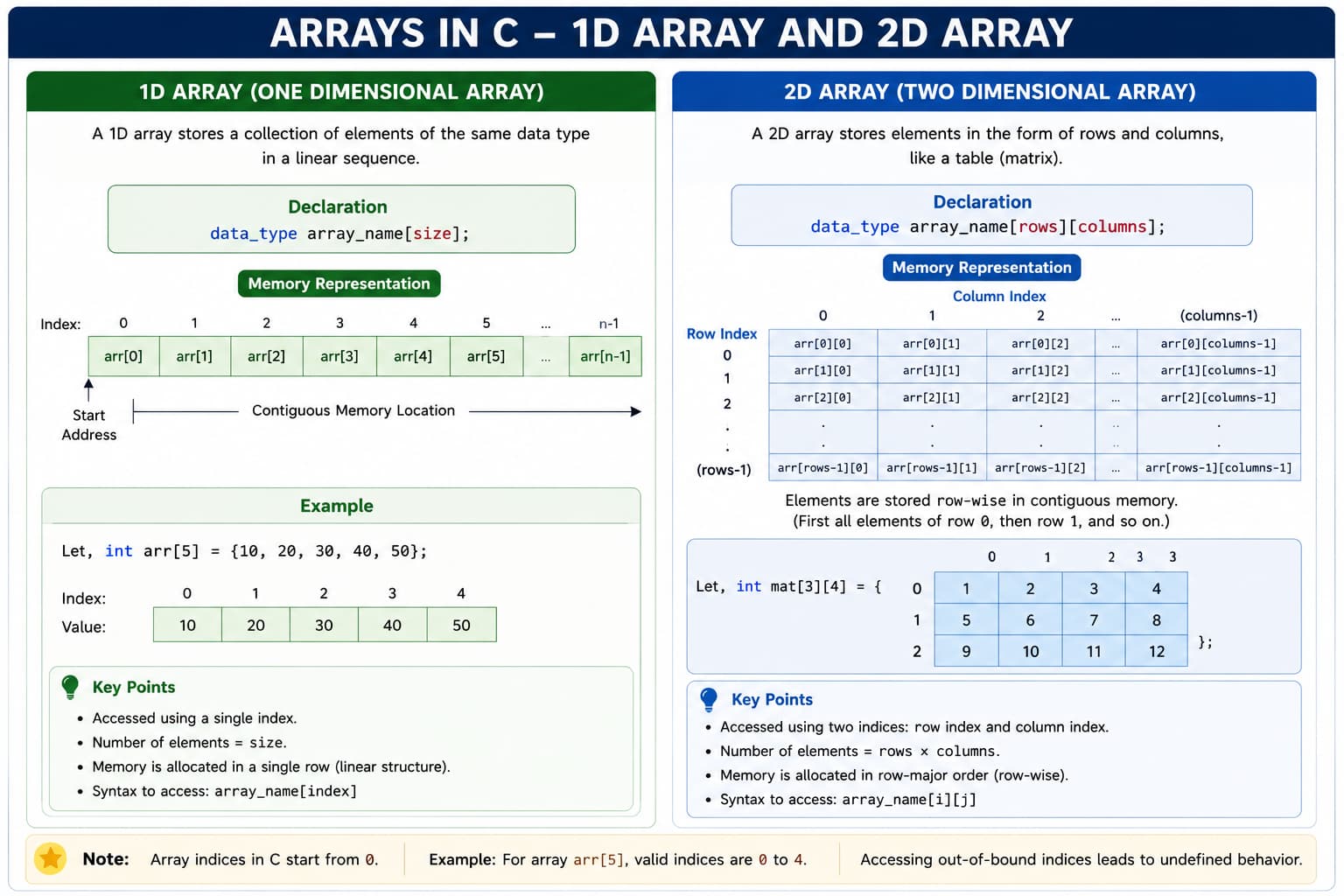
1.1 What is an Array?
An array is a fundamental data structure in C that stores a fixed-size sequential collection of elements of the same data type. Think of a row of numbered boxes: each box holds one item, and all boxes are the same size and type.
Real-world analogies:
- A parking lot with numbered spaces
- A row of school lockers
- An egg carton
1.2 Why Do We Need Arrays?
// Without array (inefficient)
int student1 = 85;
int student2 = 90;
int student3 = 78;
// What if you have 1000 students?

// With array (efficient)
int students[1000];- Code organization — group related data
- Memory efficiency — contiguous allocation
- Easy traversal — loops with an index
- Readability — cleaner code
- Algorithms — sort, search, statistics
1.3 Memory Representation
C allocates a contiguous block. Total bytes = elements × sizeof(type).
int arr[5]; // 5 × 4 = 20 bytes (typical int)1.4 Array Properties
| Property | Description | Example |
|---|---|---|
| Fixed size | Size fixed after declaration | int arr[10]; |
| Homogeneous | Same element type | All int or all float |
| Zero-based | First at index 0 | arr[0] |
| Contiguous | Consecutive addresses | + sizeof(type) each step |
| Random access | Direct by index | arr[5] = 6th element |
2. One-Dimensional Arrays (1D)
2.1 Detailed Declaration Syntax
Syntax:
data_type array_name[array_size];| Component | Description | Rules |
|---|---|---|
| data_type | Element type | int, float, char, … |
| array_name | Identifier | Variable naming rules |
| array_size | Element count | Positive integer constant |
int scores[100];\nfloat temperatures[31];\nchar name[50];int arr[]; // Error: size required
int arr[-5]; // Error: negative size
int arr[10.5]; // Error: not integer
// int arr[n]; // VLA — C99 only2.2 Comprehensive Initialization Methods
Method 1 — complete:
int arr[5] = {10, 20, 30, 40, 50};Method 2 — partial (rest are 0):
int arr[5] = {10, 20}; // 10, 20, 0, 0, 0Method 3 — compiler sets size:
int arr[] = {10, 20, 30, 40, 50};
char str[] = "Hello";  // size 6 with '\0'
Method 4 — all zeros:
int arr[5] = {0};Method 5 — designated (C99):
int arr[10] = {[2]=5, [5]=10, [8]=15};Method 6 — loop:
int arr[10];
for (int i = 0; i < 10; i++)
    arr[i] = i * 2;
2.3 Accessing Array Elements
Syntax: array_name[index]. Valid: 0 … size-1. Out of bounds = undefined behavior.
#include
int main() {
    int arr[5] = {10, 20, 30, 40, 50};
    printf("arr[0] = %d\n", arr[0]);
    int i = 3;
    printf("arr[%d] = %d\n", i, arr[i]);
    printf("arr[1+2] = %d\n", arr[1+2]);
    arr[2] = 99;
    return 0;
}
2.4 Array Traversal Patterns
Pattern 1 — forward:
int arr[5] = {1,2,3,4,5};
for (int i = 0; i < 5; i++)
    printf("%d ", arr[i]);
Pattern 2 — reverse:
for (int i = 4; i >= 0; i--)
    printf("%d ", arr[i]);
Pattern 3 — skip indices:
for (int i = 0; i < 10; i += 2)
    arr[i] = i * 10;
Pattern 4 — two pointers:
int left = 0, right = 4;
while (left < right) {
    int temp = arr[left];
    arr[left] = arr[right];
    arr[right] = temp;
    left++; right--;
}
3. Two-Dimensional Arrays (2D)
3.1 Understanding 2D Arrays
A 2D array is an array of arrays — tabular data with rows and columns (chess board, theater seats, spreadsheet, image pixels).
3.2 Memory Layout (Row-Major Order)
All elements of row 0, then row 1, then row 2…
int matrix[3][3] = {{1,2,3}, {4,5,6}, {7,8,9}};Address of arr[i][j] = Base + (i × columns + j) × sizeof(data_type)3.3 Declaration and Initialization
int matrix[3][4];
#define ROWS 3
#define COLS 4
int m[ROWS][COLS];int m[2][3] = {{1,2,3}, {4,5,6}};int m[2][3] = {1,2,3,4,5,6};int m[3][4] = {{1,2}, {4,5,6}, {7}};int m[][3] = {{1,2,3},{4,5,6},{7,8,9}};int matrix[3][3] = {[0][0]=1, [1][1]=5, [2][2]=9};Applications of 2D Arrays
- Matrix operations
- Game boards
- Tables and grade sheets
- Image processing
- Spreadsheet-style programs
Difference Between 1D and 2D Arrays
| Feature | 1D Array | 2D Array |
|---|---|---|
| Structure | Single row | Rows and columns |
| Index | One index | Two indexes |
| Example | arr[5] | arr[3][3] |
| Loops | Single loop | Nested loops |
| Usage | Linear data | Matrix data |
Common Mistakes and Best Practices
Array Best Practices:
- Always initialize arrays before use
- Use symbolic constants for array sizes (#define)
- Validate array indices before access
- Pass array size as parameter when using functions
- Use sizeof() operator to calculate array size
- Choose appropriate array dimension (1D vs 2D)
- Document array purpose and structure
- Test with boundary cases (empty, single, full)
Key Takeaways
- Arrays store homogeneous elements in contiguous memory
- 1D arrays use single indexing; 2D arrays use row-column indexing
- C uses zero-based indexing (first element at index 0)
- 2D arrays are stored in row-major order in memory
- Always specify array size (except with initialization)
- Arrays are passed by reference to functions
- Use loops for array traversal and operations
- Watch for index out of bounds errors
- Arrays have fixed size determined at compile time
- Initialize arrays to avoid garbage values