Java Programming Language Tutorial
Master Java programming from basic syntax to advanced Object-Oriented Programming (OOP), Collections Framework, Multithreading, and modern Java features with practical examples.
1. Introduction to Java
Java is a high-level, object-oriented programming language developed by Sun Microsystems (now Oracle). It follows the Write Once, Run Anywhere principle through the Java Virtual Machine (JVM).
- Platform independent via bytecode and JVM
- Strong typing with automatic memory management
- Rich standard library and active ecosystem
- Widely used in enterprise, Android, and backend systems
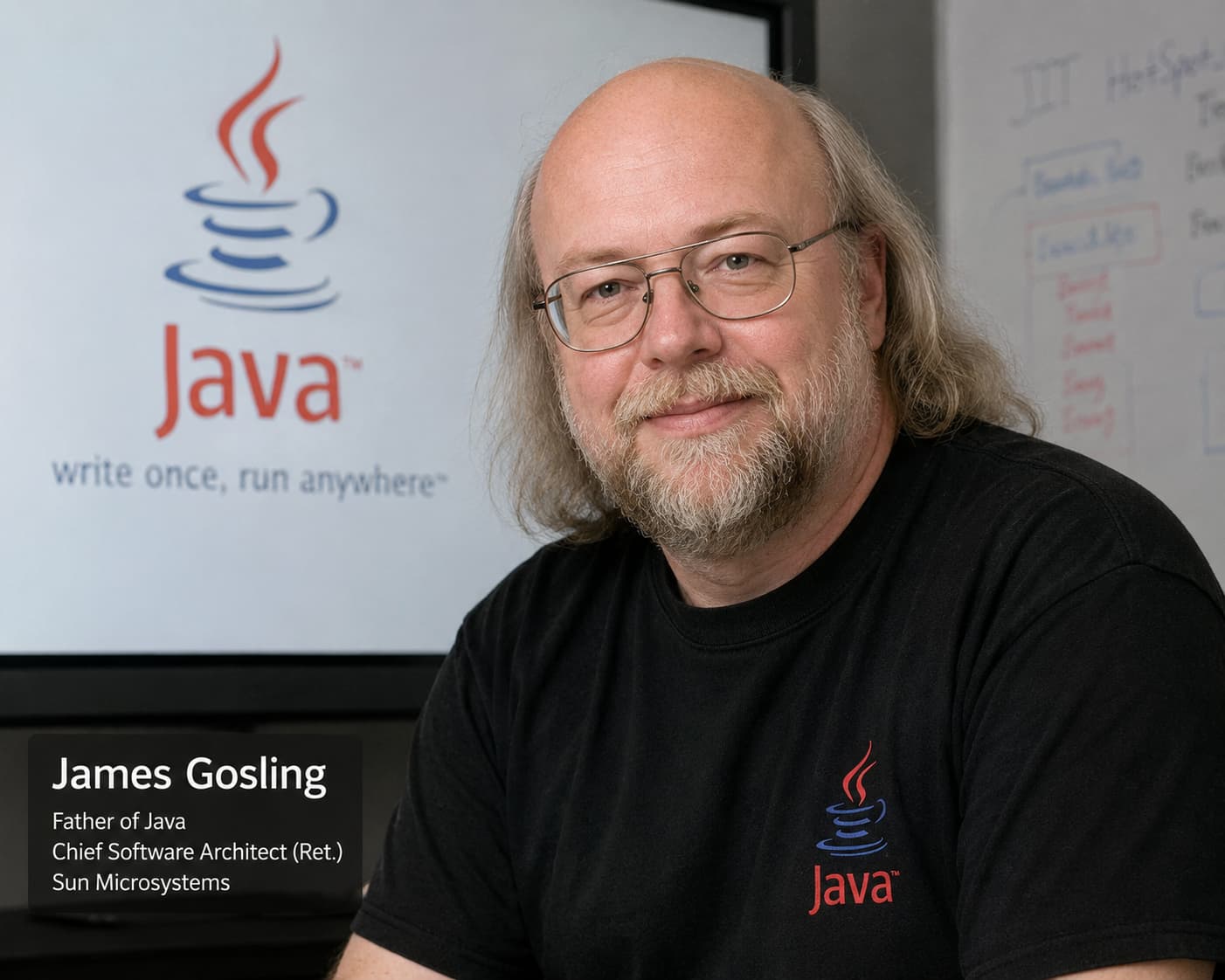
James Gosling
Father of Java — led the Oak project at Sun Microsystems
James Gosling designed Java for portable, secure, object-oriented software. He led the Oak project, invented the JVM and bytecode model, and released Java publicly in 1995. Today Java powers enterprise servers, Android apps, and large-scale backend systems worldwide.
- Originally called Oak; renamed Java for public release
- Garbage collection and strong typing improve safety
- Write Once, Run Anywhere through the Java Virtual Machine
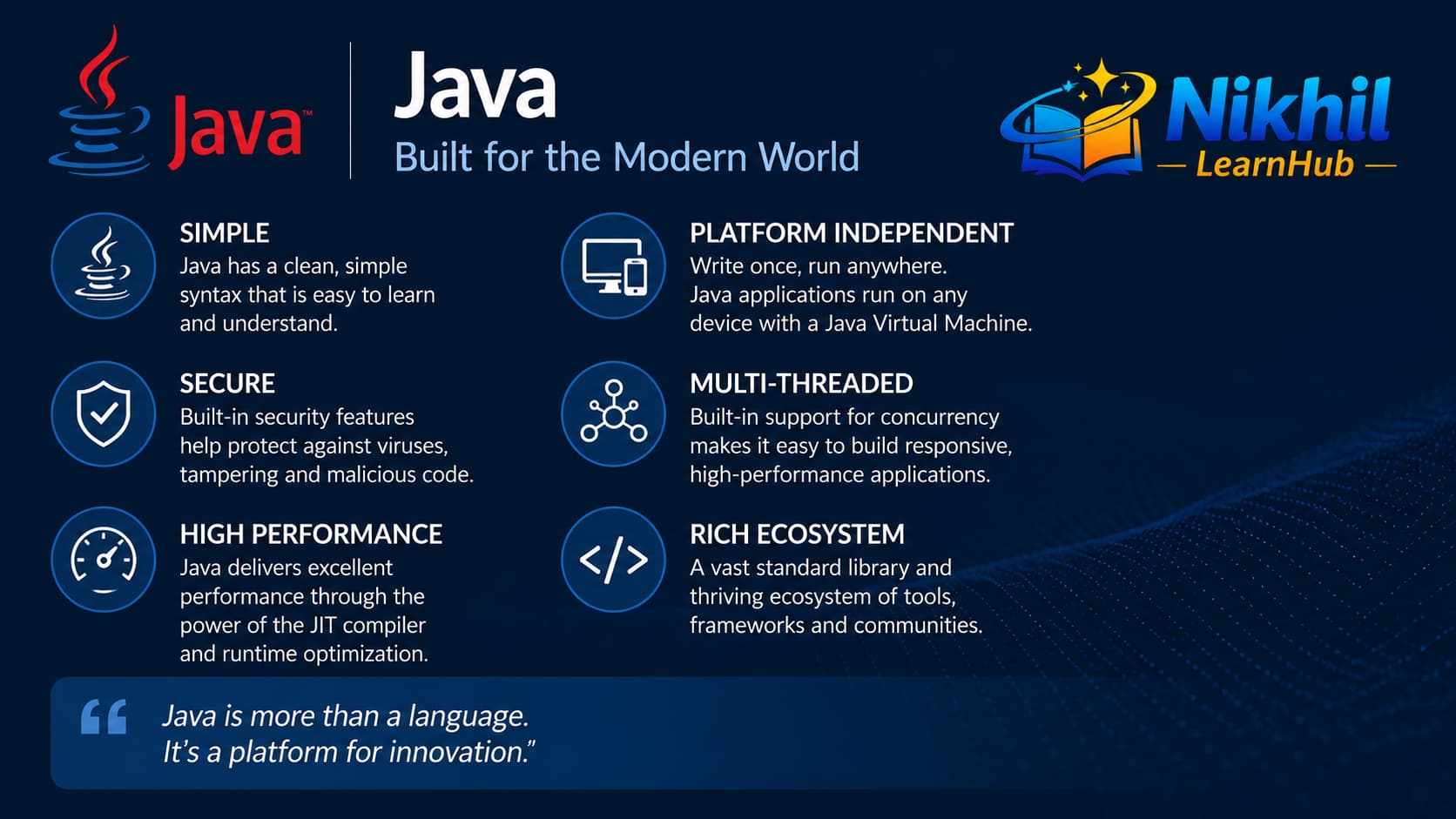
Key Java features explained
1. Write Once, Run Anywhere (WORA)
Java source is compiled to bytecode (.class files), not machine code for one CPU. Any device with a Java Virtual Machine (JVM) can run that bytecode. You develop on Windows, deploy on Linux servers or Android devices, and the same compiled classes work without rewriting the program for each operating system.
2. Object-oriented programming (OOP)
Java is built around classes and objects. Real-world entities are modeled as types with data (fields) and behavior (methods). The four OOP principles in Java are:
- Encapsulation — hide internal state with
privatefields and expose controlled access through methods. - Inheritance — reuse code with
extends(e.g.,Dog extends Animal). - Polymorphism — one interface, many implementations (method overriding and interfaces).
- Abstraction — focus on what an object does, not how, using abstract classes and interfaces.
3. Secure and robust
Java catches many errors at compile time through static typing — you cannot assign a String to an int. The JVM provides a sandbox for applets and controlled execution. Garbage collection automatically frees unused objects, reducing memory leaks. Exception handling (try-catch-finally) lets programs recover from errors instead of crashing silently.
4. Rich standard library (APIs)
Java ships with thousands of classes in the JDK — no need to build everything from scratch:
- java.util — collections (
ArrayList,HashMap), dates, optional types. - java.io / java.nio — files, streams, and modern NIO for high-performance I/O.
- java.net — sockets, HTTP clients, and networking.
- java.util.concurrent — threads, executors, and concurrent collections.
Why teams choose Java
Large codebases stay maintainable thanks to strong typing, mature tooling (Maven, Gradle, IntelliJ), long-term support (LTS releases), and a huge job market in banking, Android, and enterprise backends.
public class HelloWorld {
    public static void main(String[] args) {
        System.out.println("Hello, Java!");
    }
}
2. Java Syntax Basics
Every Java program is organized into classes. The entry point is the main method, and statements end with semicolons. Java is case-sensitive and uses curly braces to define blocks.
- File name must match the public class name
- Package declaration comes before imports
- One public class per source file (convention)
- Comments: // single-line, /* multi-line */
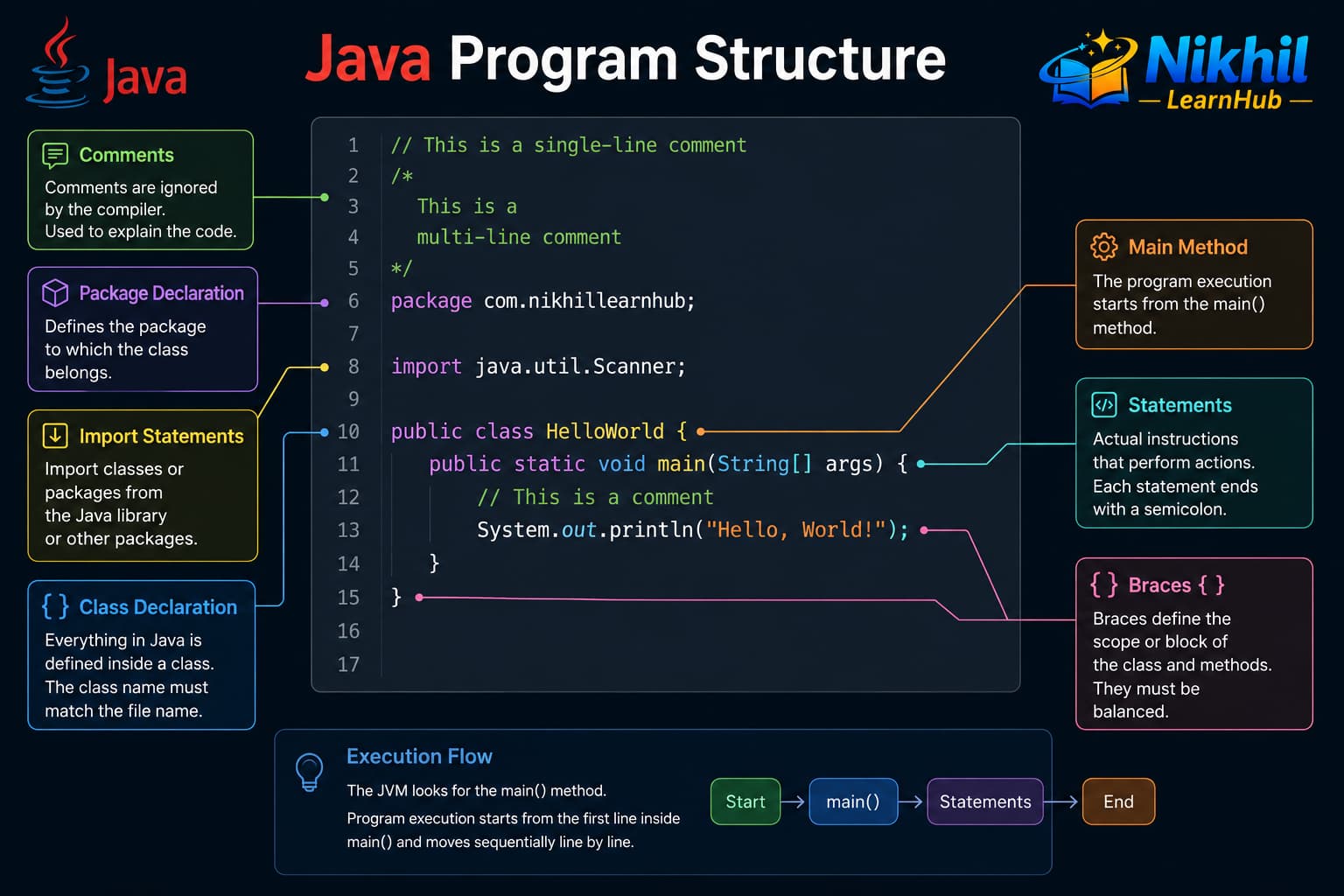
package declares the namespace (first line).
import brings in classes from other packages.
The class holds fields (data) and methods (behavior).
public static void main(String[] args) is the program entry point.
public class Demo {
    public static void main(String[] args) {
        int count = 10;
        System.out.println(count);
    }
}
3. Java vs Other Languages
Java is often compared to C++ (performance and systems heritage) and Python (ease of learning and rapid development). Each language makes different trade-offs: control vs safety, speed of development vs execution speed, and how code is compiled and run.
| Aspect | C++ | Python | Java |
|---|---|---|---|
| Paradigm | Multi-paradigm (OOP, procedural, generic); manual memory | Multi-paradigm; strong scripting / dynamic typing | Primarily object-oriented; everything lives in a class |
| Typing | Static, compile-time; pointers and references | Dynamic; types checked at runtime | Static, compile-time; no raw pointers in normal code |
| Compilation | Compiled to native machine code per platform | Interpreted (CPython) or bytecode (some implementations) | Compiled to bytecode, then JVM JIT-compiles to native code |
| Memory | Manual new / delete or smart pointers |
Automatic garbage collection (reference counting + GC) | Automatic garbage collection in the JVM |
| Portability | Recompile for each OS/CPU; platform-specific code common | Interpreter must exist on target machine | Bytecode + JVM — same .class on Windows, Linux, macOS |
| Performance | Fastest for tight loops, games, embedded, OS-level work | Slower for CPU-heavy numeric work; great for glue and scripts | Strong for servers; JIT optimizes hot paths over time |
| Syntax / learning | Complex (headers, templates, manual memory) | Concise, readable; indentation matters | Verbose but explicit; familiar C-style braces |
| Typical uses | Games, drivers, browsers, high-frequency systems | Data science, automation, web backends, teaching | Enterprise apps, Android, banking, large backend services |
C++ vs Java in practice
C++ gives you direct control over memory and hardware — ideal when every microsecond counts. Java trades some of that control for safety: no pointer arithmetic, no undefined behavior from dangling pointers, and a single portable binary format (bytecode). A C++ program compiled on Windows will not run on Linux without rebuilding; a Java .jar runs wherever a JVM is installed.
Python vs Java in practice
Python lets you write fewer lines and experiment quickly — perfect for scripts, notebooks, and prototypes. Java requires more boilerplate but catches type errors before you run the program, which matters in teams with millions of lines of code. For long-running server applications processing heavy workloads, Java’s JVM optimizations often outperform CPython.
// Java — static typing; error at compile time
int age = 25;
// age = "twenty";  // compile error

String name = "Java";
System.out.println(name.toUpperCase());

// Python equivalent (conceptual):
// age = 25
// age = "twenty"   # allowed at runtime
// name = "java"
// print(name.upper())

// C++ equivalent (conceptual):
// int age = 25;
// std::string name = "Java";
// std::cout << name;
4. Compiling and Running Java
Unlike C++, which compiles directly to machine code for one platform, Java uses a two-step process: compile to bytecode, then run on a JVM. That separation is what makes Java portable.
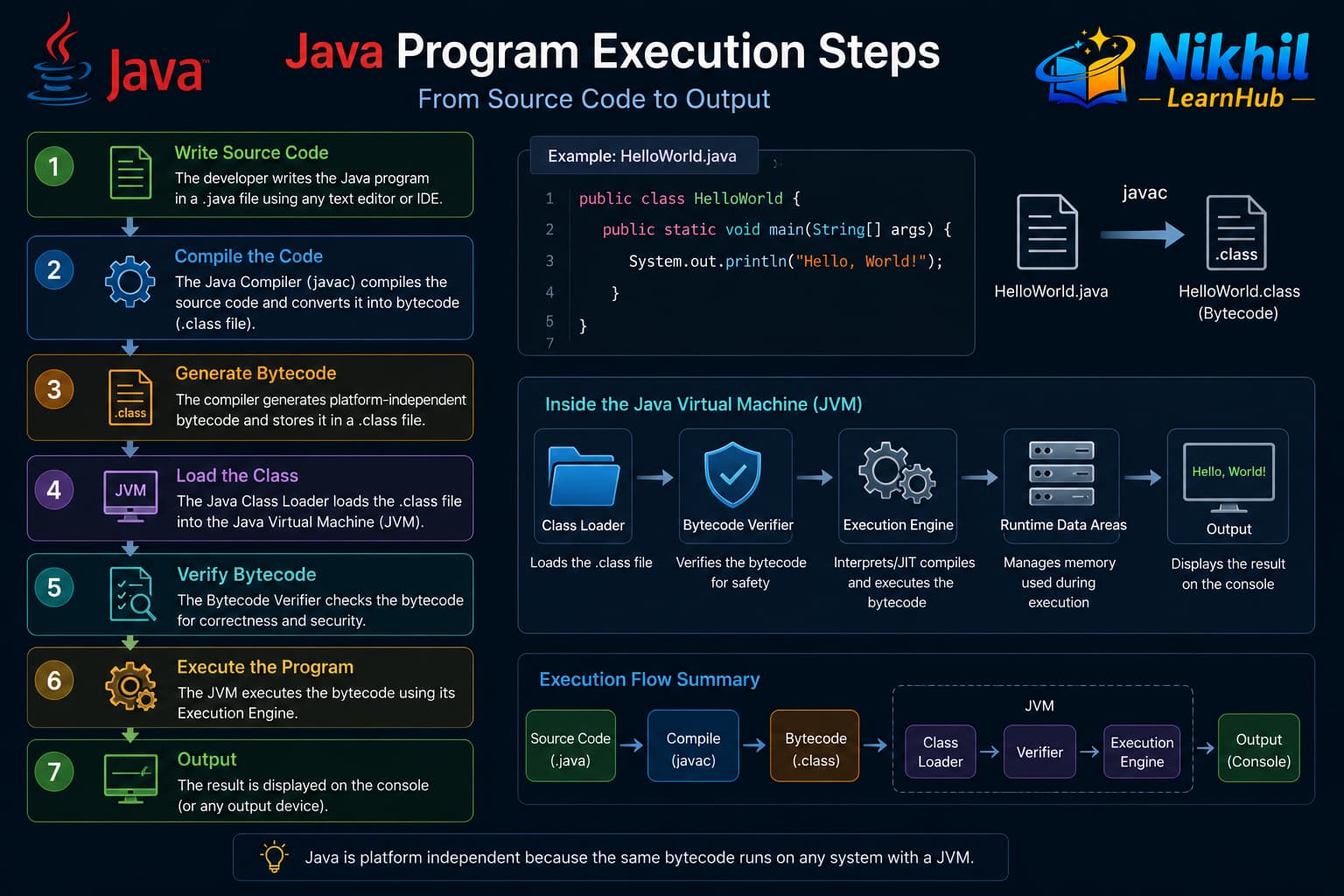
How Java runs — step by step
Step 1: Write source code
You create a text file such as HelloWorld.java containing a public class and a main method. The file name must match the public class name.
Step 2: Compile with javac
The Java compiler (javac) checks syntax and types, then produces one or more .class files containing bytecode — a platform-neutral instruction set for the JVM. If you have errors (missing semicolon, wrong type), compilation fails and no .class file is produced.
Step 3: Load and verify bytecode
When you run java HelloWorld, the JVM class loader finds HelloWorld.class, loads it into memory, and the bytecode verifier checks that the code is safe (no illegal memory access, valid jumps). This is part of Java’s security model.
Step 4: Execute — interpreter and JIT
The JVM starts by interpreting bytecode line by line. Frequently executed code paths are identified and compiled to native machine code by the Just-In-Time (JIT) compiler for faster performance. So Java is not “only interpreted” — hot code runs as fast as optimized native code after warm-up.
Step 5: Garbage collection
While your program runs, the JVM tracks objects on the heap. When objects are no longer reachable, the garbage collector reclaims memory automatically — you do not call free as in C++.
| Tool / concept | Role |
|---|---|
javac | Compiler — turns .java into .class bytecode |
java | Launcher — starts the JVM and calls main |
CLASSPATH | Tells the JVM where to search for classes and JARs |
.jar | Archive of many .class files + metadata for deployment |
| JVM | Runs bytecode; includes loader, verifier, JIT, and GC |
HelloWorld.java, run
javac HelloWorld.java then java HelloWorld.
IDEs (IntelliJ, Eclipse, VS Code) run these steps for you when you click Run.
// Terminal:
//   javac HelloWorld.java    → creates HelloWorld.class
//   java HelloWorld          → JVM runs main()

public class HelloWorld {
    public static void main(String[] args) {
        System.out.println("Running on JVM");
        System.out.println("Java version: " + System.getProperty("java.version"));
    }
}
5. Variables and Data Types
A variable is a named container for data. In Java you must declare the type before the name: int count = 10;. Types fall into two groups: primitives (built-in values) and reference types (objects on the heap).
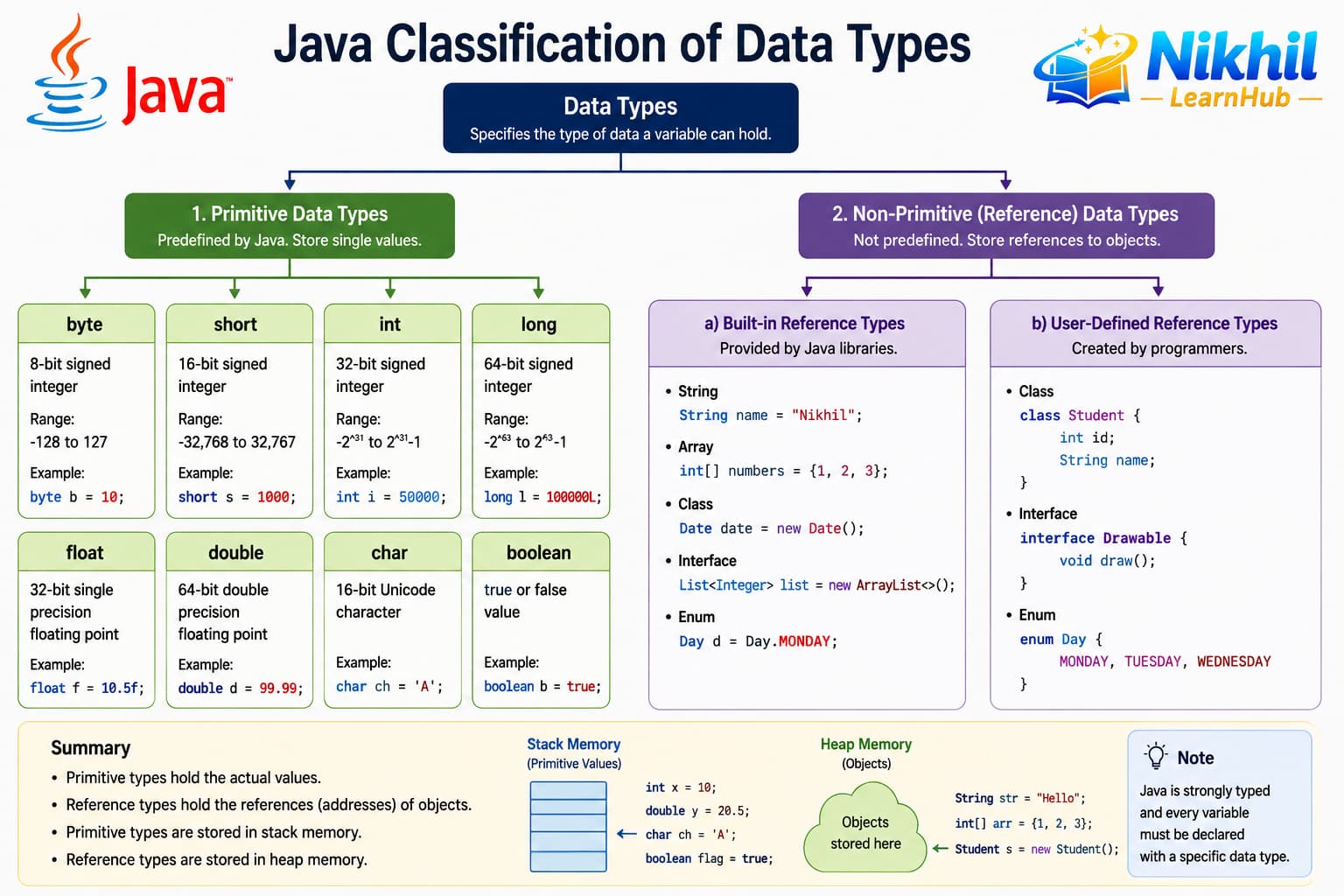
String and arrays.
Primitive data types
Primitives store simple values. They are not objects and do not support methods (except wrapper classes like Integer when you need them).
| Type | Size (typical) | Example value | Use case |
|---|---|---|---|
byte | 8 bit | -128 to 127 | Binary data, small counters |
short | 16 bit | 32000 | Legacy / compact numeric data |
int | 32 bit | 42 | Default for integers (counts, indexes) |
long | 64 bit | 9_223_372_036_854_775_807L | Large numbers (timestamps) |
float | 32 bit | 3.14f | Approximate decimals (suffix f) |
double | 64 bit | 19.99 | Default for decimals (money, science) |
char | 16 bit Unicode | 'A' | Single character (single quotes) |
boolean | 1 bit (JVM) | true / false | Conditions and flags |
Reference data types
Classes, interfaces, arrays, and String are reference types. The variable stores a reference (address) to an object on the heap; the object can be large and shared.
String name = "Nikhil";— text (immutable)int[] scores = {90, 85, 88};— array of primitivesScanner input = new Scanner(System.in);— object instance
Constants with final
Use final when a variable must not be reassigned after initialization. By convention, constant names use UPPER_SNAKE_CASE.
public class DataTypesDemo {
    public static void main(String[] args) {
        // Primitives
        int age = 21;
        long worldPopulation = 8_100_000_000L;
        double price = 19.99;
        float taxRate = 0.18f;
        char grade = 'A';
        boolean isStudent = true;

        // Reference types
        String city = "Hyderabad";
        int[] marks = {78, 92, 85};
        String[] subjects = {"Java", "Math", "Physics"};

        // Constants
        final double PI = 3.14159;
        final int MAX_LOGIN_ATTEMPTS = 3;
        // PI = 3.14;  // compile error — cannot reassign final

        // Using variables
        System.out.println(city + " — age " + age + ", grade " + grade);
        System.out.println("First mark: " + marks[0]);
        System.out.println("Subjects: " + subjects[1]);

        // Wrapper classes (primitive → object when needed)
        Integer boxedAge = age;           // autoboxing
        int unboxed = boxedAge;           // unboxing
        System.out.println("Boxed age: " + boxedAge);
    }
}int to a long is widening (automatic).
Putting a double into an int requires an explicit cast: int n = (int) 9.7; → 9.