C Programming Language Tutorial
Master the C programming language from basic syntax to advanced concepts with practical examples, exercises, and projects.
Step-by-Step
Beginner friendly approach
Practical Examples
100+ code examples
Real Projects
Build portfolio projects
Introduction to C Programming
C is a general-purpose, procedural programming language developed by Dennis Ritchie at Bell Labs in the early 1970s. It is one of the most widely used programming languages of all time and forms the basis for many other languages like C++, Java, and C#.
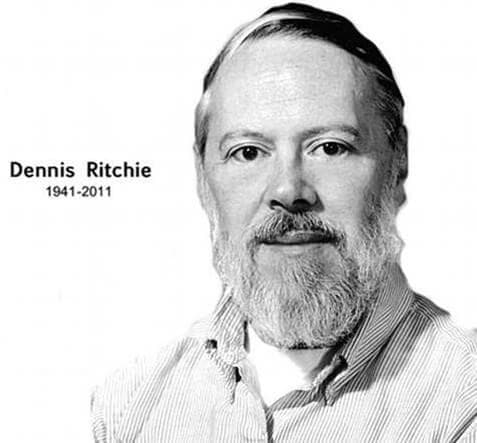 Creator of C · Co-creator of Unix
Dennis Ritchie — Creator of C
Dennis MacAlistair Ritchie was an American computer scientist who shaped modern computing. While working at Bell Telephone Laboratories, he designed and implemented the C programming language (around 1972–1973) and, with Ken Thompson, built the Unix operating system. C gave programmers close control over memory and hardware while staying more portable than assembly language—ideas that still underpin operating systems, embedded software, and language design today.
Ritchie and Thompson shared the Turing Award in 1983 and the U.S. National Medal of Technology in 1998. With Brian Kernighan, he co-authored The C Programming Language (1978), often called “K&R C,” which taught generations of programmers. C directly influenced C++, Objective-C, and countless other languages; Unix and its descendants power servers, phones, and the internet worldwide.
- Created C to rewrite Unix in a portable, efficient language
- Introduced types, structs, and a clear compilation model still used today
- Helped standardize C (ANSI C / C89) for consistent compilers everywhere
History of C
- Developed by Dennis Ritchie between 1969 and 1973
- Originally designed for UNIX operating system
- ANSI standardized in 1989 (C89)
- ISO standardized in 1990 (C90)
- Latest standard is C18 (2018)
Why Learn C?
- Foundation for other programming languages
- Used in system programming and embedded systems
- High performance and efficiency
- Teaches fundamental programming concepts
- Widely used in operating systems and compilers
First C Program
Every C program must have a main() function. Here's the traditional "Hello, World!" program:
#include <stdio.h>

int main() {
    printf("Hello, World!\n");
    return 0;
}
Basic Syntax and Structure
C programs are composed of various tokens which can be keywords, identifiers, constants, string literals, and symbols. A typical program is organized into clear sections—from preprocessor directives and global declarations through main() and its statements.
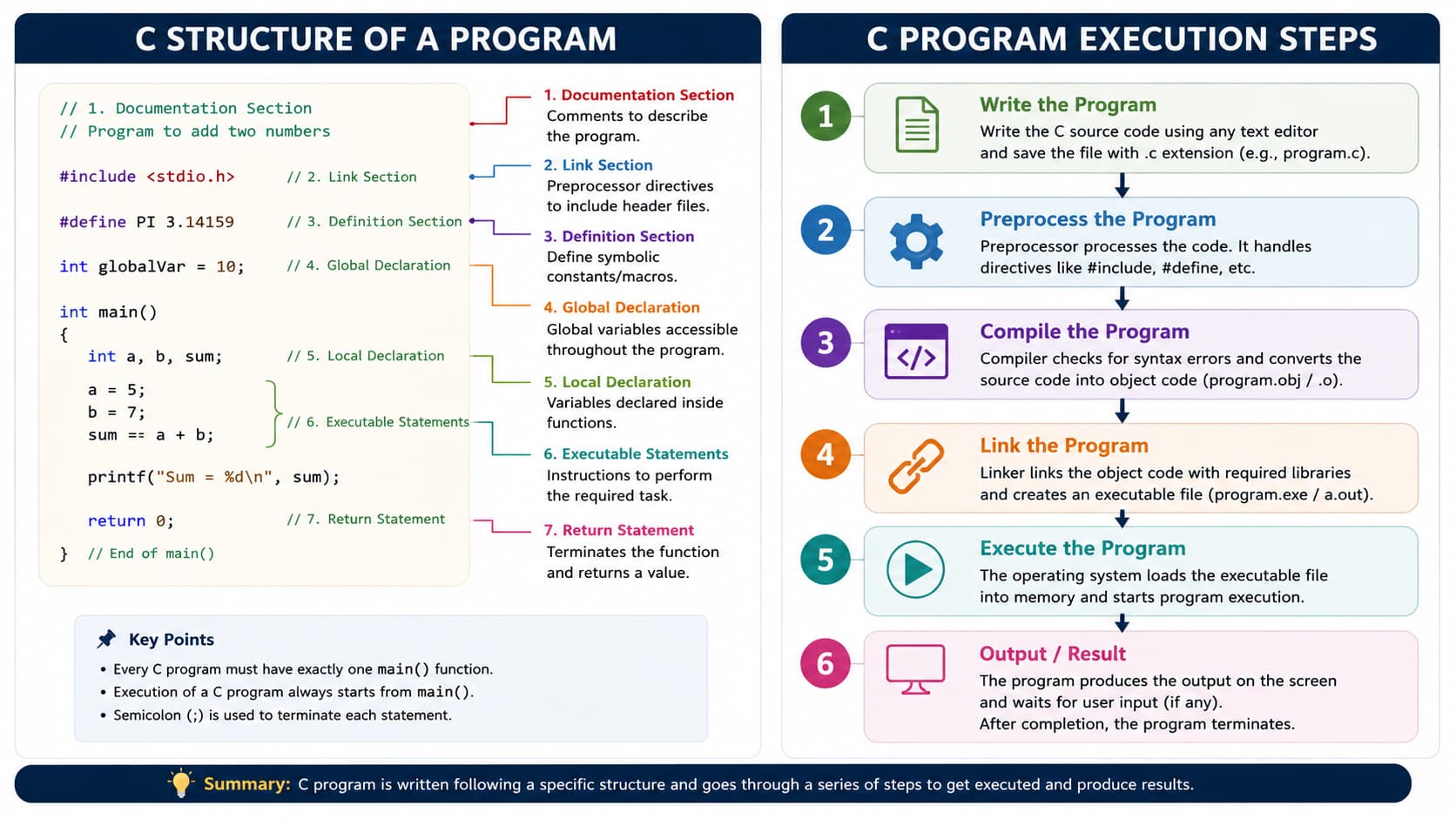
#include), optional global variables and functions, the main() entry point, and executable statements inside functions.| Component | Description | Example |
|---|---|---|
| Preprocessor Directives | Instructions for the preprocessor | #include <stdio.h> |
| Functions | Blocks of code that perform tasks | int main() { ... } |
| Variables | Named storage locations | int count = 10; |
| Statements | Instructions that perform actions | printf("Hello"); |
| Comments | Explanatory text ignored by compiler | // Single line comment |
Variables and Data Types
Variables are used to store data in memory. Each variable has a specific type, which determines the size and layout of the variable's memory.
Rules to Declare a Variable
Before you use a variable in C, you must declare it with a data type and a valid name. These rules apply to local variables inside functions and global variables outside functions.
1. Declaration syntax
| Form | Syntax | Example |
|---|---|---|
| Declare only | type name; |
int count; |
| Declare and initialize | type name = value; |
int count = 0; |
| Multiple variables (same type) | type a, b, c; |
int x, y = 10, z; |
| With modifiers | unsigned/signed type name; |
unsigned int total; |
2. Naming rules
Valid names
- Start with a letter or underscore (
_) - After the first character: letters, digits, underscores only
- Case-sensitive —
age,Age, andAGEare different - Must not be a C keyword (
int,return,while, etc.) - No spaces or special characters (
-,$,@)
Examples:
studentCount,_index,MAX_SIZE
Invalid names
2ndPlace— starts with a digituser-name— contains a hyphenuser name— contains a spaceint,float— reserved keywordsprice$— invalid special character
3. Scope and placement rules
- Local variables — declared inside a function (usually at the start of a block); visible only in that block.
- Global variables — declared outside all functions; visible to the whole file (use sparingly).
- Declare before use — in older C (C89), all declarations must appear before executable statements in a block. In C99 and later, you may declare variables anywhere in the block.
- No redeclaration — you cannot declare the same name twice in the same scope (
int x; int x;is an error). - Reassignment is allowed — after declaration, change the value with
=(e.g.age = 30;).
Quick checklist
- Choose the correct type (
int,float,char, …) - Use a valid identifier (not a keyword)
- Initialize when possible — uninitialized locals hold garbage values
- Use const for values that must not change:
const int MAX = 100;
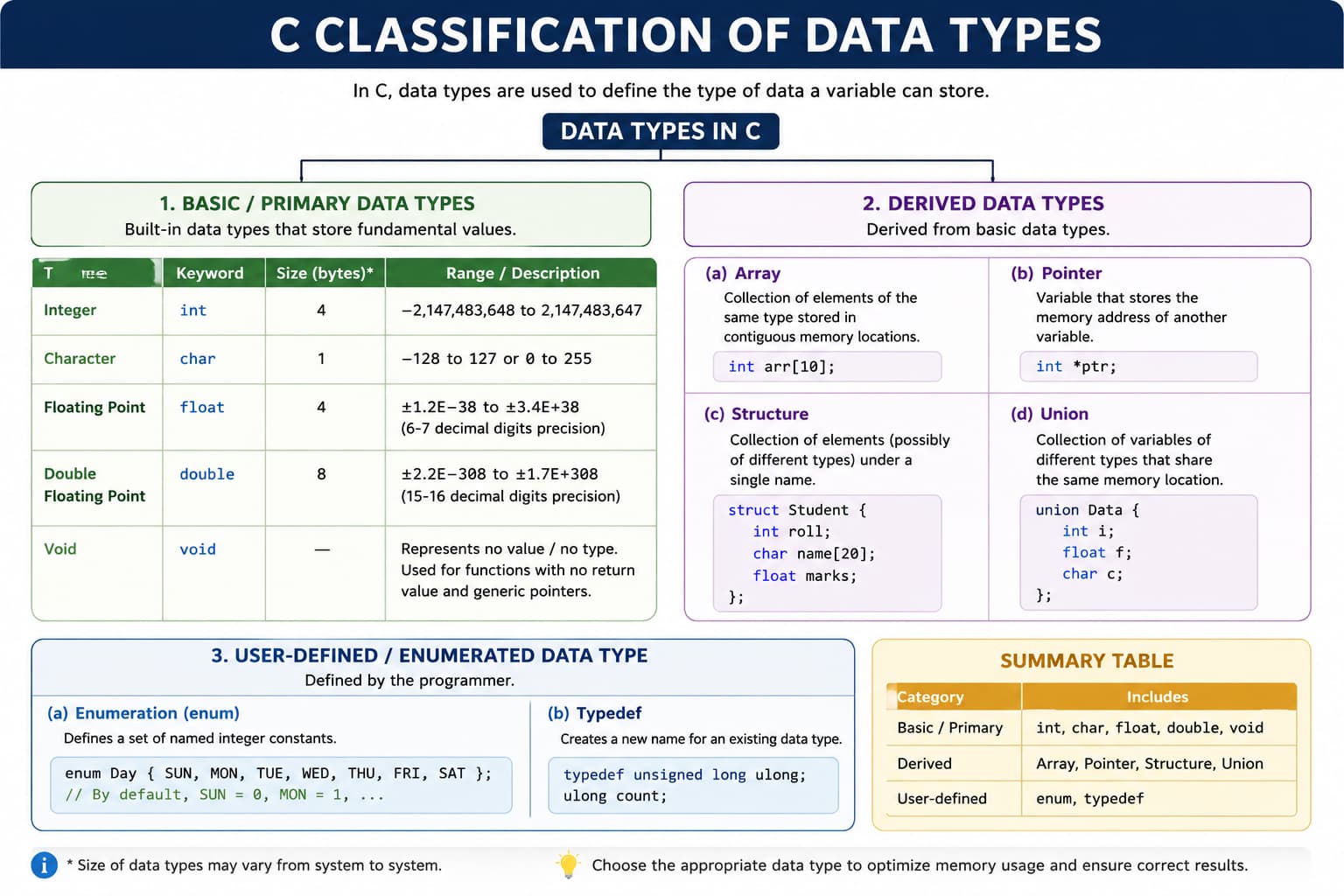
int, float, double, and char define how much memory a variable uses and how values are stored and printed.#include <stdio.h>
int main() {
// Variable declaration and initialization
int age = 25;
float salary = 45000.50;
double pi = 3.1415926535;
char grade = 'A';
_Bool isEmployed = 1;
// Display values
printf("Age: %d\n", age);
printf("Salary: %.2f\n", salary);
printf("Grade: %c\n", grade);
printf("Is Employed: %d\n", isEmployed);
return 0;
}C Data Types Reference
| Data Type | Keyword | Size (Bytes) | Range | Format Specifier |
|---|---|---|---|---|
| char | char |
1 | -128 to 127 or 0 to 255 | %c |
| unsigned char | unsigned char |
1 | 0 to 255 | %c |
| short | short or short int |
2 | -32,768 to 32,767 | %hd |
| unsigned short | unsigned short |
2 | 0 to 65,535 | %hu |
| int | int |
4 | -2,147,483,648 to 2,147,483,647 | %d or %i |
| unsigned int | unsigned int |
4 | 0 to 4,294,967,295 | %u |
| long | long or long int |
4 or 8 | -2,147,483,648 to 2,147,483,647 (4 bytes) -9.22×10¹⁸ to 9.22×10¹⁸ (8 bytes) |
%ld |
| unsigned long | unsigned long |
4 or 8 | 0 to 4,294,967,295 (4 bytes) 0 to 1.84×10¹⁹ (8 bytes) |
%lu |
| long long | long long |
8 | -9.22×10¹⁸ to 9.22×10¹⁸ | %lld |
| unsigned long long | unsigned long long |
8 | 0 to 1.84×10¹⁹ | %llu |
| float | float |
4 | ±1.2×10⁻³⁸ to ±3.4×10³⁸ (6-7 decimal digits precision) | %f |
| double | double |
8 | ±2.3×10⁻³⁰⁸ to ±1.7×10³⁰⁸ (15-16 decimal digits precision) | %lf |
| long double | long double |
10, 12, or 16 | ±3.4×10⁻⁴⁹³² to ±1.1×10⁴⁹³² (19-20 decimal digits precision) | %Lf |
| void | void |
N/A | No value | N/A |
| _Bool | _Bool (C99) |
1 | 0 (false) or 1 (true) | %d |
Type Modifiers
signed- Can be positive or negative (default for integers)unsigned- Only positive valuesshort- Smaller storage (at least 16 bits)long- Larger storage (at least 32 bits)long long- Very large storage (at least 64 bits)
Important Notes
- Size may vary by compiler and platform
- Use
sizeof()operator to check size on your system charcan be signed or unsigned by default (compiler dependent)intis usually the "natural" size for the processor- Always initialize variables before use
C Language: Practical Takeaways
- CoreC teaches fundamental programming concepts very clearly (control flow, functions, arrays, pointers).
- MemoryYou get explicit memory understanding, which helps in debugging performance and avoiding resource leaks.
- SystemC is still central in embedded systems, OS components, compilers, and device drivers.
- DisciplineBecause C is less forgiving, it develops strong coding discipline and careful problem-solving habits.
#include <stdio.h>

int main(void) {
    int values[] = {12, 5, 18, 9, 21};
    int n = sizeof(values) / sizeof(values[0]);
    int sum = 0, max = values[0];

    for (int i = 0; i < n; i++) {
        sum += values[i];
        if (values[i] > max) max = values[i];
    }

    printf("Count: %d\\n", n);
    printf("Sum: %d\\n", sum);
    printf("Max: %d\\n", max);
    return 0;
}