Python Programming Language Tutorial
Master Python programming from basic syntax to advanced concepts including web development, data science, machine learning, automation, and more with practical examples.
Easy to Learn
Beginner friendly syntax
200+ Examples
Practical code samples
Data Science
AI/ML ready
Web Development
Django & Flask
Introduction to Python Programming
Python is a high-level, interpreted programming language known for its simplicity and readability. Created by Guido van Rossum and first released in 1991, Python has become one of the most popular programming languages worldwide, especially in data science, machine learning, web development, and automation.
History of Python
- Created by Guido van Rossum in 1991
- Inspired by ABC language
- Python 2.0 released in 2000
- Python 3.0 released in 2008
- Latest stable version: Python 3.12+
Why Learn Python?
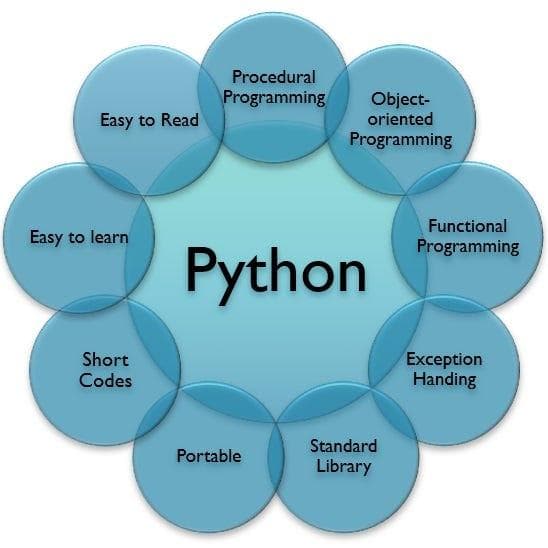
- Simple and easy-to-learn syntax
- Extensive library support
- Versatile (Web, Data Science, AI, Automation)
- Large community and excellent documentation
- High demand in job market
First Python Program
Python programs are simple and readable. Here's the traditional "Hello, World!" program:
# Simple Hello World program in Python
print("Hello, World!")

# Python doesn't require semicolons
# Indentation is crucial in Python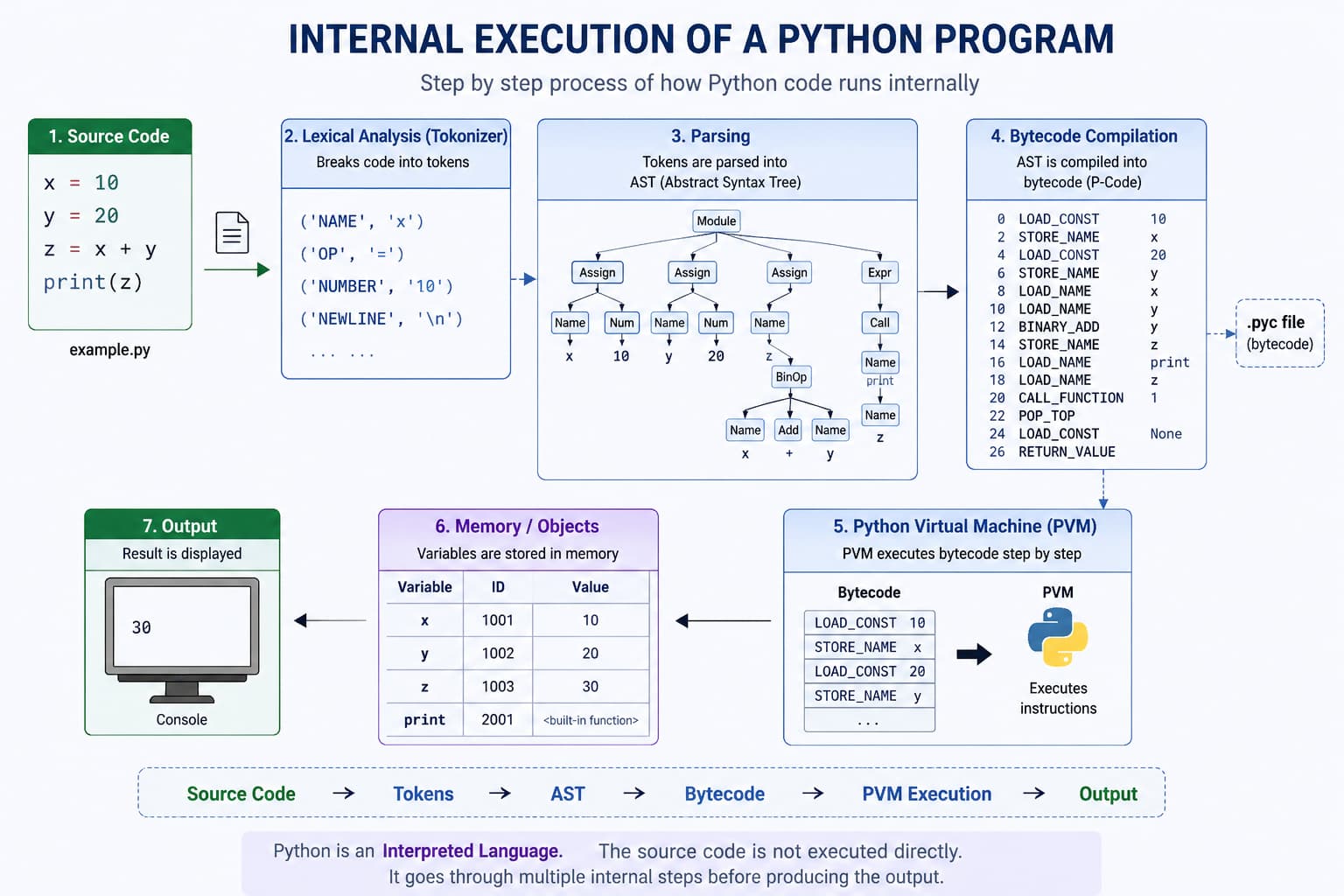
.py file is read by the Python interpreter, executed step by step, and produces output—no separate compile step like many traditional languages.Python Syntax Basics
Python syntax is clean and easy to understand. Unlike other languages, Python uses indentation (whitespace) to define code blocks.
# Variables don't need explicit declaration
message = "Hello, Python!"

# Conditional statement
if len(message) > 10:
    print("Long message")
else:
    print("Short message")

# For loop
for i in range(5):
    print(f"Number: {i}")

# Function definition
def greet(name):
    return f"Hello, {name}!"

print(greet("Developer"))Variables and Data Types in Python
Python is dynamically typed - you don't need to declare variable types. Variables are created when you assign a value to them.
# Variable declaration and initialization
name = "John Doe"          # String
age = 25                   # Integer
salary = 45000.50          # Float
is_employed = True         # Boolean
skills = ["Python", "Django", "Data Science"]  # List

# Multiple assignment
x, y, z = 10, 20, 30

# Check variable type
print(type(name))      # <class 'str'>
print(type(age))       # <class 'int'>
print(type(is_employed)) # <class 'bool'>
Popular Python Versions
| Version | Release Year | Highlights | Status |
|---|---|---|---|
| Python 2.7 | 2010 | Legacy version widely used in older systems | End of life |
| Python 3.6 | 2016 | f-strings, improved async support | End of life |
| Python 3.8 | 2019 | Walrus operator, positional-only parameters | Maintenance phase |
| Python 3.10 | 2021 | Structural pattern matching (`match-case`) | Stable |
| Python 3.11 | 2022 | Major performance improvements, better errors | Stable |
| Python 3.12+ | 2023+ | Faster runtime and language refinements | Recommended for new projects |
Python vs C, C++, and Java
| Feature | Python | C | C++ | Java |
|---|---|---|---|---|
| Execution | Interpreted | Compiled | Compiled | Compiled to bytecode + JVM |
| Typing | Dynamic | Static | Static | Static |
| Syntax | Very simple, readable | Low-level, concise but strict | Feature-rich, complex | Verbose, structured |
| Performance | Moderate | Very high | Very high | High |
| Memory Control | Automatic | Manual | Manual / smart pointers | Automatic (Garbage Collector) |
| Best For | AI, automation, scripting, web | Systems, embedded | Games, performance apps | Enterprise, Android, backend |
Script vs Program
| Aspect | Script | Program |
|---|---|---|
| Execution | Usually interpreted line by line | Usually compiled or packaged before execution |
| Size | Small to medium tasks | Small to very large applications |
| Use Case | Automation, quick tasks, glue logic | Full software solutions and products |
| Maintenance | Often short-term or utility focused | Long-term with architecture and modules |
Client-Side Script vs Server-Side Script
Comparison Table
| Feature | Client-Side Script | Server-Side Script |
|---|---|---|
| Definition | Scripts that run on the user's web browser | Scripts that run on the web server |
| Execution Location | User's computer/browser | Web server |
| Primary Languages | JavaScript, HTML, CSS, VBScript | PHP, Python, Ruby, Java, C#, Node.js, Perl |
| Processing Time | After page loads (runtime) | Before page is sent to client |
| User Interaction | Responds immediately to user actions | Requires page reload or AJAX request |
| Internet Dependency | Can work offline after initial load | Always requires internet connection |
| Speed | Faster (no server communication needed) | Slower (requires network round trips) |
| Security | Less secure (code visible to users) | More secure (code hidden from users) |
| Code Visibility | Source code accessible to anyone | Source code hidden on server |
| Access to Resources | Limited browser resources | Complete server resources (database, file system) |
| Data Processing | Processes data on client machine | Processes data on server machine |
| Bandwidth Usage | Reduces server bandwidth | Consumes more server bandwidth |
| Server Load | No server load | Increases server processing load |
| Examples | Form validation, animations, tooltips, popups | User authentication, database queries, file uploads |
| Browser Dependency | Depends on browser compatibility | Independent of browser type |
| Caching | Can be cached by browser | Cannot be cached by client |
| Updates | Requires page reload to update | Can update content dynamically |
| Database Access | Cannot directly access databases | Can directly access databases |
| SEO Impact | Can hurt SEO (search engines may not execute JS) | Better for SEO (content rendered on server) |
Detailed Comparison
Client-Side Scripting Features
Advantages:
- Reduces server workload
- Faster response time
- Rich user interface capabilities
- Interactive web pages
- Reduces network traffic
Disadvantages:
- Security risks (code exposed)
- Browser compatibility issues
- Cannot access server resources directly
- Slower processing on old computers
Common Uses:
// Example: Form validation on client-side
function validateForm() {
    let email = document.getElementById("email").value;
    if (email === "") {
        alert("Email is required");
        return false;
    }
    return true;
}
Server-Side Scripting Features
Advantages:
- Secure (code hidden from users)
- Can access databases and server files
- Browser independent
- Better for sensitive operations
- Handles large data processing
Disadvantages:
- Slower (requires server communication)
- Increases server load
- Requires page reload (without AJAX)
- More bandwidth consumption
Common Uses:
<?php
// Example: Server-side authentication
session_start();
$username = $_POST['username'];
$password = $_POST['password'];

// Database check (secured)
if ($username === "admin" && password_verify($password, $hash)) {
    $_SESSION['user'] = $username;
    echo "Login successful";
} else {
    echo "Invalid credentials";
}
?>
When to Use Which?
| Scenario | Use Client-Side | Use Server-Side |
|---|---|---|
| Form validation | Basic validation | Critical validation |
| User authentication | No | Yes |
| Database operations | No | Yes |
| Animations and effects | Yes | No |
| File upload/download | No | Yes |
| Dynamic content updates | Yes (with AJAX) | Yes |
| Sensitive calculations | No | Yes |
| Browser detection | Yes | No |
| Session management | No | Yes |
| Real-time chat | Yes (WebSockets) | Yes |
Python Applications
Data Science & Analytics
Python is the #1 language for data science with libraries like:
- NumPy: Numerical computing
- Pandas: Data manipulation
- Matplotlib/Seaborn: Data visualization
- Scikit-learn: Machine learning
Artificial Intelligence & ML
Leading AI/ML frameworks in Python:
- TensorFlow: Deep learning framework
- PyTorch: Research-focused ML
- Keras: High-level neural networks
- OpenCV: Computer vision
Web Development
Popular Python web frameworks:
- Django: Full-featured framework
- Flask: Microframework
- FastAPI: Modern API framework
- Pyramid: Flexible framework
Automation & Scripting
Python excels at automation tasks:
- File system operations
- Web scraping (BeautifulSoup, Scrapy)
- Task automation
- System administration
Python Key Advantages (Explained with Examples)
Python is popular not only because it is beginner-friendly, but also because it helps developers build real projects quickly. Here are the major advantages with practical examples.
-
Readability
Simple and readable syntax:
Python code often looks close to plain English, which reduces learning time and makes maintenance easier.
Example: Instead of writing many lines with brackets and semicolons, you can write:if score >= 35: print("Pass"). -
Productivity
Faster development and productivity:
You can prototype features quickly because Python has concise syntax and rich libraries.
Example: A CSV report generator that may take many lines in lower-level languages can be built quickly using Python +pandas. -
Libraries
Huge library ecosystem:
Python has libraries for web, AI, automation, data, and testing.
Example: UseFlask/Djangofor web apps,NumPy/Pandasfor data analysis, andTensorFlow/PyTorchfor machine learning. -
Portability
Cross-platform support:
The same Python script usually works on Windows, Linux, and macOS with minimal changes.
Example: A file-renaming automation script can run on a laptop (Windows) and a cloud server (Linux). -
Automation
Excellent for automation:
Python is ideal for repetitive tasks and reduces manual effort.
Example: Automatically read emails, download attachments, clean data, and send a daily summary report. -
Community
Strong community and learning resources:
If you face an issue, there are tutorials, forums, and open-source examples readily available.
Example: Beginners can quickly solve errors by checking Python docs, Stack Overflow, and GitHub examples. -
Career Scope
Career and industry demand:
Python is used in startups and enterprises for backend, AI, data science, and QA automation.
Example: Roles like Python Developer, Data Analyst, ML Engineer, and Automation Engineer all rely on Python.
# One short script: readable + fast development + library usage
import statistics

scores = [78, 92, 88, 95, 84]
average = statistics.mean(scores)

if average >= 85:
    print("Great class performance!")
else:
    print("Needs improvement.")

print(f"Average score: {average:.2f}")