C Input/Output Functions - Complete Guide
Master C input/output functions including printf(), scanf(), format specifiers, return values, and practical programming examples for effective C programming.
printf() & scanf()
Complete reference
Format Specifiers
Complete guide
Practical Examples
Real-world usage
Introduction to C Input/Output
Input/Output (I/O) operations are fundamental to any programming language. In C, I/O is performed using functions from the standard library stdio.h (Standard Input/Output). These functions allow programs to communicate with users by reading input and displaying output.
Key Concepts
- Include
#include <stdio.h>for I/O functions printf()- Output function for displaying datascanf()- Input function for reading data- Format specifiers define data type for I/O operations
- Return values indicate success/failure of operations
Common I/O Functions
- printf(): Formatted output to console
- scanf(): Formatted input from console
getchar(): Read single characterputchar(): Write single charactergets() / fgets(): Read string inputputs(): Write string output
Important Note About stdio.h
The stdio.h header file must be included at the beginning of any C program that uses input/output functions. This file contains declarations for all standard I/O functions and is part of the C Standard Library.
C Program Execution
Before you use printf() and scanf(), it helps to know how a C program moves from source code to running output. A .c file is edited, processed by the preprocessor, compiled into object code, linked into an executable, loaded into memory, and then executed—starting at main().
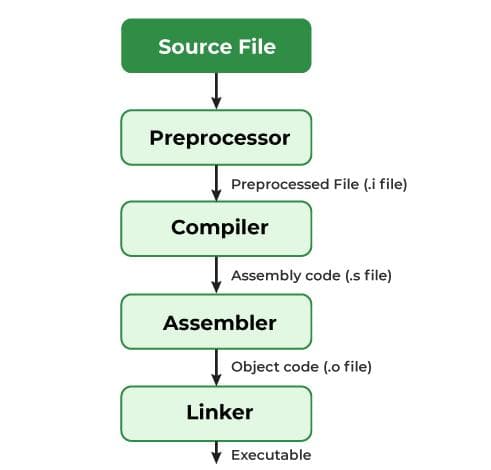
printf/scanf interact with standard input and output.Build Steps
- Preprocess: Handles
#includeand macros - Compile: Translates C to machine code (object file)
- Link: Combines object files and libraries into
.exe
At Runtime
- OS loads the program and calls
main() printf()writes formatted data to stdoutscanf()reads formatted data from stdin- Program ends when
main()returns
The printf() Function - Complete Guide
The printf() function is used to display formatted output to the standard output (usually the console/screen). It's the most commonly used output function in C.
Syntax:
int printf(const char *format, ...);
Parameters:
| Parameter | Description | Example |
|---|---|---|
format |
Format string containing text and format specifiers | "Value: %d" |
... |
Variable number of arguments matching format specifiers | 10, "Hello", 3.14, etc. |
Return Value:
- Returns the number of characters printed (excluding the null character)
- Returns a negative value if an error occurs
printf("Hello");returns 5printf("Number: %d", 42);returns 9 ("Number: 42" has 9 characters)
Common Format Specifiers for printf():
| Specifier | Data Type | Description | Example |
|---|---|---|---|
| %d | int | Signed decimal integer | printf("%d", 42); |
| %i | int | Signed decimal integer (same as %d) | printf("%i", 42); |
| %u | unsigned int | Unsigned decimal integer | printf("%u", 100U); |
| %f | float/double | Decimal floating point (default 6 decimal places) | printf("%f", 3.14159); |
| %c | char | Single character | printf("%c", 'A'); |
| %s | char* (string) | String of characters | printf("%s", "Hello"); |
| %p | void* | Pointer address | printf("%p", &variable); |
| %x | unsigned int | Hexadecimal integer (lowercase) | printf("%x", 255); // ff |
| %X | unsigned int | Hexadecimal integer (uppercase) | printf("%X", 255); // FF |
| %o | unsigned int | Octal integer | printf("%o", 64); // 100 |
| %e | float/double | Scientific notation (lowercase) | printf("%e", 1234.567); |
| %E | float/double | Scientific notation (uppercase) | printf("%E", 1234.567); |
| %g | float/double | Uses %e or %f, whichever is shorter | printf("%g", 1234.567); |
| %G | float/double | Uses %E or %f, whichever is shorter | printf("%G", 1234.567); |
| %% | None | Prints a literal % character | printf("Discount: 10%%"); |
printf() Examples:
#include <stdio.h>

int main() {
    int age = 25;
    float salary = 45000.50;
    char grade = 'A';
    char name[] = "John Doe";

    // Basic examples
    printf("Hello, World!\n");

    // Integer output
    printf("Age: %d\n", age);
    printf("Age in hex: %x\n", age);

    // Floating point output
    printf("Salary: %f\n", salary);
    printf("Salary with 2 decimals: %.2f\n", salary);

    // Character output
    printf("Grade: %c\n", grade);

    // String output
    printf("Name: %s\n", name);

    // Multiple values
    printf("Employee: %s, Age: %d, Salary: $%.2f, Grade: %c\n",
           name, age, salary, grade);

    // Return value demonstration
    int chars_printed = printf("This is a test\n");
    printf("Characters printed: %d\n", chars_printed - 1); // -1 for \n

    return 0;
}
Hello, World!
Age: 25
Age in hex: 19
Salary: 45000.500000
Salary with 2 decimals: 45000.50
Grade: A
Name: John Doe
Employee: John Doe, Age: 25, Salary: $45000.50, Grade: A
This is a test
Characters printed: 14
The scanf() Function - Complete Guide
The scanf() function is used to read formatted input from the standard input (usually the keyboard). It's the most commonly used input function in C.
Syntax:
int scanf(const char *format, ...);
Parameters:
| Parameter | Description | Important Notes |
|---|---|---|
format |
Format string containing format specifiers | Must match the type of variables being read |
... |
Pointer to variables where input will be stored | Variables must be passed using address-of operator (&) |
Return Value:
- Returns the number of input items successfully matched and assigned
- Returns EOF if end-of-file is reached or an error occurs before any conversion
- Returns 0 if no input items are matched
scanf("%d", &num);returns 1 if successful, 0 if input is not a numberscanf("%d %f", &a, &b);returns 2 if both values are read successfully
Common Format Specifiers for scanf():
| Specifier | Data Type | Description | Example |
|---|---|---|---|
| %d | int* | Signed decimal integer | scanf("%d", &number); |
| %i | int* | Integer (decimal, octal with 0, hex with 0x) | scanf("%i", &number); |
| %u | unsigned int* | Unsigned decimal integer | scanf("%u", &value); |
| %f | float* | Floating point number | scanf("%f", &floatValue); |
| %lf | double* | Double precision floating point | scanf("%lf", &doubleValue); |
| %c | char* | Single character (reads whitespace too) | scanf("%c", &ch); |
| %s | char* | String (stops at whitespace) | scanf("%s", name); |
| %[ ] | char* | Scanset - reads characters matching set | scanf("%[A-Z]", uppercase); |
| %x | unsigned int* | Hexadecimal integer | scanf("%x", &hexValue); |
| %o | unsigned int* | Octal integer | scanf("%o", &octValue); |
scanf() Examples:
#include <stdio.h>

int main() {
    int age;
    float height;
    char initial;
    char name[50];
    double salary;

    // Reading integer input
    printf("Enter your age: ");
    int result1 = scanf("%d", &age);
    printf("Age: %d, scanf returned: %d\n", age, result1);

    // Reading float input
    printf("Enter your height in meters: ");
    int result2 = scanf("%f", &height);
    printf("Height: %.2f meters, scanf returned: %d\n", height, result2);

    // Reading character input (note: reads whitespace)
    printf("Enter your initial: ");
    int result3 = scanf(" %c", &initial); // Space before %c ignores whitespace
    printf("Initial: %c, scanf returned: %d\n", initial, result3);

    // Reading string input (stops at whitespace)
    printf("Enter your first name: ");
    int result4 = scanf("%s", name);
    printf("Name: %s, scanf returned: %d\n", name, result4);

    // Reading multiple values at once
    printf("Enter age and height (separated by space): ");
    int age2;
    float height2;
    int result5 = scanf("%d %f", &age2, &height2);
    printf("Age: %d, Height: %.2f, scanf returned: %d\n", age2, height2, result5);

    // Reading double precision
    printf("Enter your salary: ");
    int result6 = scanf("%lf", &salary);
    printf("Salary: %.2lf, scanf returned: %d\n", salary, result6);

    // Checking return value for error handling
    int number;
    printf("Enter a number: ");
    if (scanf("%d", &number) == 1) {
        printf("Successfully read: %d\n", number);
    } else {
        printf("Invalid input!\n");
        // Clear input buffer
        while (getchar() != '\n');
    }

    return 0;
}
Enter your age: 25
Age: 25, scanf returned: 1
Enter your height in meters: 1.75
Height: 1.75 meters, scanf returned: 1
Enter your initial: J
Initial: J, scanf returned: 1
Enter your first name: John
Name: John, scanf returned: 1
Enter age and height (separated by space): 30 1.80
Age: 30, Height: 1.80, scanf returned: 2
Enter your salary: 50000.75
Salary: 50000.75, scanf returned: 1
Enter a number: abc
Invalid input!
Practical Examples - printf() and scanf() Together
Short programs that show printf() and scanf() working together. Each example also uses return values for input checks or output length.
#include <stdio.h>

int main() {
    int a, b, n, chars;

    printf("Enter two integers: ");
    n = scanf("%d %d", &a, &b);
    if (n != 2) {
        printf("scanf failed (returned %d)\n", n);
        return 1;
    }

    chars = printf("Sum = %d\n", a + b);
    printf("printf returned %d characters\n", chars);
    return 0;
}
#include <stdio.h>

int main() {
    char name[20];
    int age, n;

    printf("Name: ");
    scanf("%19s", name);
    printf("Age: ");
    n = scanf("%d", &age);
    if (n == 1)
        printf("Hello %s, age %d\n", name, age);
    else
        printf("Bad age input (scanf returned %d)\n", n);
    return 0;
}
#include <stdio.h>

int main() {
    float c, f;
    int n;

    printf("Celsius: ");
    if (scanf("%f", &c) != 1) {
        printf("Invalid input\n");
        return 1;
    }
    f = (c * 9.0f / 5.0f) + 32.0f;
    n = printf("%.1f C = %.1f F\n", c, f);
    printf("(printf returned %d)\n", n);
    return 0;
}
Tricky Points: printf and scanf Return Values
Return values are easy to ignore, but they matter in interviews and for safe input handling.
printf() returns the number of characters written, or a negative value on error.
Return type is int, not void.
scanf() returns how many items were successfully read and stored—not whether Enter was pressed.
scanf return to the number of conversions you expect.
Partial success: input 10 x for %d %d returns 1, not 0.
scanf returns EOF when input ends before any conversion (usually -1).
EOF is not the same as return 0. Zero means no match; EOF means no more input.
scanf leaves bad characters in the buffer and breaks the next read.
Always check the return value and flush invalid input before calling scanf again.
printf return counts characters; a newline \n counts as one character.
Use the return value for logging or buffer sizing, not as a success/fail flag for normal output.
Common Mistakes and Best Practices
Best Practices for C I/O:
- Always check the return value of
scanf()to verify successful input - Use field width specifiers with
%sto prevent buffer overflows - Include a space before
%cinscanf()to skip whitespace - Use
%.2for similar to control decimal places in output - Clear the input buffer after failed
scanf()calls:while(getchar() != '\n'); - Always prompt the user before
scanf()so they know what to enter - Use
printf()return value for debugging output issues
Key Takeaways
- Always include
#include <stdio.h>for I/O functions printf()displays formatted output and returns the number of characters printedscanf()reads formatted input and returns the number of successful conversions- Use
&(address-of operator) with variables inscanf()(except arrays) - Format specifiers must match the data type:
%dfor int,%ffor float,%lffor double - Use
" %c"(space before %c) inscanf()to skip whitespace when reading characters - Check
scanf()return value to validate user input - Limit string input with field width:
%9sfor 9 characters maximum - Control floating point precision:
%.2ffor 2 decimal places - Clear input buffer after errors:
while(getchar() != '\n');