What is the difference between class and struct?
Default access: struct members are public, class members private—otherwise nearly identical in C++.
Master C++ OOP fundamentals: classes, objects, inheritance, polymorphism, encapsulation, and abstraction with real-world examples and best practices.
Data hiding and protection
Code reusability and hierarchy
Many forms, single interface
Hide complexity, show essentials
Object-oriented programming models real-world entities with classes. Learn encapsulation, constructors, destructors, and how the this pointer ties methods to instances.
OOP is central to C++ frameworks (Qt, game engines, enterprise). Interview loops always include class design questions.
Object-Oriented Programming (OOP) is a programming paradigm that organizes software design around data, or objects, rather than functions and logic. C++ is a multi-paradigm language that fully supports OOP.
Think of a Car as a class. Each individual car (Toyota Camry, Honda Civic) is an object. All cars inherit basic properties from the Vehicle class. Different cars (electric, gasoline) implement the same interface (start(), stop()) differently - that's polymorphism!
The following table explains the fundamental concepts of Object-Oriented Programming in C++:
| Concept | Definition | C++ Implementation | Real-World Example |
|---|---|---|---|
| Class | Blueprint or template for creating objects | class ClassName { }; | Car design blueprint |
| Object | Instance of a class with actual data | ClassName obj; | Actual car on the road |
| Encapsulation | Bundling data and methods together, hiding implementation | private: and public: | Capsule containing medicine |
| Inheritance | Deriving new classes from existing ones | class Child : public Parent | Child inherits traits from parents |
| Polymorphism | One interface, multiple implementations | virtual functions, overriding | Person can be Student, Teacher, etc. |
| Abstraction | Hiding complex reality while exposing essentials | Abstract classes, interfaces | Car dashboard (hides engine complexity) |
| Constructor | Special method called when object is created | ClassName() { } | Car assembly process |
| Destructor | Special method called when object is destroyed | ~ClassName() { } | Car recycling process |
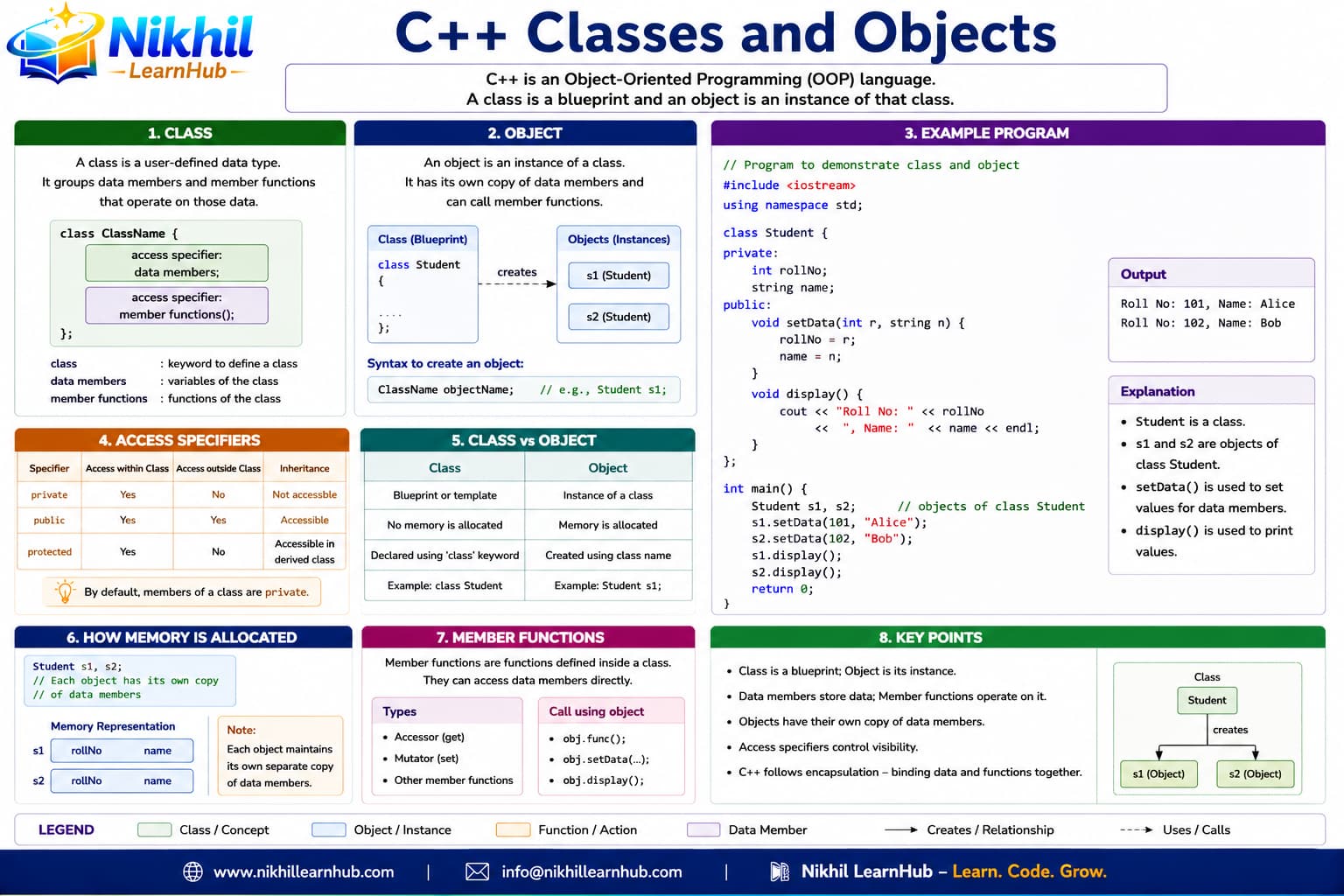
A class is a user-defined data type that holds both data (attributes) and functions (methods). An object is an instance of a class.
class ClassName {
private:
    // Private members (accessible only within class)
    dataType privateVariable;

protected:
    // Protected members (accessible within class and derived classes)
    dataType protectedVariable;

public:
    // Public members (accessible from anywhere)
    dataType publicVariable;

    // Constructor
    ClassName(parameters) {
        // Initialization code
    }

    // Member functions (methods)
    returnType methodName(parameters) {
        // Method implementation
    }

    // Destructor
    ~ClassName() {
        // Cleanup code
    }
};class Account {
int id; double bal;
public:
void deposit(double a);
};Account acc;
acc.deposit(100);cout << acc.getBalance();void setId(int id){ this->id=id; }static int count;
Account::count++;void Account::deposit(double a){ bal+=a; }Constructors initialize objects when they are created. Destructors clean up when objects are destroyed. C++ provides several types of constructors.
ClassName obj;ClassName obj(params);ClassName obj2 = obj1;Student() { name=""; }Student(string n): name(n) {}Student(const Student& o): name(o.name) {}Point(int x,int y): x(x),y(y) {}~Student() { cout<<"bye"; }Student(const Student&)=delete;Encapsulation is the bundling of data and methods that operate on that data within a single unit (class), and restricting direct access to some of the object's components.
class Example {
private:    // Accessible ONLY within this class
    int secretData;

protected:  // Accessible within this class AND derived classes
    int familyData;

public:     // Accessible from ANYWHERE
    int publicData;

    // Getter method (accessor)
    int getSecretData() const {
        return secretData;
    }

    // Setter method (mutator) with validation
    void setSecretData(int value) {
        if (value >= 0) {
            secretData = value;
        }
    }
};private:
string name;
int marks;string getName() const { return name; }void setMarks(int m){ if(m>=0) marks=m; }friend ostream& operator<<(ostream& os, const Student& s);int getMarks() const { return marks; }// users call deposit(), not bal+=Inheritance allows a new class (derived class) to inherit properties and behaviors from an existing class (base class). This promotes code reusability and establishes relationships between classes.
// BASE CLASS (Parent)
class BaseClass {
protected:
    int protectedData;
public:
    void baseMethod() { }
};

// DERIVED CLASS (Child) - Single Inheritance
class DerivedClass : public BaseClass {
public:
    void derivedMethod() {
        protectedData = 10; // Can access protected members
        baseMethod();       // Can access public methods
    }
};

// MULTIPLE INHERITANCE
class MultiDerived : public Base1, public Base2 {
    // Inherits from both Base1 and Base2
};class Vehicle { protected: int speed; };class Car : public Vehicle { };void start() override { speed=10; }Car(): Vehicle() {}Vehicle* v = new Car();virtual ~Vehicle()=default;Polymorphism allows objects of different classes to be treated as objects of a common base class. It enables one interface to be used for a general class of actions.
// BASE CLASS with virtual function
class Base {
public:
    virtual void show() {        // Virtual function
        cout << "Base show()" << endl;
    }

    virtual void display() = 0;  // Pure virtual function (abstract)

    virtual ~Base() {}           // Virtual destructor
};

// DERIVED CLASS overriding virtual function
class Derived : public Base {
public:
    void show() override {       // Override keyword (C++11)
        cout << "Derived show()" << endl;
    }

    void display() override {
        cout << "Derived display()" << endl;
    }
};virtual double pay() const = 0;double pay() const override { return base+bonus; }Employee* e = new Manager();
cout<<e->pay();// runtime picks Manager::payclass Shape { virtual double area()=0; };Manager* m = dynamic_cast<Manager*>(e);Abstraction is the process of hiding complex implementation details and showing only essential features to the user. In C++, abstraction is achieved through abstract classes and interfaces.
// ABSTRACT CLASS (contains pure virtual function)
class AbstractClass {
public:
    // Pure virtual function - makes class abstract
    virtual void essentialOperation() = 0;

    // Virtual destructor
    virtual ~AbstractClass() {}

    // Can have implemented methods too
    void commonOperation() {
        cout << "Common implementation" << endl;
    }
};

// CONCRETE CLASS implementing abstraction
class ConcreteClass : public AbstractClass {
public:
    void essentialOperation() override {
        cout << "Concrete implementation" << endl;
    }
};class Device { public: virtual void on()=0; };void use(Device& d){ d.on(); }class Printer : public Device { /* ... */ };printer.print(doc); // not driver bytes// header declares, cpp definesApp depends on Device*, not Printerclass Invoice { void total(); };class App { void ui(); void db(); };class Car { Engine engine; };class X: public Y: public Z {}class Logger { virtual void log(string)=0; };int getX() const { return x; }Default access: struct members are public, class members private—otherwise nearly identical in C++.
When an object’s lifetime ends—scope exit or delete—for stack and heap objects respectively.
If you manage resources, define/copy/move/destructor appropriately—expanded in advanced OOP topics.