Java Arrays - Complete Guide
Master all Java array types with detailed explanations, memory diagrams, and practical examples. Arrays are fundamental data structures for storing multiple values of the same type.
1. Introduction to Java Arrays
An array stores multiple values of the same type in contiguous memory. Array length is fixed after creation and indexed from zero.
- Fixed size once created
- Zero-based indexing
- Length property, not method
- Reference type stored on heap
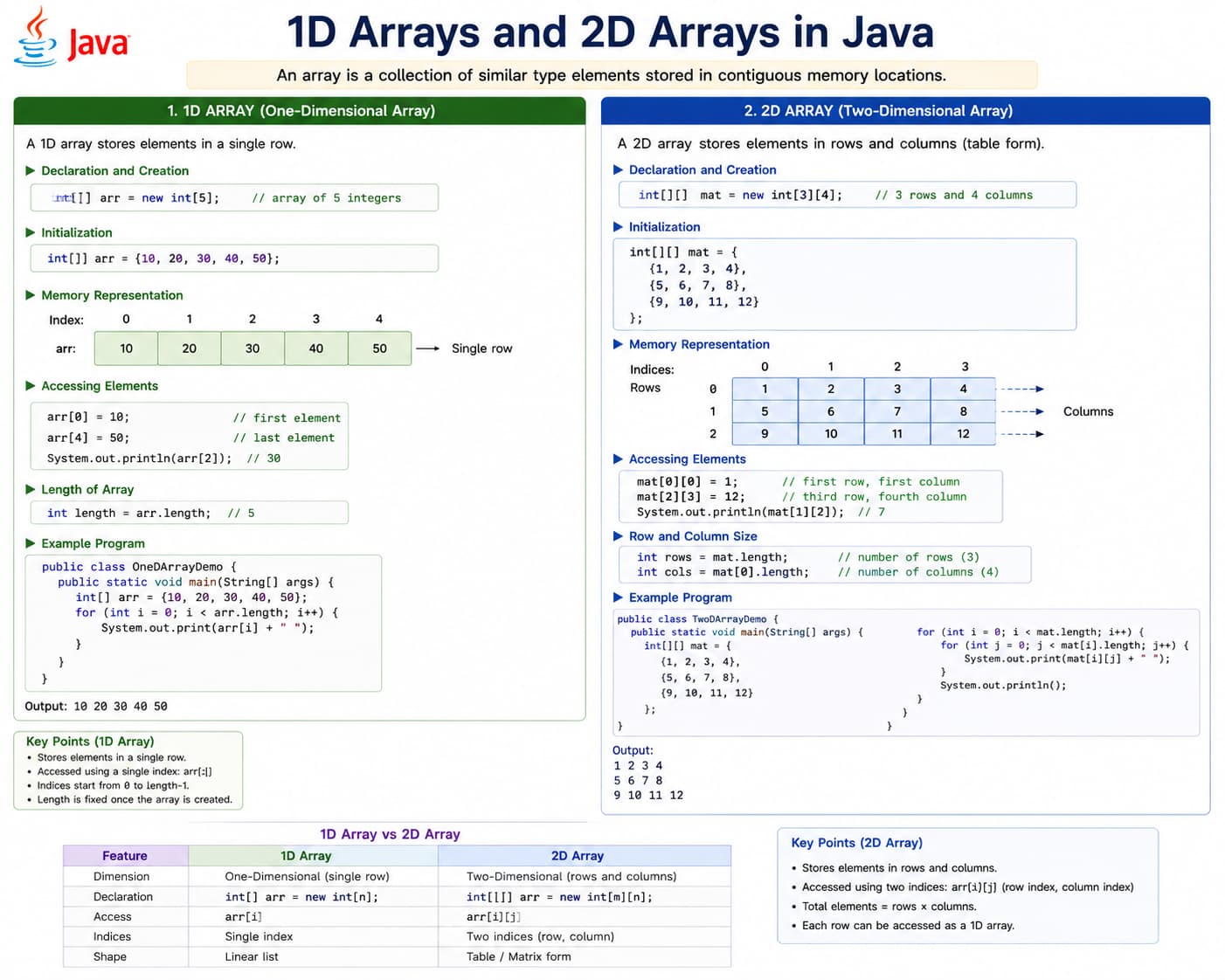
0…n-1; 2D arrays are arrays of arrays; length is fixed after creation.
Array essentials
Fixed length, zero-based index, same element type — 2D arrays are arrays of arrays.
public class ArrayIntro {
    public static void main(String[] args) {
        int[] scores = {90, 85, 78};
        System.out.println(scores[0]);
        System.out.println(scores.length);
    }
}
2. Initialization, Storing, and Accessing
An array variable holds a reference to an array object on the heap. Elements are stored in indexed slots starting at 0.
Ways to initialize arrays
| Style | Syntax | When to use |
|---|---|---|
| Declare + allocate | int[] a = new int[5]; |
Size known; values filled later (defaults: 0, false, null) |
| Literal shorthand | int[] a = {10, 20, 30}; |
Known values at creation |
| Anonymous array | method(new int[]{1, 2}); |
One-time argument without a variable |
| 2D allocation | int[][] m = new int[3][4]; |
Rectangular matrix (3 rows × 4 columns) |
Storing and accessing values
- Store:
arr[index] = value; - Read:
value = arr[index]; - 2D:
matrix[row][col]— row first, then column - Length:
arr.length(1D) ormatrix.length/matrix[i].length(2D)
public class InitAccess {
    public static void main(String[] args) {
        // 1D: literal init
        int[] marks = {78, 92, 85};

        // 1D: allocate then store
        String[] names = new String[2];
        names[0] = "Asha";
        names[1] = "Ravi";

        // Access
        System.out.println(marks[1]);      // 92
        marks[2] = 88;                     // update

        // 2D: store and access
        int[][] seats = new int[2][3];
        seats[0][0] = 101;
        seats[1][2] = 203;
        System.out.println(seats[1][2]);   // 203
    }
}
3. One-Dimensional Arrays — Applications
A 1D array is a single row of values. Use it when data is a sequence of the same type.
| Application | Example data |
|---|---|
| Student marks in one subject | {78, 92, 85, 60} |
| Daily temperature readings | {32, 31, 33, 30} |
| Product prices in a cart | {499, 1200, 250} |
| Roll numbers of a class | {101, 102, 103} |
| Search / sort / find max-min | Algorithms on a single list |
public class OneDApp {
    public static void main(String[] args) {
        int[] marks = {78, 92, 85, 60};
        int max = marks[0];
        for (int i = 1; i < marks.length; i++) {
            if (marks[i] > max) max = marks[i];
        }
        System.out.println("Highest mark: " + max);
    }
}
4. Two-Dimensional Arrays — Applications
A 2D array is an array of arrays — think rows and columns. Access with matrix[row][col].
| Application | Rows × meaning |
|---|---|
| Class marks (students × subjects) | Each row = one student, each column = one subject |
| Cinema seat booking | Row = seat row, column = seat number |
| Chess / tic-tac-toe board | Grid of cells |
| Spreadsheet-like tables | Tabular reports |
| Image pixels (grayscale) | Height × width brightness values |
public class TwoDApp {
    public static void main(String[] args) {
        // 3 students, 2 subjects (Math, Science)
        int[][] marks = {
            {78, 85},
            {92, 88},
            {60, 72}
        };
        int student = 1, subject = 0;
        System.out.println("Student 2 Math: " + marks[student][subject]);

        for (int r = 0; r < marks.length; r++) {
            for (int c = 0; c < marks[r].length; c++) {
                System.out.print(marks[r][c] + "\t");
            }
            System.out.println();
        }
    }
}
5. Array Operations and Time Complexity
Common operations on arrays and their typical time complexity (n = number of elements; for 2D, n ≈ rows × columns).
| Operation | 1D example | Time complexity | Notes |
|---|---|---|---|
| Access by index | arr[i] |
O(1) | Direct jump to slot |
| Update by index | arr[i] = x |
O(1) | Same as access |
| Search (unsorted) | Find value 42 | O(n) | May scan entire array |
| Search (sorted) | Binary search | O(log n) | Requires sorted data |
| Traverse all elements | for / for-each loop | O(n) | Visit each element once |
| Sum / average / max | One pass loop | O(n) | Linear scan |
| Sort | Arrays.sort(arr) |
O(n log n) | Built-in dual-pivot quicksort |
| Copy | Arrays.copyOf(arr, len) |
O(n) | Copies every element |
| Insert/delete in middle | Shift elements | O(n) | Arrays are fixed size — use ArrayList for frequent inserts |
| 2D access | matrix[r][c] |
O(1) | Two index lookups |
| 2D traverse all | Nested loops | O(rows × cols) | Every cell visited once |
import java.util.Arrays;

public class ArrayOps {
    public static void main(String[] args) {
        int[] data = {40, 10, 30, 20};

        // Traverse + sum — O(n)
        int sum = 0;
        for (int x : data) sum += x;

        // Linear search — O(n)
        int target = 30, index = -1;
        for (int i = 0; i < data.length; i++) {
            if (data[i] == target) { index = i; break; }
        }

        // Sort — O(n log n)
        Arrays.sort(data);

        System.out.println("Sum: " + sum + ", index of 30: " + index);
        System.out.println(Arrays.toString(data));
    }
}
Why arrays are fast for access
Index access is O(1) because the address of arr[i] is computed from base address + (i × element size). Trade-off: fixed length and costly middle insert/delete compared to linked structures.
6. Jagged Arrays — Why Use Them?
In Java, a 2D array is really an array of row arrays. A jagged array has rows of different lengths — not a perfect rectangle.
Why jagged arrays?
- Save memory — no wasted slots when each row needs a different size
- Real data is uneven — students take different numbers of optional subjects; a triangle of numbers has 1, then 2, then 3 elements per row
- Sparse tables — most rows are short; only some rows are long
- Flexibility — each row is its own
int[]object on the heap
| Rectangular 2D | Jagged 2D |
|---|---|
new int[3][4] — every row has 4 columns |
new int[3][] — row 0 has 1 col, row 1 has 2, etc. |
| Class marks: same subjects for all students | Each student’s optional subject list differs |
public class JaggedArray {
    public static void main(String[] args) {
        int[][] triangle = new int[4][];  // 4 rows, lengths assigned later
        for (int r = 0; r < triangle.length; r++) {
            triangle[r] = new int[r + 1];  // row r has (r+1) elements
            for (int c = 0; c < triangle[r].length; c++) {
                triangle[r][c] = r + c;
            }
        }
        System.out.println("Row 2 length: " + triangle[2].length);  // 3
    }
}
7. Three-Dimensional Arrays — Why and Where Used?
A 3D array adds one more index: arr[depth][row][col] or arr[x][y][z]. It is an array of 2D arrays (or array of arrays of arrays).
Why 3D arrays?
- Model data that has three natural dimensions (not just rows and columns)
- Keep related values together in one structure instead of many separate 2D arrays
- Useful in graphics, simulation, and scientific code where a “cube” of values is natural
Where 3D arrays are used
| Domain | What the 3 dimensions represent |
|---|---|
| RGB images | Height × width × 3 color channels (R, G, B) |
| 3D graphics / games | Volume grid (x, y, z) for voxels or temperature field |
| Time-series grids | Day × hour × sensor reading |
| Exam data | Batch × student × subject marks |
| Cinema halls | Screen × row × seat status |
public class ThreeDArray {
    public static void main(String[] args) {
        // 2 batches, 2 students each, 3 subjects
        int[][][] marks = {
            { {78, 85, 90}, {92, 88, 80} },   // batch 0
            { {70, 75, 72}, {65, 68, 70} }    // batch 1
        };
        int batch = 0, student = 1, subject = 2;
        System.out.println("Batch 1, Student 2, Subject 3: "
            + marks[batch][student][subject]);  // 80

        // Allocate explicitly: 2 floors, 3 rows, 4 seats
        boolean[][][] seats = new boolean[2][3][4];
        seats[0][1][2] = true;  // floor 0, row 1, seat 2 booked
    }
}ArrayList) are enough. Use 3D when the problem truly has three indices. Deep nesting hurts readability — consider classes or records (e.g. Batch → List<Student>) for complex data.
8. Array Best Practices
Arrays are fast but fixed-size. Modern Java often prefers ArrayList for dynamic collections while arrays remain essential for performance-critical code.
- Check bounds before accessing index
- Use Arrays.copyOf instead of manual copy
- Prefer List when size changes often
- Use enhanced for to avoid index errors
- Consider Arrays.stream for processing