1. Introduction to Control Statements
Control statements change program flow based on conditions. Java provides if, else-if, else, and switch for branching decisions.
- Conditions must evaluate to boolean
- Blocks use curly braces for multiple statements
- switch works with int, enum, String (Java 7+)
- Ternary operator for simple assignments
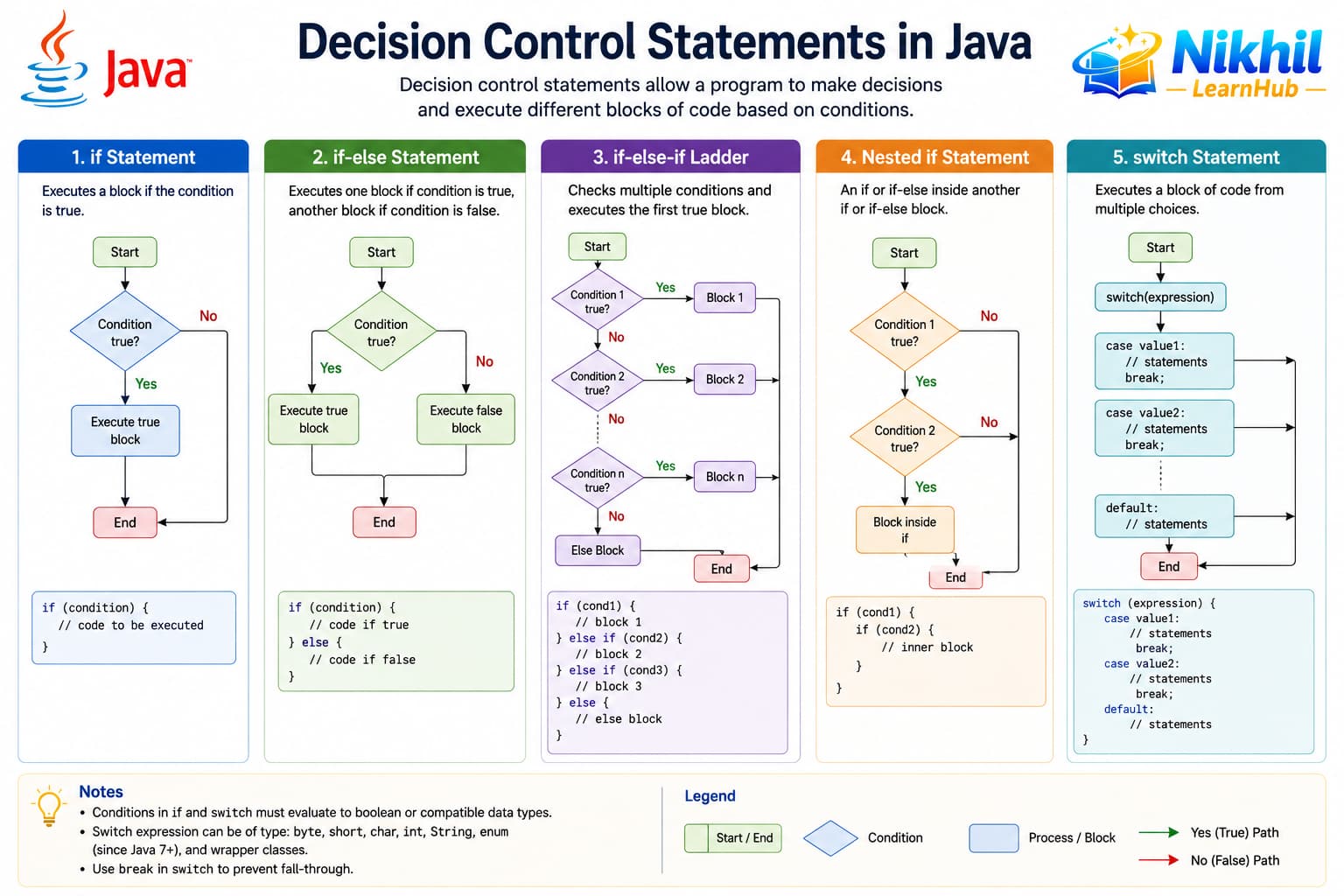 Decision making:
 if, if-else, else-if ladder, and switch control non-linear program flow.
public class ControlIntro {
    public static void main(String[] args) {
        int score = 85;
        if (score >= 60) {
            System.out.println("Pass");
        }
    }
}
2. Control Statements Reference
Each control structure fits different decision patterns. if-else chains handle ranges; switch handles discrete matching values.
- if — single condition
- if-else — two branches
- else-if ladder — multiple ranges
- switch — match constant values
- Ternary — compact if-else expression
| Statement |
Syntax idea |
When to use |
if | Run block when condition is true | Single branch decision |
if-else | Two mutually exclusive paths | Binary choice |
else-if | Chain multiple conditions | Many ranges or categories |
switch | Match value to cases | Many discrete constants |
Nested if | if inside another if | Compound conditions |
3. The if Statement
The if statement executes a block when its condition is true. Omitting braces works for one statement but braces are recommended for clarity.
- Condition in parentheses
- Block in curly braces
- Only runs when condition is true
- Can nest if inside if
public class IfDemo {
    public static void main(String[] args) {
        int temp = 35;
        if (temp > 30) {
            System.out.println("Hot day");
        }
    }
}
4. if-else and else-if Ladders
if-else chooses between two paths. else-if chains test multiple conditions in order until one matches.
- else runs when if condition is false
- Only one branch executes in else-if chain
- Order conditions from most specific to general
- Final else catches remaining cases
public class GradeDemo {
    public static void main(String[] args) {
        int marks = 78;
        if (marks >= 90) System.out.println("A");
        else if (marks >= 75) System.out.println("B");
        else System.out.println("C");
    }
}
5. The switch Statement
switch compares one expression against multiple case labels. break prevents fall-through to the next case unless intentional.
- Works with int, char, byte, short, enum, String
- Use break to exit after a case
- default handles unmatched values
- Java 14+ switch expressions return values
public class SwitchDemo {
    public static void main(String[] args) {
        int day = 3;
        switch (day) {
            case 1: System.out.println("Mon"); break;
            case 2: System.out.println("Tue"); break;
            case 3: System.out.println("Wed"); break;
            default: System.out.println("Other");
        }
    }
}
6. Control Flow Best Practices
Readable branching logic is easier to test and maintain. Avoid deeply nested conditions when early returns or helper methods help.
- Always include default in switch
- Use braces even for single statements
- Prefer switch for many discrete values
- Extract complex conditions into boolean variables
- Avoid deep nesting beyond 2-3 levels
7. When to Use if, if-else, else-if, Nested if, and switch
Imagine a shopping mall billing system. At checkout, the cashier applies discounts based on membership, bill amount, and special offers. The same business rules can be written in different ways — choose the structure that matches how many decisions you need.
| Structure |
When to use (mall discount) |
Branches |
if |
One optional action — no alternative path needed |
1 (do or skip) |
if-else |
Exactly two outcomes — member vs non-member |
2 |
else-if ladder |
Three or more ordered ranges — bill slabs or tier levels |
3+ |
Nested if |
Decision inside another decision — member and bill amount |
Layered |
switch |
Match one variable to fixed labels — membership type or coupon code |
Discrete cases |
Shared scenario for all examples below:
billAmount — total purchase in rupeesisMember — true if the customer has a mall cardmembershipType — "GOLD", "SILVER", or "REGULAR"isFestivalSale — true during festival week
Use if — one condition, one action
Apply an extra festival discount only when the sale is on. If it is not a festival, nothing extra happens — no else needed.
double billAmount = 4200;
boolean isFestivalSale = true;
double discount = 0;

if (isFestivalSale) {
    discount = billAmount * 0.05;  // extra 5% during festival
}
System.out.println("Festival discount: Rs " + discount);
Use if-else — exactly two paths
Members get 10%; everyone else gets 0%. Only two outcomes — perfect for if-else.
double billAmount = 3500;
boolean isMember = false;
double discount;

if (isMember) {
    discount = billAmount * 0.10;
} else {
    discount = 0;
}
System.out.println("Discount: Rs " + discount);
Use else-if ladder — many ordered categories
Discount by bill slab: high spenders get more. Test from highest slab downward so only one branch runs.
double billAmount = 12000;
double discountPercent;

if (billAmount >= 10000) {
    discountPercent = 20;
} else if (billAmount >= 5000) {
    discountPercent = 10;
} else if (billAmount >= 2000) {
    discountPercent = 5;
} else {
    discountPercent = 0;
}
System.out.println("Slab discount: " + discountPercent + "%");
Use nested if — condition depends on another condition
First check membership; inside that, check bill amount for a bigger Gold bonus. Nested if fits when the inner rule only matters if the outer rule is true.
double billAmount = 8000;
boolean isMember = true;
double discount = 0;

if (isMember) {
    discount = billAmount * 0.10;           // base member 10%
    if (billAmount >= 5000) {
        discount += billAmount * 0.05;      // extra 5% for big bills
    }
} else {
    System.out.println("No member discount");
}
System.out.println("Total discount: Rs " + discount);
Use switch — match fixed membership or coupon codes
Each membership type maps to a fixed discount. When the variable has a small set of known string values, switch is clearer than a long else-if chain.
double billAmount = 6000;
String membershipType = "GOLD";
double discountPercent;

switch (membershipType) {
    case "GOLD":
        discountPercent = 20;
        break;
    case "SILVER":
        discountPercent = 15;
        break;
    case "REGULAR":
        discountPercent = 5;
        break;
    default:
        discountPercent = 0;
        break;
}
double discount = billAmount * discountPercent / 100;
System.out.println("Discount: Rs " + discount);
Quick chooser (same mall example)
- if — festival bonus only (optional extra)
- if-else — member gets discount, non-member does not
- else-if — discount by bill range (2000 / 5000 / 10000 slabs)
- nested if — member discount, then extra if bill is high
- switch — GOLD / SILVER / REGULAR fixed percentages
Real checkout systems often combine structures: a switch for membership tier, an if for festival sale, and an else-if ladder for bill slabs. Start with the clearest structure for each rule, then merge results into one final discount variable.