Java Exception Handling - Complete Tutorial
Master Java exception handling: Learn try-catch-finally blocks, throw, throws, custom exceptions, exception hierarchy, and best practices for robust error management.
1. Introduction to Exception Handling
Exceptions represent error conditions that disrupt normal flow. Java uses try-catch-finally to handle errors without crashing silently.
- Throwable is root of errors and exceptions
- Checked exceptions must be handled or declared
- Unchecked: RuntimeException and subclasses
- Error types are serious JVM problems
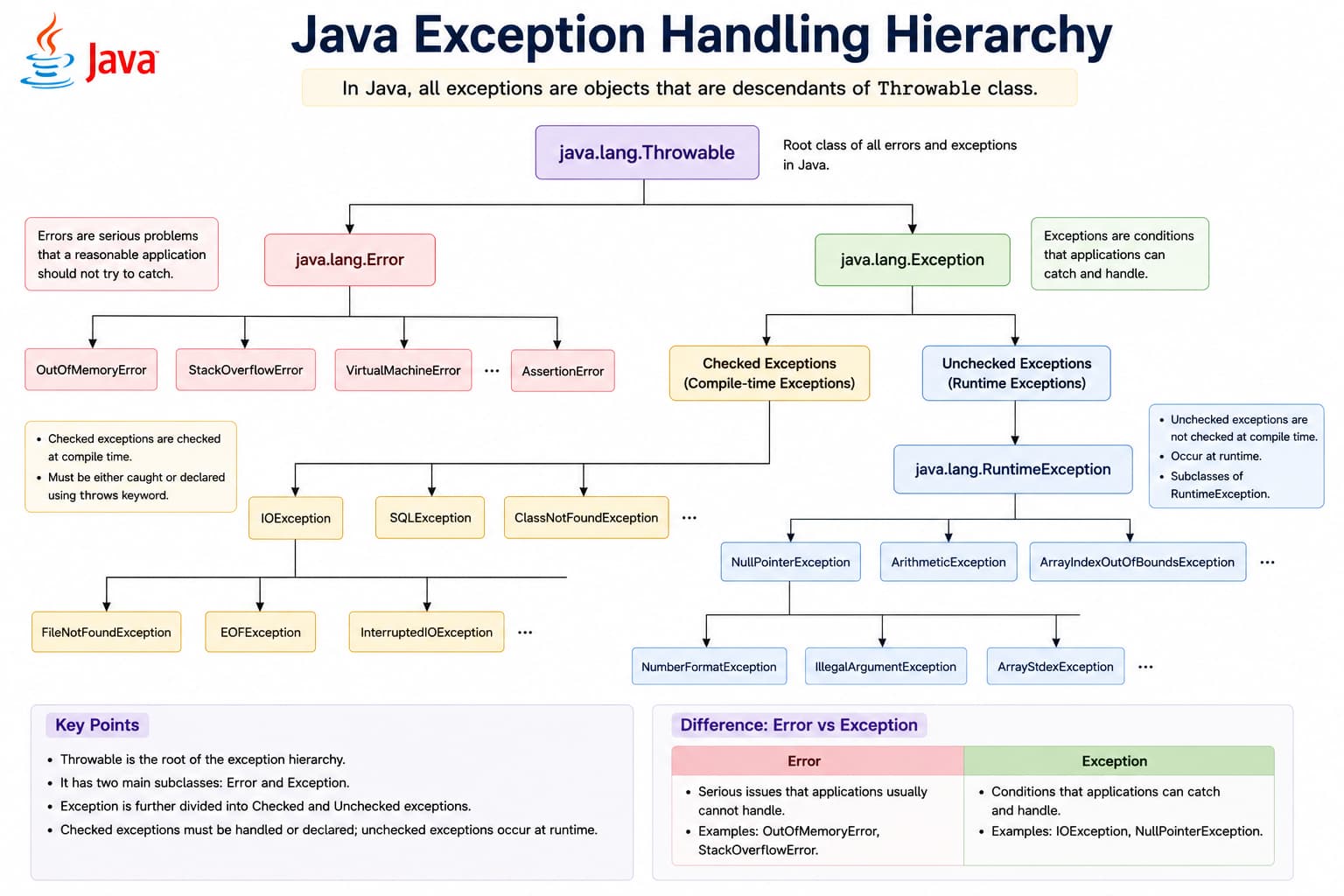
try risky code; catch handles types; finally cleanup; throw/throws for checked errors.
Exception tip
Catch specific types first; use finally to close files and streams.
public class ExceptionIntro {
    public static void main(String[] args) {
        try {
            int result = 10 / 0;
        } catch (ArithmeticException e) {
            System.out.println("Cannot divide by zero");
        }
    }
}
2. Exception Hierarchy
All exceptions inherit from Throwable. Exception and Error branch below it; RuntimeException is the base for unchecked exceptions.
- Exception — recoverable conditions
- RuntimeException — programming bugs
- Error — OutOfMemoryError, StackOverflowError
- Catch specific types before general Exception
3. try-catch-finally Blocks
The try block holds code that may fail. One or more catch blocks handle specific exception types. The optional finally block always runs for cleanup (unless the JVM exits).
try— risky code that may throwcatch— handles a matching exception typefinally— cleanup; runs after try/catchtry-with-resources— auto-closesAutoCloseableresources
import java.io.*;

public class TryResources {
    public static void main(String[] args) {
        try (FileReader fr = new FileReader("data.txt")) {
            System.out.println("Reading...");
        } catch (IOException e) {
            System.out.println("File error: " + e.getMessage());
        }
    }
}
4. Try with Multiple Catch Blocks
A single try block can have multiple catch blocks, each handling a different exception type. When an exception is thrown, Java checks catch blocks from top to bottom and runs the first matching handler only.
Basic syntax
public class MultipleCatchDemo {
    public static void main(String[] args) {
        String input = args.length > 0 ? args[0] : "10";

        try {
            int value = Integer.parseInt(input);
            int result = 100 / value;
            System.out.println("Result: " + result);
        } catch (NumberFormatException e) {
            System.out.println("Invalid number: " + input);
        } catch (ArithmeticException e) {
            System.out.println("Cannot divide by zero");
        } catch (Exception e) {
            System.out.println("Unexpected error: " + e.getMessage());
        } finally {
            System.out.println("Cleanup complete");
        }
    }
}
Rules for multiple catch blocks
- Specific before general — catch subclasses before superclasses (e.g.
IOExceptionbeforeException) - Only one catch runs — the first matching block handles the exception; others are skipped
- Unreachable catch — placing a parent type before a child type is a compile error
- Same try, shared finally — one
finallyapplies to all catch blocks in that try
import java.io.*;

public class FileReadDemo {
    public static void readFile(String path) {
        try {
            FileReader reader = new FileReader(path);
            char[] buffer = new char[1024];
            reader.read(buffer);
            reader.close();
        } catch (FileNotFoundException e) {
            System.out.println("File not found: " + path);
        } catch (IOException e) {
            System.out.println("I/O error while reading: " + e.getMessage());
        } catch (SecurityException e) {
            System.out.println("No permission to read file");
        }
    }
}
Catch order: subclass before superclass
Java requires catch blocks to be ordered from most specific to most general. Reversing the order causes a compile-time unreachable catch error.
try {
    // risky code
} catch (ArrayIndexOutOfBoundsException e) {
    // specific: index out of range
} catch (IllegalArgumentException e) {
    // specific: bad argument
} catch (RuntimeException e) {
    // broader unchecked
} catch (Exception e) {
    // broadest recoverable
}try {
// risky code
} catch (Exception e) {
// handles everything below Exception
} catch (IOException e) {
// ERROR: Unreachable catch block for IOException
}Multi-catch (Java 7+)
Use a single catch with the pipe (|) operator when two or more exception types need the same handling. The caught variable is implicitly final.
import java.io.*;
import java.sql.*;

public class MultiCatchDemo {
    public static void connect() {
        try {
            // code that may throw IOException or SQLException
        } catch (IOException | SQLException e) {
            System.out.println("Connection failed: " + e.getMessage());
            // e cannot be reassigned here
        }
    }
}- Syntax:
catch (TypeA | TypeB e) { ... } - Cannot combine a type with its subclass:
catch (Exception | IOException e)is invalid - The variable cannot be reassigned inside the catch block
Multiple catch vs multi-catch
| Approach | When to use | Example |
|---|---|---|
Multiple catch blocks | Different logic per exception type | catch (FileNotFoundException e) vs catch (IOException e) |
Multi-catch (|) | Same handling for several types | catch (IOException | SQLException e) |
Single broad catch (Exception e) | Top-level logging or fallback only | Avoid when you can handle types separately |
Quick tip
Prefer specific catches with meaningful messages. Use multi-catch to avoid duplicate code. Keep catch (Exception e) last, or omit it if you only expect known types.
5. throw and throws
throw creates an exception at runtime. throws declares checked exceptions a method may propagate to its caller.
- throw new Exception("message")
- throws on method signature
- Caller must handle or rethrow checked
- Do not throw for normal control flow
import java.io.*;

class FileUtil {
    static void read(String path) throws IOException {
        if (path == null) throw new IllegalArgumentException("null path");
        new FileReader(path);
    }
}
6. Custom Exceptions
Define application-specific exceptions by extending Exception (checked) or RuntimeException (unchecked) with meaningful names and messages.
- Extend Exception for checked custom errors
- Extend RuntimeException for unchecked
- Add constructors with message and cause
- Document when they are thrown
class InsufficientFundsException extends Exception {
    InsufficientFundsException(String msg) { super(msg); }
}
class Bank {
    void withdraw(double amt) throws InsufficientFundsException {
        throw new InsufficientFundsException("Low balance");
    }
}
7. Exception Handling Best Practices
Handle exceptions at the right level, log useful context, and never swallow errors silently.
- Catch specific exceptions first
- Log exception with stack trace
- Do not use exceptions for flow control
- Close resources in finally or try-with-resources
- Include meaningful error messages
8. Practical Exception Examples
Validate input early, wrap low-level exceptions in domain exceptions, and present user-friendly messages at the UI layer.
- Parse int with NumberFormatException handling
- Retry logic for transient IO failures
- Global handler in main for uncaught exceptions
- Custom validation exceptions
public class ParseDemo {
    public static void main(String[] args) {
        String input = "abc";
        try {
            int n = Integer.parseInt(input);
            System.out.println(n);
        } catch (NumberFormatException e) {
            System.out.println("Not a number");
        }
    }
}
9. Tricky Points
Common exception-handling pitfalls in interviews and production code — especially around multiple catch blocks.
Multiple catch blocks
catch (IOException e) must come before catch (Exception e). The reverse order is a compile error because the second catch would never run.
NumberFormatException and Exception are declared, a bad parse hits the first block only — not both.
catch (Exception | IOException e) is invalid because IOException is a subclass of Exception. Both types must be unrelated (or siblings).
e = new Exception() inside catch (IOException | SQLException e).
finally and return
finally executes even when try or catch contains return, unless System.exit() is called.
try { return 1; } and finally { return 2; }, the method returns 2 — the try return is discarded.
Checked vs unchecked
throws. The compiler enforces this for IOException, SQLException, etc.
RuntimeException and subclasses (e.g. NullPointerException) do not require throws — but you can still catch them.
OutOfMemoryError and StackOverflowError extend Error, not Exception. Catching Exception does not catch Error.
Common mistakes
catch (Exception e) { } swallows errors silently — always log or rethrow with context.
catch (Throwable t) unless you are a top-level framework handler — it catches Error too.
if for normal logic — it hurts readability and performance.
addSuppressed() on the primary exception — check getSuppressed() when debugging.
Rule of thumb
Catch the most specific type you can handle; order catches from subclass to superclass; use multi-catch for shared logic; never swallow exceptions; prefer try-with-resources over manual finally for I/O.