Java Keywords - Complete Reference
Learn all Java keywords and reserved words with detailed explanations, usage examples, and best practices. Keywords are reserved words that have special meaning in Java and cannot be used as identifiers.
1. What Are Java Keywords?
Keywords are reserved words with special meaning to the compiler. You cannot use them as class names, variable names, or method names. Java has about 50 keywords that define structure and behavior.
- Reserved by the Java Language Specification
- Lowercase only (class, not Class)
- Context-sensitive: true, false, null are literals
- New keywords added in newer Java versions (var, yield, record)
public class KeywordDemo {
    public static void main(String[] args) {
        int count = 5;
        if (count > 0) {
            System.out.println("Positive");
        }
    }
}
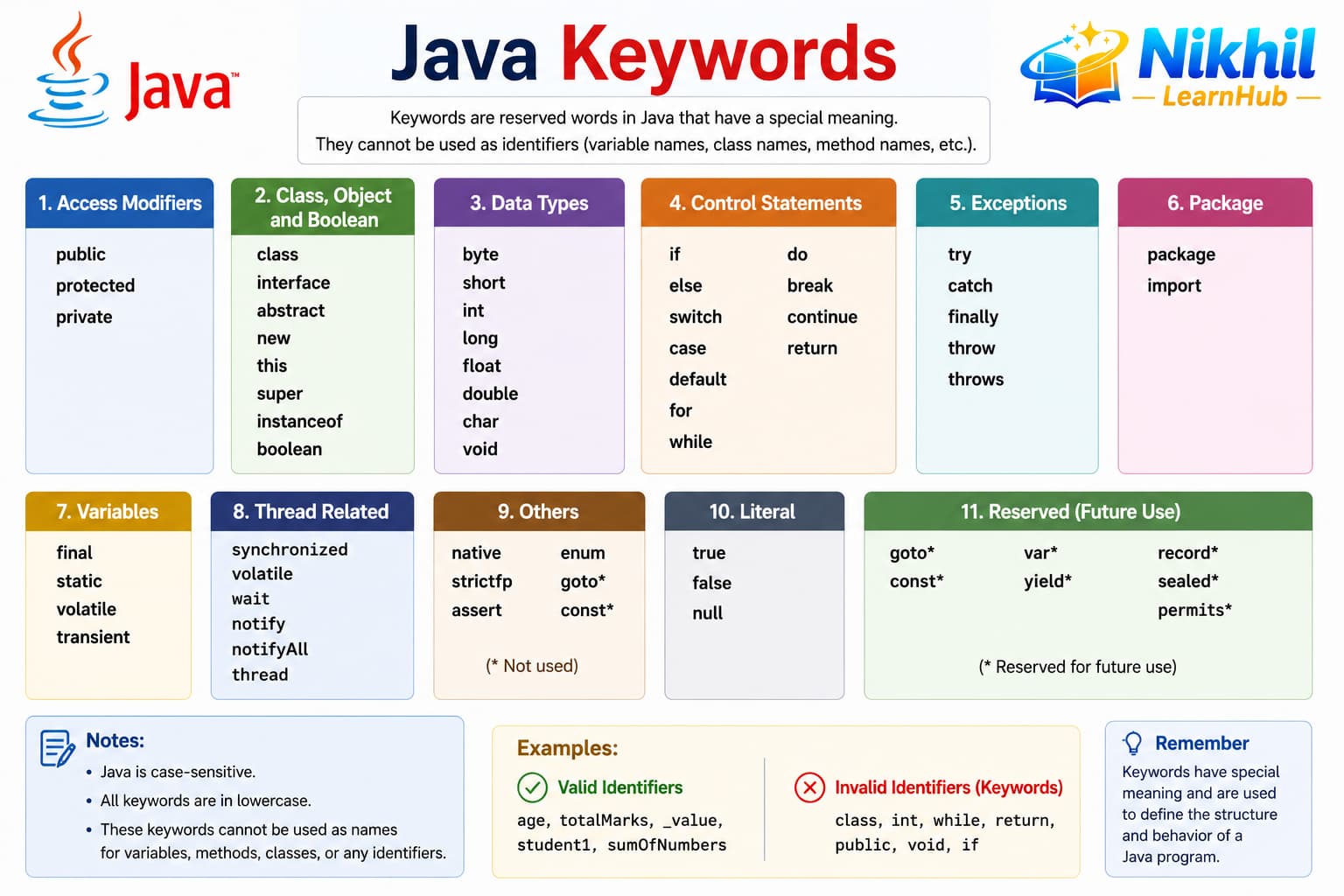
2. Java Keywords Reference Table
The table below groups keywords by purpose: data types, control flow, OOP, modifiers, and exception handling. Memorizing categories helps you read unfamiliar code faster.
- Access: public, private, protected
- Class structure: class, interface, extends, implements
- Control: if, else, switch, for, while, break, continue
- Modifiers: static, final, abstract, synchronized, volatile
| Category | Keywords | Purpose |
|---|---|---|
| Data types | boolean, byte, char, short, int, long, float, double | Primitive type declarations |
| Literals | true, false, null | Boolean and null literals |
| Class structure | class, interface, enum, extends, implements, package, import | Types and modules |
| Access | public, protected, private | Visibility modifiers |
| Modifiers | static, final, abstract, synchronized, volatile, transient, native, strictfp | Behavior and storage |
| Control flow | if, else, switch, case, default, for, while, do, break, continue, return | Branching and loops |
| Exceptions | try, catch, finally, throw, throws | Error handling |
| OOP / objects | new, this, super, instanceof | Object creation and type checks |
| Modern Java | var, yield, record, sealed, permits, non-sealed | Java 10+ features |
3. Keyword Examples in Context
Seeing keywords inside real code clarifies how they work together. Modifiers combine with class and method declarations to control visibility and behavior.
- abstract + class defines incomplete types
- final on variables prevents reassignment
- synchronized protects shared data in threads
- enum defines fixed constant sets
public final class Constants {
    static final double PI = 3.14159;
}

enum Day { MON, TUE, WED }

abstract class Shape {
    abstract double area();
}
4. Keywords Best Practices
Use keywords correctly to avoid compile errors and write idiomatic Java. Prefer modern alternatives where they improve readability without hiding intent.
- Never use keywords as identifiers
- Use var only when the type is obvious from context
- Prefer final for variables that should not change
- Learn modifier order: public static final
- Keep switch cases exhaustive with Java 17+ patterns