Java Loops - Complete Tutorial
Master Java loops: Learn for, while, do-while loops, nested loops, break, continue statements, and for-each loops with practical examples and best practices for efficient iteration.
1. Introduction to Java Loops
Loops repeat a block of code while a condition holds or for a fixed number of iterations. They eliminate repetitive copy-paste code.
- for — known iteration count
- while — condition checked first
- do-while — body runs at least once
- Enhanced for — iterate collections and arrays
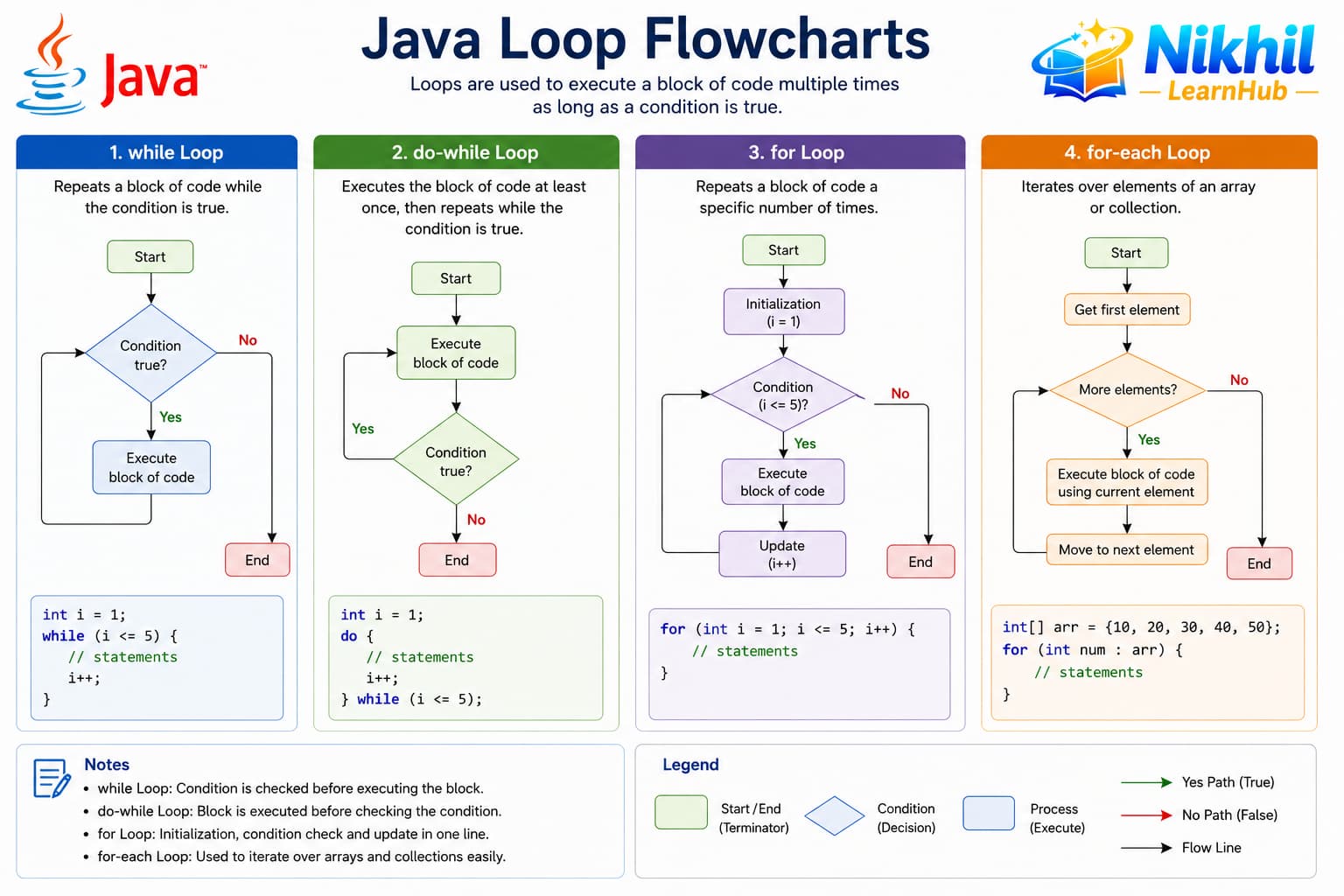
for for fixed iterations; while when count is unknown; do-while runs at least once; for-each for arrays and collections.
Loop types at a glance
Use for for known counts, while when unknown, do-while for at least one run, enhanced for for collections.
| Loop | Checks condition | Best for |
|---|---|---|
for | Before each iteration | Known iteration count |
while | Before each iteration | Unknown count, may run zero times |
do-while | After each iteration | At least one execution (menus) |
Enhanced for | Per element | Arrays and collections |
public class LoopIntro {
    public static void main(String[] args) {
        for (int i = 1; i <= 3; i++) {
            System.out.println("Count: " + i);
        }
    }
}
2. The for Loop
The classic for loop has initialization, condition, and update in one line. It is ideal when you know how many times to iterate.
- init runs once at start
- condition checked before each iteration
- update runs after each iteration
- All three parts are optional
public class ForDemo {
    public static void main(String[] args) {
        int sum = 0;
        for (int i = 1; i <= 5; i++) {
            sum += i;
        }
        System.out.println("Sum: " + sum);
    }
}
3. The while Loop
while repeats as long as the condition is true. The condition is evaluated before each iteration, so the body may never run.
- Condition at top of loop
- Update must change condition to avoid infinite loop
- Good for unknown iteration count
- Common with Scanner input loops
public class WhileDemo {
    public static void main(String[] args) {
        int n = 5;
        while (n > 0) {
            System.out.println(n);
            n--;
        }
    }
}
4. The do-while Loop
do-while executes the body at least once, then checks the condition. Use it when the first iteration must always run.
- Body before condition
- Semicolon required after while(...)
- Menu systems often use do-while
- Condition checked at bottom
public class DoWhileDemo {
    public static void main(String[] args) {
        int x = 0;
        do {
            System.out.println(x);
            x++;
        } while (x < 3);
    }
}
5. Enhanced for Loop (for-each)
The enhanced for loop iterates over arrays and Iterable collections without manual index management. It is read-only for the index.
- Syntax: for (Type item : collection)
- Works with arrays and Iterable types
- Cannot modify index during iteration
- Cleaner than traditional for with arrays
public class ForEachDemo {
    public static void main(String[] args) {
        String[] colors = {"Red", "Green", "Blue"};
        for (String c : colors) {
            System.out.println(c);
        }
    }
}
6. Nested Loops
A loop inside another loop handles multi-dimensional data like matrices and pattern printing. Inner loop runs completely for each outer iteration.
- Common for 2D arrays and tables
- Watch total iteration count (O(n²))
- Use meaningful variable names (row, col)
- Break only exits innermost loop
public class NestedDemo {
    public static void main(String[] args) {
        for (int i = 1; i <= 3; i++) {
            for (int j = 1; j <= i; j++) {
                System.out.print("*");
            }
            System.out.println();
        }
    }
}
7. Infinite Loop, break, and continue
These tools control how a loop behaves: an infinite loop repeats until you stop it; break exits the loop early; continue skips the rest of the current iteration and moves to the next one.
| Keyword | Effect | Typical use in Java |
|---|---|---|
| Infinite loop | Runs until break or condition becomes false |
Menus, servers, “keep asking until valid input” |
break |
Leaves the loop immediately | Found target, user chose Exit, error stop |
continue |
Skips to next iteration | Ignore invalid data, skip weekends, filter values |
When is an infinite loop useful?
An infinite loop runs forever unless something stops it — usually break or a condition that eventually becomes false. In Java you often write while (true) or for (;;) when you do not know how many times to repeat:
- Menu-driven apps — show options until the user picks Exit
- Input validation — keep asking until the user enters a valid PIN or age
- Game loops — update and redraw until the player quits
Always provide a clear exit with break; otherwise the program never ends.
import java.util.Scanner;

public class MenuLoop {
    public static void main(String[] args) {
        Scanner sc = new Scanner(System.in);
        int choice;

        while (true) {  // intentional infinite loop
            System.out.println("1. Check balance  2. Exit");
            System.out.print("Choice: ");
            choice = sc.nextInt();

            if (choice == 2) {
                System.out.println("Goodbye!");
                break;      // exit the loop
            }
            if (choice == 1) {
                System.out.println("Balance: Rs 5000");
            }
        }
        sc.close();
    }
}
Why use break?
break stops the loop immediately and jumps to the first statement after the loop. Use it when further iterations are pointless.
- Stop searching once a product ID is found in a list
- Exit when a password attempt succeeds
- Leave a
while (true)menu when the user chooses Exit
public class FindPass {
    public static void main(String[] args) {
        int[] marks = {42, 55, 38, 72, 61};
        int passMark = 60;
        int found = -1;

        for (int i = 0; i < marks.length; i++) {
            if (marks[i] >= passMark) {
                found = marks[i];
                break;   // no need to check remaining elements
            }
        }
        System.out.println(found >= 0 ? "First pass: " + found : "No pass found");
    }
}
Why use continue?
continue skips the rest of the current iteration and goes to the next condition check. The loop keeps running — only the current round is cut short.
- Skip negative or zero values when summing sales
- Print only even numbers in a range
- Ignore blank lines when reading file data
public class SumPositive {
    public static void main(String[] args) {
        int[] dailySales = {1200, -50, 800, 0, 1500, -200};
        int total = 0;

        for (int sale : dailySales) {
            if (sale <= 0) {
                continue;   // skip returns and zero entries
            }
            total += sale;
        }
        System.out.println("Valid sales total: Rs " + total);
    }
}import java.util.Scanner;
public class InputLoop {
public static void main(String[] args) {
Scanner sc = new Scanner(System.in);
int age;
while (true) {
System.out.print("Enter age (1-120, 0 to quit): ");
age = sc.nextInt();
if (age == 0) break; // user wants to exit
if (age < 1 || age > 120) {
System.out.println("Invalid — try again.");
continue; // skip rest, ask again
}
System.out.println("Age accepted: " + age);
break; // valid input — leave loop
}
sc.close();
}
}break vs continue
break — leave the loop completely. continue — skip to the next iteration only. Accidental infinite loops happen when the condition never becomes false; always update loop variables or plan an exit with break.
8. Practical Loop Examples
Loops power common tasks: summing arrays, searching for values, and generating sequences. Combine loops with conditionals for filtering.
- Sum/average of array elements
- Find max or min in a list
- Reverse a string character by character
- FizzBuzz-style pattern problems
public class SumArray {
    public static void main(String[] args) {
        int[] nums = {4, 8, 15, 16};
        int sum = 0;
        for (int n : nums) sum += n;
        System.out.println("Total: " + sum);
    }
}
9. Loop Best Practices
Efficient, readable loops avoid off-by-one errors and unnecessary work. Choose the loop type that matches your iteration pattern.
- Prefer for-each when index is not needed
- Avoid modifying collection size during iteration
- Extract complex loop bodies into methods
- Check boundary conditions carefully
- Consider Stream API for functional style