Java OOP Basics - Objects & Classes
Master Java Object-Oriented Programming: Learn classes, objects, constructors, methods, and the four pillars of OOP (Encapsulation, Inheritance, Polymorphism, Abstraction) with practical examples.
1. Introduction to OOP in Java
Object-Oriented Programming models software as objects that combine data (fields) and behavior (methods). Java is designed around OOP from the ground up.
- Encapsulation — hide internal details
- Inheritance — reuse and extend code
- Polymorphism — one interface, many forms
- Abstraction — focus on essentials
new instance; encapsulation hides fields behind accessors.
public class OOPIntro {
    public static void main(String[] args) {
        Car car = new Car("Toyota");
        car.drive();
    }
}
class Car {
    String brand;
    Car(String brand) { this.brand = brand; }
    void drive() { System.out.println(brand + " driving"); }
}
2. What Is a Class?
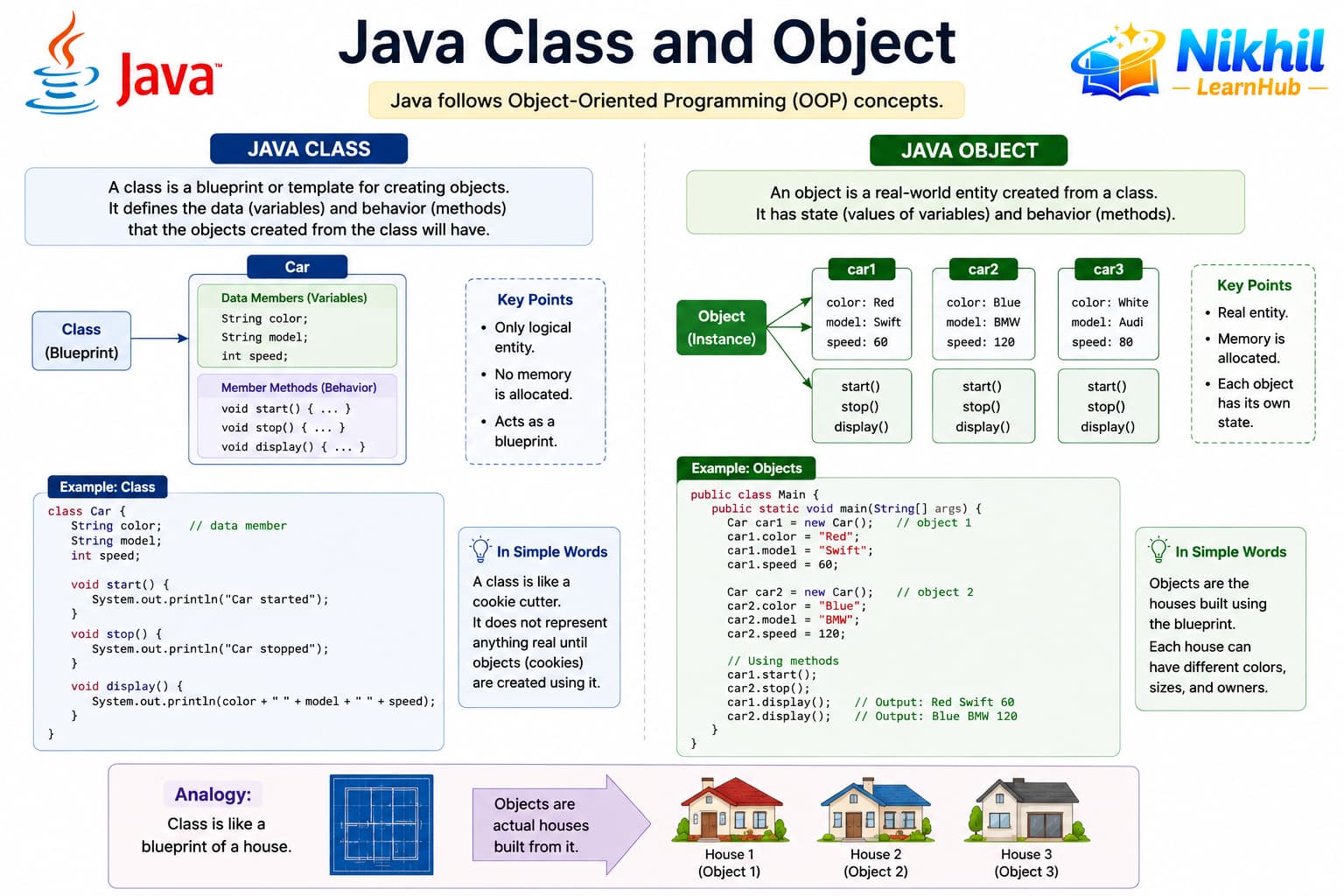
A class is a blueprint or template. It describes what data (fields) and actions (methods) objects of that type will have — but it is not a real student or car by itself.
- Defined once with the
classkeyword - Stored in method area (class metadata, bytecode) when loaded
- Like an architectural plan for a house — not the house itself
| Real-world analogy | In Java |
|---|---|
| Car design document | class Car { ... } |
| Fields on the plan | String brand; int speed; |
| Actions the car can do | void accelerate() { ... } |
// Class (blueprint) — not an object yet
class Student {
    String name;
    int rollNo;

    void display() {
        System.out.println(name + " - Roll " + rollNo);
    }
}
3. What Is an Object?
An object is a real instance created from a class. It has its own values in memory. Many objects can share the same class blueprint.
- Created with
new ClassName() - Reference variable (e.g.
s1) points to the object on the heap - Each object has its own instance fields
| Class | Object |
|---|---|
| One definition | Many instances |
class Student | new Student() → Anita, Ravi, … |
| Describes structure | Holds actual data |
public class ObjectDemo {
    public static void main(String[] args) {
        Student s1 = new Student();  // object on heap
        s1.name = "Anita";
        s1.rollNo = 101;
        s1.display();
    }
}
4. How to Create Multiple Objects?
Call new as many times as you need. Each call creates a separate object with independent field values.
public class MultipleObjects {
    public static void main(String[] args) {
        Student s1 = new Student();
        s1.name = "Anita";
        s1.rollNo = 101;

        Student s2 = new Student();
        s2.name = "Ravi";
        s2.rollNo = 102;

        Student s3 = new Student();
        s3.name = "Priya";
        s3.rollNo = 103;

        s1.display();  // Anita - Roll 101
        s2.display();  // Ravi - Roll 102
        s3.display();  // Priya - Roll 103

        // Changing s1 does not affect s2
        s1.rollNo = 999;
        System.out.println(s2.rollNo);  // still 102
    }
}
You can also store many objects in an array or ArrayList:
Student[] batch = new Student[3];
batch[0] = new Student();
batch[0].name = "A";
batch[1] = new Student();
batch[1].name = "B";
5. How Memory Is Allocated to Each Object
When you write Student s1 = new Student();, Java allocates memory in two main places:
| Memory area | What is stored |
|---|---|
| Stack | Reference variables (s1, s2) — addresses pointing to heap objects |
| Heap | Actual objects — each object's instance fields (name, rollNo) live here |
| Method area | Class definition, static fields, bytecode (one copy per class) |
s1ands2are separate references on the stacknew Student()creates a new heap object each time- When no reference points to an object, it becomes eligible for garbage collection
Picture this
s1 → Object A (Anita, 101) | s2 → Object B (Ravi, 102). Same class, different heap blocks. Assigning s1 = s2 makes both references point to the same object — still one object on the heap.
6. Sharing Class Variables and Methods Between Objects
Instance members belong to each object. Static members belong to the class — one copy shared by all objects.
| Keyword | Belongs to | Shared? |
|---|---|---|
| (none) instance field | Each object | No — each has its own balance |
static field | Class | Yes — one bankName for all accounts |
| instance method | Object | Called per object: a1.deposit(100) |
static method | Class | Called without object: Math.max(2, 5) |
class BankAccount {
    static String bankName = "LearnHub Bank";  // shared by ALL accounts
    static int totalAccounts = 0;

    String owner;           // each object has its own
    double balance;         // each object has its own

    BankAccount(String owner) {
        this.owner = owner;
        totalAccounts++;    // shared counter
    }

    void deposit(double amount) {  // instance method
        balance += amount;
    }

    static void showBankInfo() {     // class method — no object needed
        System.out.println("Bank: " + bankName + ", Accounts: " + totalAccounts);
    }
}

public class StaticDemo {
    public static void main(String[] args) {
        BankAccount a1 = new BankAccount("Anita");
        BankAccount a2 = new BankAccount("Ravi");

        a1.deposit(1000);
        a2.deposit(500);

        BankAccount.showBankInfo();  // Bank: LearnHub Bank, Accounts: 2
        System.out.println(a1.balance);  // 1000
        System.out.println(a2.balance);  // 500
        System.out.println(BankAccount.bankName);  // same for everyone
    }
}
7. What Is Encapsulation? (With Example)
Encapsulation means wrapping data and the code that uses it together, and hiding internal details behind a controlled interface (usually private fields + public methods).
- Protect data from invalid changes
- User of the class only sees safe operations
- Implementation can change without breaking callers
class SafeAccount {
    private double balance;  // hidden — cannot do account.balance = -1000 from outside

    public void deposit(double amount) {
        if (amount > 0) {
            balance += amount;
        }
    }

    public void withdraw(double amount) {
        if (amount > 0 && amount <= balance) {
            balance -= amount;
        } else {
            System.out.println("Invalid or insufficient funds");
        }
    }

    public double getBalance() {
        return balance;  // read-only access
    }
}

public class EncapsulationDemo {
    public static void main(String[] args) {
        SafeAccount acc = new SafeAccount();
        acc.deposit(5000);
        acc.withdraw(2000);
        // acc.balance = -999;  // COMPILE ERROR — private
        System.out.println("Balance: " + acc.getBalance());  // 3000
    }
}
8. What Is Abstraction? (With Example)
Abstraction shows only what is necessary and hides complexity. You use a TV remote without knowing internal circuits — in Java, abstraction is done with abstract classes and interfaces.
- Focus on what something does, not how
- Reduces coupling and simplifies usage
- Example:
Listinterface — you calladd()without caring aboutArrayListvsLinkedListinternals
// Abstraction: only payment behavior, no implementation detail
interface Payment {
    void pay(double amount);  // what to do — not how
}

class CreditCardPayment implements Payment {
    public void pay(double amount) {
        System.out.println("Paid Rs " + amount + " via Credit Card");
    }
}

class UpiPayment implements Payment {
    public void pay(double amount) {
        System.out.println("Paid Rs " + amount + " via UPI");
    }
}

public class AbstractionDemo {
    public static void checkout(Payment p, double bill) {
        p.pay(bill);  // caller does not care which payment type
    }

    public static void main(String[] args) {
        checkout(new CreditCardPayment(), 1500);
        checkout(new UpiPayment(), 750);
    }
}9. Constructors
Constructors initialize new objects. They share the class name, have no return type, and can be overloaded with different parameters.
- Same name as class
- Called automatically on new
- Default constructor provided if none written
- this() calls another constructor
class Book {
    String title;
    Book(String title) {
        this.title = title;
    }
    Book() {
        this("Unknown");
    }
}
10. OOP Basics Best Practices
Start with clear class responsibilities and meaningful names. Favor composition when inheritance is not a true IS-A relationship.
- Keep fields private
- Use meaningful class and method names
- One class, one primary responsibility
- Initialize fields in constructors
- Override toString for debugging
11. Practice Exercises
Apply OOP basics by modeling real-world entities as classes with fields, constructors, and methods.
- Create a Rectangle class with area and perimeter
- Build a BankAccount with deposit and withdraw
- Design a Person class with name and age
- Add validation in setter methods
class Rectangle {
    double width, height;
    Rectangle(double w, double h) {
        width = w; height = h;
    }
    double area() { return width * height; }
}