Python OOPs: Objects and Classes Complete Guide
Master Python Object-Oriented Programming with focus on objects, classes, abstraction, and encapsulation. Learn OOP fundamentals with practical examples.
Objects
Real-world entities
Classes
Blueprints for objects
Abstraction
Hide complexity
Encapsulation
Data protection
What is Object-Oriented Programming?
Object-Oriented Programming (OOP) is a programming paradigm that organizes software design around objects rather than functions and logic. Python is a multi-paradigm language that fully supports OOP concepts.
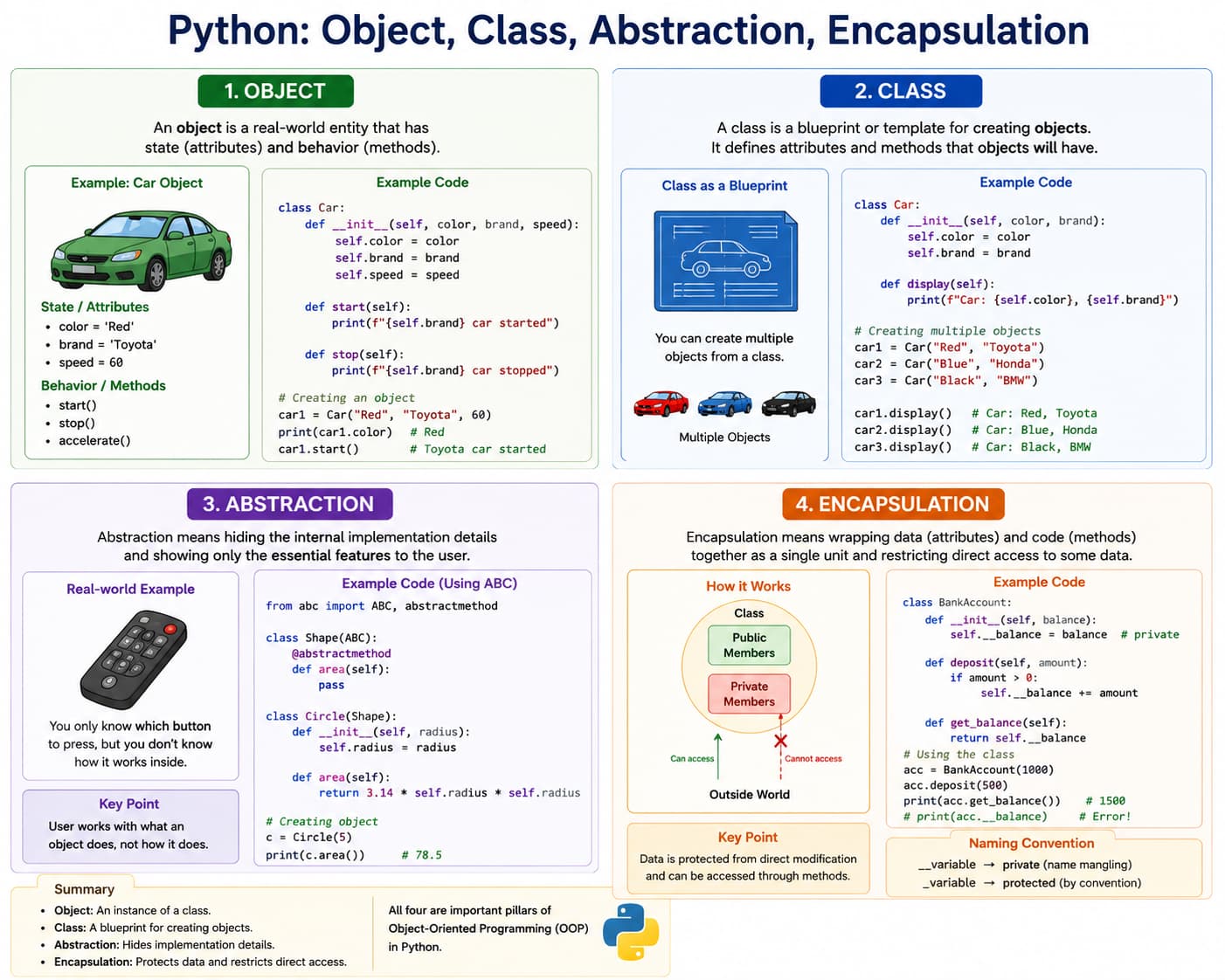
Key OOP Concepts
- Class: Blueprint for creating objects
- Object: Instance of a class
- Attribute: Data stored in object/class
- Method: Function defined in class
- Constructor: Special method for initialization
- Self: Reference to current instance
OOP Pillars (We'll Cover)
- Abstraction: Hide complex implementation details
- Encapsulation: Bundle data with methods
- Inheritance: Create new classes from existing
- Polymorphism: Same interface, different implementation
Note: This tutorial focuses on Abstraction & Encapsulation
Real-world Analogy
Think of a class as a blueprint and an object as the real thing created from it.
- House: Class = HousePlan, Objects = HouseA and HouseB with different color/rooms
- Student: Class = Student, Objects = Nikhil and Ravi with unique roll numbers
- Car: Class = Car, Objects = TeslaModel3 and HondaCity with different mileage
- Bank Account: Class = BankAccount, Objects = AliceAccount and BobAccount with separate balances
- Mobile Phone: Class = Phone, Objects = SamsungS24 and iPhone15 with different storage and battery levels
# Defining a simple class
class Dog:
    """A simple Dog class"""

    # Class attribute (shared by all instances)
    species = "Canis familiaris"

    # Constructor method (initializer)
    def __init__(self, name, age):
        # Instance attributes (unique to each instance)
        self.name = name
        self.age = age

    # Instance method
    def bark(self):
        return f"{self.name} says: Woof!"

    def describe(self):
        return f"{self.name} is {self.age} years old and is a {self.species}"

# Creating objects (instances) of Dog class
dog1 = Dog("Buddy", 3)
dog2 = Dog("Max", 5)

# Accessing attributes
print(f"Dog 1 name: {dog1.name}")  # Buddy
print(f"Dog 2 age: {dog2.age}")    # 5
print(f"Both are: {dog1.species}") # Canis familiaris

# Calling methods
print(dog1.bark())      # Buddy says: Woof!
print(dog2.describe())  # Max is 5 years old and is a Canis familiaris

# Checking object types
print(type(dog1))       #
print(isinstance(dog1, Dog))  # True

# Object identity (memory address)
print(f"dog1 id: {id(dog1)}")
print(f"dog2 id: {id(dog2)}")
What is a Class?
A class is a blueprint/template for creating objects.
Example: Car blueprint -> Class, Actual car -> Object
class ClassName: # attributes and methods pass
What is an Object?
An object is an instance of a class.
Creating a Class and Object
class Student:
    name = "Rahul"

obj = Student()
print(obj.name)
Output: Rahul
Instance Variables and Methods
class Car:
    def __init__(self, brand):
        self.brand = brand

    def display(self):
        print("Brand:", self.brand)

c1 = Car("Toyota")
c1.display()
Real-Life OOP Example: Bank Account
class BankAccount:
    def __init__(self, name, balance):
        self.name = name
        self.balance = balance

    def deposit(self, amount):
        self.balance += amount

    def show_balance(self):
        print("Balance:", self.balance)

acc = BankAccount("Ravi", 5000)
acc.deposit(2000)
acc.show_balance()
More Class and Object Examples
Use these examples to understand how methods, objects, and constructors are used in real projects.
1) Single class with multiple methods
class Calculator:
    def add(self, a, b):
        return a + b

    def subtract(self, a, b):
        return a - b

    def multiply(self, a, b):
        return a * b

calc = Calculator()
print(calc.add(10, 5))
print(calc.subtract(10, 5))
print(calc.multiply(10, 5))
Output: 15, 5, 50
2) Single class with multiple objects
class Student:
    def __init__(self, name, marks):
        self.name = name
        self.marks = marks

    def show(self):
        print(f"{self.name} scored {self.marks}")

s1 = Student("Nikhil", 92)
s2 = Student("Ravi", 85)
s3 = Student("Asha", 88)

s1.show()
s2.show()
s3.show()
Output: Nikhil scored 92, Ravi scored 85, Asha scored 88
3) Multiple classes with multiple objects
class Teacher:
    def __init__(self, name, subject):
        self.name = name
        self.subject = subject

    def intro(self):
        print(f"Teacher: {self.name}, Subject: {self.subject}")

class Classroom:
    def __init__(self, room_no):
        self.room_no = room_no

    def info(self):
        print(f"Classroom Number: {self.room_no}")

t1 = Teacher("Meena", "Math")
t2 = Teacher("Kiran", "Science")
c1 = Classroom(101)
c2 = Classroom(202)

t1.intro()
t2.intro()
c1.info()
c2.info()
Output: Teacher and classroom details printed for all objects
4) Default and parameter constructor
class Book:
    # Default constructor style using default argument values
    def __init__(self, title="Unknown", price=0):
        self.title = title
        self.price = price

    def show(self):
        print(f"{self.title} - Rs.{self.price}")

# Object using default constructor values
b1 = Book()

# Object using parameter constructor values
b2 = Book("Python Basics", 499)

b1.show()
b2.show()
Output: Unknown - Rs.0, Python Basics - Rs.499
What is Abstraction?
Abstraction means hiding implementation details and showing only essential features.
Example: You drive a car without knowing engine internals.
Python provides abstract classes using the abc module.
Abstract Class Example
from abc import ABC, abstractmethod

class Vehicle(ABC):
    @abstractmethod
    def start(self):
        pass

class Car(Vehicle):
    def start(self):
        print("Car starts with key")

c = Car()
c.start()
Output: Car starts with key
Why Use Abstraction?
- Reduces complexity
- Improves security
- Hides unnecessary details
- Makes code easier to maintain
What is Encapsulation?
Encapsulation means binding data and methods together and restricting direct access to data.
Public Members
Accessible from anywhere.
class Student:
    def __init__(self):
        self.name = "Rahul"

obj = Student()
print(obj.name)
Protected Members
Use single underscore _variable.
class Student:
    def __init__(self):
        self._name = "Rahul"

obj = Student()
print(obj._name)
Protected members should not be accessed directly outside the class.
Private Members
Use double underscore __variable.
class Student:
    def __init__(self):
        self.__name = "Rahul"

obj = Student()
# print(obj.__name)  # Error
Accessing Private Variables
class Student:
    def __init__(self):
        self.__name = "Rahul"

    def show(self):
        print(self.__name)

obj = Student()
obj.show()
Output: Rahul
Getter and Setter Methods
class Employee:
    def __init__(self):
        self.__salary = 0

    def set_salary(self, amount):
        self.__salary = amount

    def get_salary(self):
        return self.__salary

e = Employee()
e.set_salary(50000)
print(e.get_salary())
Output: 50000
Abstraction vs Encapsulation
| Feature | Abstraction | Encapsulation |
|---|---|---|
| Purpose | Hide implementation | Hide data |
| Focus | What object does | How data is protected |
| Achieved Using | Abstract classes | Private variables |
Real-Life Example: ATM Machine
- Abstraction: User sees only withdraw/deposit options
- Encapsulation: Bank balance data is protected internally
Advantages and Practice
Advantages of OOP
- Reusability
- Security
- Modularity
- Easy maintenance
- Real-world modeling
Mini Practice Programs
- Create Student class with name and marks
- Create BankAccount with deposit method
- Create abstract Shape class
- Create private salary variable
- Use getter and setter methods
Summary
- Class -> Blueprint
- Object -> Instance of class
- Abstraction -> Hides implementation
- Encapsulation -> Protects data
__init__()-> Constructorself-> Current object reference