Python Programming
Lists
20+ Methods
Comprehension
Python Lists Complete Guide
Learn all Python list operations - creation, manipulation, built-in methods, slicing, list comprehension with practical examples and complete reference.
Mutable
Can be modified
Ordered
Maintains order
Comprehension
Elegant creation
Slicing
Sub-list extraction
Table of Contents
1. Introduction to Lists
Lists are ordered, mutable (changeable), and heterogeneous (can hold different data types) collections in Python. They are one of the most versatile data structures.
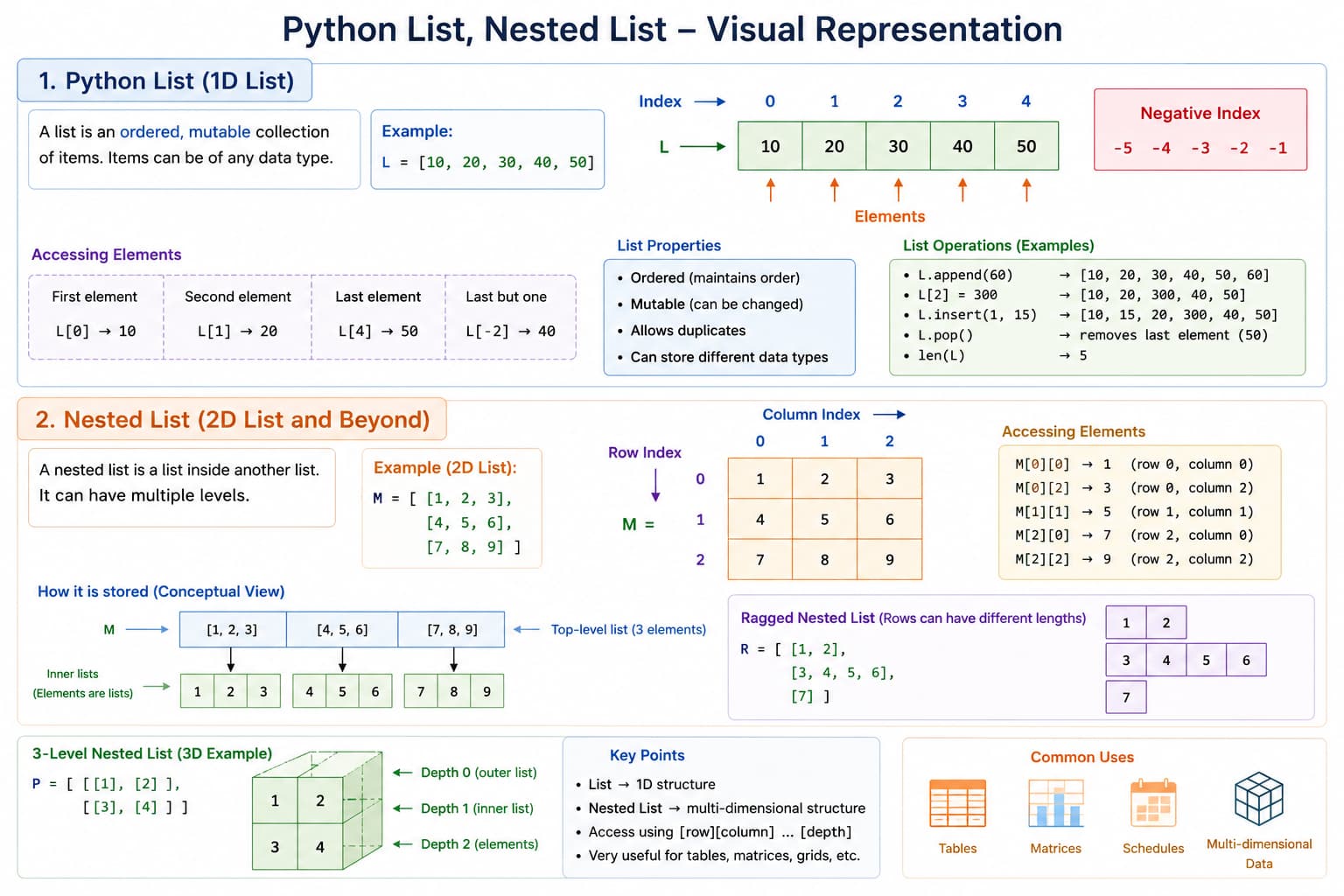
[]—ideal for stacks of items, iteration, and dynamic growth.Key Properties
- Ordered — Items have a defined order
- Mutable — Can be changed after creation
- Allow duplicates
- Mixed data types — Can contain different types in one list
- Dynamic size — Grow and shrink as needed
2. Creating Lists
Creating lists
# Empty list
empty_list = []
empty_list2 = list()

# List with items
numbers = [1, 2, 3, 4, 5]
mixed = [1, "hello", 3.14, True, None]
nested = [[1, 2], [3, 4], [5, 6]]

# Using list constructor
chars = list("Python")  # ['P', 'y', 't', 'h', 'o', 'n']
range_list = list(range(5))  # [0, 1, 2, 3, 4]

# List comprehension (more on this later)
squares = [x**2 for x in range(1, 6)]  # [1, 4, 9, 16, 25]

# Creating lists with repetition
zeros = [0] * 5  # [0, 0, 0, 0, 0]
matrix = [[0] * 3 for _ in range(3)]  # [[0,0,0], [0,0,0], [0,0,0]]
3. Accessing List Elements
Indexing
Indexing
fruits = ['apple', 'banana', 'orange', 'mango', 'grape']

# Positive indexing (0-based)
print(fruits[0])    # 'apple'
print(fruits[2])    # 'orange'
print(fruits[4])    # 'grape'

# Negative indexing (from end)
print(fruits[-1])   # 'grape' (last element)
print(fruits[-2])   # 'mango'
print(fruits[-3])   # 'orange'

# IndexError if out of range
# print(fruits[10])  # IndexError: list index out of range
4. List Slicing
Slicing [start:end:step]
numbers = [0, 1, 2, 3, 4, 5, 6, 7, 8, 9]

# Syntax: [start:end:step]
# start - included, end - excluded, step - increment

print(numbers[2:6])     # [2, 3, 4, 5]
print(numbers[:4])      # [0, 1, 2, 3] (from start)
print(numbers[6:])      # [6, 7, 8, 9] (to end)
print(numbers[:])       # [0,1,2,3,4,5,6,7,8,9] (full copy)
print(numbers[::2])     # [0, 2, 4, 6, 8] (every 2nd)
print(numbers[1::2])    # [1, 3, 5, 7, 9] (every 2nd starting at 1)
print(numbers[::-1])    # [9,8,7,6,5,4,3,2,1,0] (reverse)

# Slicing with negative indices
print(numbers[-5:-2])   # [5, 6, 7]
print(numbers[-3:])     # [7, 8, 9]
print(numbers[:-3])     # [0, 1, 2, 3, 4, 5, 6]
5. Modifying Lists
Changing Elements
Assignment and slice assignment
fruits = ['apple', 'banana', 'orange']

# Change single element
fruits[1] = 'blueberry'
print(fruits)  # ['apple', 'blueberry', 'orange']

# Change multiple elements with slicing
fruits[1:3] = ['cherry', 'date']
print(fruits)  # ['apple', 'cherry', 'date']

# Replace with different number of elements
fruits[1:2] = ['kiwi', 'lemon', 'mango']
print(fruits)  # ['apple', 'kiwi', 'lemon', 'mango', 'date']

# Remove with slicing
fruits[1:4] = []
print(fruits)  # ['apple', 'date']
Adding Elements
append, insert, extend
fruits = ['apple', 'banana']

# Append to end
fruits.append('orange')
print(fruits)  # ['apple', 'banana', 'orange']

# Insert at specific position
fruits.insert(1, 'mango')
print(fruits)  # ['apple', 'mango', 'banana', 'orange']

# Extend with another list
fruits.extend(['grape', 'kiwi'])
print(fruits)  # ['apple', 'mango', 'banana', 'orange', 'grape', 'kiwi']

# Using + operator (creates new list)
more_fruits = fruits + ['pear', 'peach']
print(more_fruits)  # ['apple', 'mango', 'banana', 'orange', 'grape', 'kiwi', 'pear', 'peach']
Removing Elements
remove, pop, del, clear
fruits = ['apple', 'banana', 'orange', 'mango', 'banana']

# Remove by value (first occurrence only)
fruits.remove('banana')
print(fruits)  # ['apple', 'orange', 'mango', 'banana']

# Remove by index and return value
popped = fruits.pop(2)
print(popped)   # 'mango'
print(fruits)   # ['apple', 'orange', 'banana']

# Pop last element
last = fruits.pop()
print(last)     # 'banana'
print(fruits)   # ['apple', 'orange']

# Delete by index
del fruits[0]
print(fruits)   # ['orange']

# Delete slice
fruits = ['a', 'b', 'c', 'd', 'e', 'f']
del fruits[1:4]
print(fruits)   # ['a', 'e', 'f']

# Clear entire list
fruits.clear()
print(fruits)   # []
6. List Methods
Information Methods
len, count, index, membership
numbers = [1, 2, 3, 2, 4, 2, 5]

# Length
print(len(numbers))  # 7

# Count occurrences
print(numbers.count(2))  # 3

# Find index of first occurrence
print(numbers.index(2))   # 1
print(numbers.index(2, 2))  # 3 (start searching from index 2)

# Check if element exists
print(3 in numbers)   # True
print(10 in numbers)  # False

# Check if list is empty
if numbers:
    print("List has elements")
else:
    print("List is empty")
Sorting and Reversing
sort, sorted, reverse, reversed
numbers = [3, 1, 4, 1, 5, 9, 2]

# sort() - modifies original list
numbers.sort()
print(numbers)  # [1, 1, 2, 3, 4, 5, 9]

# sort descending
numbers.sort(reverse=True)
print(numbers)  # [9, 5, 4, 3, 2, 1, 1]

# sorted() - returns new list
numbers = [3, 1, 4, 1, 5, 9, 2]
sorted_numbers = sorted(numbers)
print(sorted_numbers)  # [1, 1, 2, 3, 4, 5, 9]
print(numbers)         # [3, 1, 4, 1, 5, 9, 2] (unchanged)

# Sort with custom key
words = ['banana', 'apple', 'cherry', 'date']
words.sort(key=len)
print(words)  # ['date', 'apple', 'banana', 'cherry']

# Reverse the list
numbers.reverse()
print(numbers)  # [2, 9, 5, 1, 4, 1, 3]

# reversed() - returns iterator
for item in reversed(numbers):
    print(item, end=' ')  # 3 1 4 1 5 9 2
Copying Lists
Shallow vs deep copy
original = [1, 2, [3, 4]]

# Shallow copy methods
copy1 = original.copy()
copy2 = list(original)
copy3 = original[:]

# Shallow copy - nested objects are referenced
original[2][0] = 99
print(original)  # [1, 2, [99, 4]]
print(copy1)     # [1, 2, [99, 4]] (changed too!)

# Deep copy for nested structures
import copy
deep_copy = copy.deepcopy(original)
original[2][1] = 88
print(original)   # [1, 2, [99, 88]]
print(deep_copy)  # [1, 2, [99, 4]] (unchanged)
Next: See the complete list methods reference table below.
Python List Methods Complete Reference
Python provides powerful built-in list methods for various operations. Here's a comprehensive table of all list methods with examples.
Complete List Methods Reference Table
| Category | Method | Description | Syntax Example | Result |
|---|---|---|---|---|
| Adding Elements | append() | Adds element to end of list | list.append(4) |
[1,2,3,4] |
| Adding Elements | extend() | Adds all elements of iterable to end | list.extend([4,5]) |
[1,2,3,4,5] |
| Adding Elements | insert() | Inserts element at specified index | list.insert(1, 99) |
[1,99,2,3] |
| Removing Elements | remove() | Removes first occurrence of value | list.remove(2) |
[1,3] (removes 2) |
| Removing Elements | pop() | Removes and returns element at index (default last) | list.pop(1) |
2 (returns removed element) |
| Removing Elements | clear() | Removes all elements from list | list.clear() |
[] |
| Searching | index() | Returns index of first occurrence | list.index(3) |
2 (index of 3) |
| Searching | count() | Counts occurrences of value | list.count(2) |
1 (count of 2) |
| Sorting | sort() | Sorts list in-place | list.sort() |
[1,2,3,4] |
| Sorting | reverse() | Reverses list in-place | list.reverse() |
[3,2,1] |
| Utility | copy() | Returns shallow copy of list | list.copy() |
new list copy |
Important Distinctions:
append()vsextend(): append adds single element, extend adds multiplepop()returns removed element,remove()doesn't return anythingsort()modifies list in-place,sorted()returns new sorted listreverse()modifies in-place,reversed()returns iteratorcopy()creates shallow copy, usecopy.deepcopy()for nested lists
7. List Operations
Concatenation and Repetition
+, *, extend
# Concatenation with +
list1 = [1, 2, 3]
list2 = [4, 5, 6]
combined = list1 + list2
print(combined)  # [1, 2, 3, 4, 5, 6]

# Repetition with *
repeat = [1, 2] * 3
print(repeat)    # [1, 2, 1, 2, 1, 2]

# Using extend() (modifies original)
list1.extend(list2)
print(list1)  # [1, 2, 3, 4, 5, 6]
Comparison
Lexicographic comparison
# Lexicographic comparison
list_a = [1, 2, 3]
list_b = [1, 2, 4]
list_c = [1, 2, 3]

print(list_a == list_c)   # True
print(list_a != list_b)   # True
print(list_a < list_b)    # True (3 < 4)

# Compare element by element
print([1, 2, 3] > [1, 2])     # True (3 vs nothing)
print([1, 2, 3] > [1, 2, 3])  # False (equal)
Looping Through Lists
for, enumerate, zip
fruits = ['apple', 'banana', 'orange', 'mango']

# Basic for loop
for fruit in fruits:
    print(fruit)

# With index
for i in range(len(fruits)):
    print(f"{i}: {fruits[i]}")

# Using enumerate (recommended)
for i, fruit in enumerate(fruits):
    print(f"{i}: {fruit}")

# Enumerate with custom start
for i, fruit in enumerate(fruits, start=1):
    print(f"{i}: {fruit}")

# Using while loop
i = 0
while i < len(fruits):
    print(fruits[i])
    i += 1

# Looping backwards
for fruit in reversed(fruits):
    print(fruit)

# Multiple lists with zip()
names = ['Alice', 'Bob', 'Charlie']
ages = [25, 30, 35]
for name, age in zip(names, ages):
    print(f"{name} is {age} years old")
8. List Comprehension
List comprehension provides a concise way to create lists.
Basic Syntax
Basics
# Traditional way
squares = []
for x in range(10):
    squares.append(x**2)

# List comprehension
squares = [x**2 for x in range(10)]
print(squares)  # [0, 1, 4, 9, 16, 25, 36, 49, 64, 81]
With Condition
Filtering
# Even numbers
evens = [x for x in range(20) if x % 2 == 0]
print(evens)  # [0, 2, 4, 6, 8, 10, 12, 14, 16, 18]

# Numbers > 5
greater_than_5 = [x for x in range(10) if x > 5]
print(greater_than_5)  # [6, 7, 8, 9]

# Conditional expression
parity = ["even" if x % 2 == 0 else "odd" for x in range(5)]
print(parity)  # ['even', 'odd', 'even', 'odd', 'even']
Nested Loops
Nested comprehensions
# Cartesian product
pairs = [(x, y) for x in [1, 2, 3] for y in ['a', 'b']]
print(pairs)  # [(1, 'a'), (1, 'b'), (2, 'a'), (2, 'b'), (3, 'a'), (3, 'b')]

# Flatten a matrix
matrix = [[1, 2, 3], [4, 5, 6], [7, 8, 9]]
flattened = [num for row in matrix for num in row]
print(flattened)  # [1, 2, 3, 4, 5, 6, 7, 8, 9]
Advanced Examples
Primes, set & dict comprehension
# With function calls
def is_prime(n):
    if n < 2:
        return False
    for i in range(2, int(n**0.5) + 1):
        if n % i == 0:
            return False
    return True

primes = [x for x in range(50) if is_prime(x)]
print(primes)  # [2, 3, 5, 7, 11, 13, 17, 19, 23, 29, 31, 37, 41, 43, 47]

# Set comprehension (similar syntax)
unique_letters = {char for char in "hello world" if char.isalpha()}
print(unique_letters)  # {'h', 'e', 'l', 'o', 'w', 'r', 'd'}

# Dictionary comprehension
square_dict = {x: x**2 for x in range(5)}
print(square_dict)  # {0: 0, 1: 1, 2: 4, 3: 9, 4: 16}
9. Nested Lists
Creating and Accessing
Matrix basics
# Create a matrix (3x3)
matrix = [
    [1, 2, 3],
    [4, 5, 6],
    [7, 8, 9]
]

# Access elements
print(matrix[0][0])  # 1
print(matrix[1][2])  # 6
print(matrix[2][1])  # 8

# Access entire row
print(matrix[1])  # [4, 5, 6]

# Access entire column (list comprehension)
col = [row[1] for row in matrix]
print(col)  # [2, 5, 8]
Modifying Nested Lists
Modify rows / columns
matrix = [[1, 2, 3], [4, 5, 6], [7, 8, 9]]

# Change single element
matrix[1][1] = 55
print(matrix)  # [[1, 2, 3], [4, 55, 6], [7, 8, 9]]

# Add a row
matrix.append([10, 11, 12])
print(matrix)  # [[1, 2, 3], [4, 55, 6], [7, 8, 9], [10, 11, 12]]

# Add a column (to all rows)
for row in matrix:
    row.append(0)
print(matrix)  # [[1, 2, 3, 0], [4, 55, 6, 0], [7, 8, 9, 0], [10, 11, 12, 0]]
Operations on Nested Lists
Flatten, transpose, sum
# Flatten nested list
nested = [[1, 2], [3, 4], [5, 6]]
flat = [num for sublist in nested for num in sublist]
print(flat)  # [1, 2, 3, 4, 5, 6]

# Transpose matrix
matrix = [[1, 2, 3], [4, 5, 6], [7, 8, 9]]
transpose = [[row[i] for row in matrix] for i in range(len(matrix[0]))]
print(transpose)  # [[1, 4, 7], [2, 5, 8], [3, 6, 9]]

# Sum of all elements
total = sum(sum(row) for row in matrix)
print(total)  # 45
10. Common List Patterns
Removing Duplicates
Unique elements
# Method 1: Convert to set (loses order)
numbers = [1, 2, 2, 3, 3, 3, 4, 4, 5]
unique = list(set(numbers))
print(unique)  # [1, 2, 3, 4, 5] (order not preserved)

# Method 2: Preserve order using dict.fromkeys()
unique_ordered = list(dict.fromkeys(numbers))
print(unique_ordered)  # [1, 2, 3, 4, 5]

# Method 3: Manual method
unique_manual = []
for num in numbers:
    if num not in unique_manual:
        unique_manual.append(num)
print(unique_manual)  # [1, 2, 3, 4, 5]
Finding Common Elements
Intersection
list1 = [1, 2, 3, 4, 5]
list2 = [4, 5, 6, 7, 8]

# Intersection
common = [x for x in list1 if x in list2]
print(common)  # [4, 5]

# Using set (more efficient for large lists)
common_set = list(set(list1) & set(list2))
print(common_set)  # [4, 5]
Grouping and Chunking
Chunks and zip
# Split list into chunks
def chunk_list(lst, chunk_size):
    return [lst[i:i + chunk_size] for i in range(0, len(lst), chunk_size)]

numbers = [1, 2, 3, 4, 5, 6, 7, 8, 9]
chunks = chunk_list(numbers, 3)
print(chunks)  # [[1, 2, 3], [4, 5, 6], [7, 8, 9]]

# Using zip for parallel grouping
pairs = list(zip([1, 2, 3], ['a', 'b', 'c']))
print(pairs)  # [(1, 'a'), (2, 'b'), (3, 'c')]
Filtering
filter and conditions
numbers = list(range(20))

# Filter even numbers
evens = [x for x in numbers if x % 2 == 0]
print(evens)  # [0, 2, 4, 6, 8, 10, 12, 14, 16, 18]

# Using filter() function
evens_filter = list(filter(lambda x: x % 2 == 0, numbers))
print(evens_filter)  # [0, 2, 4, 6, 8, 10, 12, 14, 16, 18]

# Filter with multiple conditions
result = [x for x in numbers if x % 2 == 0 and x > 10]
print(result)  # [12, 14, 16, 18]
Mapping and Transforming
map and zip
numbers = [1, 2, 3, 4, 5]

# Map using list comprehension
squared = [x**2 for x in numbers]
print(squared)  # [1, 4, 9, 16, 25]

# Using map() function
squared_map = list(map(lambda x: x**2, numbers))
print(squared_map)  # [1, 4, 9, 16, 25]

# Multiple iterables
list1 = [1, 2, 3]
list2 = [10, 20, 30]
sums = [a + b for a, b in zip(list1, list2)]
print(sums)  # [11, 22, 33]
11. Performance Considerations
List vs Other Structures
timeit comparison
import timeit

# List vs tuple for iteration
list_test = list(range(1000))
tuple_test = tuple(range(1000))

# Tuples are slightly faster for iteration
list_time = timeit.timeit(lambda: [x for x in list_test], number=10000)
tuple_time = timeit.timeit(lambda: [x for x in tuple_test], number=10000)
print(f"List: {list_time:.4f}s, Tuple: {tuple_time:.4f}s")
Efficient Operations
Pre-allocation vs append
# Pre-allocate list size when known
size = 10000

# Inefficient - repeated resizing
inefficient = []
for i in range(size):
    inefficient.append(i)

# Efficient - pre-allocated
efficient = [0] * size
for i in range(size):
    efficient[i] = i

# Even more efficient - list comprehension
best = [i for i in range(size)]
Membership Testing
list vs set lookup
# For membership testing, use set for large collections
large_list = list(range(10000))
large_set = set(large_list)

# Set is much faster for 'in' operations
import time
start = time.time()
print(9999 in large_list)
print(f"List: {time.time() - start:.6f}s")

start = time.time()
print(9999 in large_set)
print(f"Set: {time.time() - start:.6f}s")
Common Pitfalls
Pitfalls
# Pitfall 1: Modifying list while iterating
numbers = [1, 2, 3, 4, 5]
# This will skip elements!
for num in numbers:
    if num % 2 == 0:
        numbers.remove(num)
print(numbers)  # [1, 3, 5] - works here but dangerous

# Better: Create new list
numbers = [1, 2, 3, 4, 5]
numbers = [num for num in numbers if num % 2 != 0]

# Pitfall 2: Default argument mutation
def add_item(item, lst=[]):  # Don't do this!
    lst.append(item)
    return lst

print(add_item(1))  # [1]
print(add_item(2))  # [1, 2] - unexpected!

# Correct way
def add_item(item, lst=None):
    if lst is None:
        lst = []
    lst.append(item)
    return lst

# Pitfall 3: Shallow copy with nested lists
original = [[1, 2], [3, 4]]
shallow = original[:]
original[0][0] = 99
print(shallow)  # [[99, 2], [3, 4]] - changed!

# Use deepcopy for nested structures
import copy
deep = copy.deepcopy(original)
12. Practical Examples
Stack (LIFO)
Stack with append/pop
stack = []
stack.append(10)
stack.append(20)
stack.append(30)
print(stack.pop())  # 30
print(stack)        # [10, 20]
Rotate a List
rotate
def rotate(lst, k):
    k = k % len(lst)
    return lst[-k:] + lst[:-k]

nums = [1, 2, 3, 4, 5]
print(rotate(nums, 2))  # [4, 5, 1, 2, 3]
Merge Two Sorted Lists
merge_sorted
def merge_sorted(a, b):
    out = []
    i = j = 0
    while i < len(a) and j < len(b):
        if a[i] <= b[j]:
            out.append(a[i])
            i += 1
        else:
            out.append(b[j])
            j += 1
    out.extend(a[i:])
    out.extend(b[j:])
    return out

print(merge_sorted([1, 3, 5], [2, 4, 6]))  # [1, 2, 3, 4, 5, 6]
Key Takeaways
- Ordered & mutable — Lists preserve order and support in-place changes
- Indexing & slicing — Same ideas as strings; slicing creates a (shallow) copy
- Methods vs built-ins —
sort()/reverse()mutate;sorted()/reversed()often return new views or iterators - List comprehension — Prefer for concise transforms and filters
- Nested lists — Need
deepcopywhen cloning nested structure independently - Membership at scale — Prefer
setfor many repeatedinchecks - Avoid mutating while iterating — Build a new list instead