Python Multithreading: Complete Guide with Examples
Learn how threads communicate with Queue, Event, Lock, Condition, and Semaphore, then dive into how the GIL affects CPU-bound work.
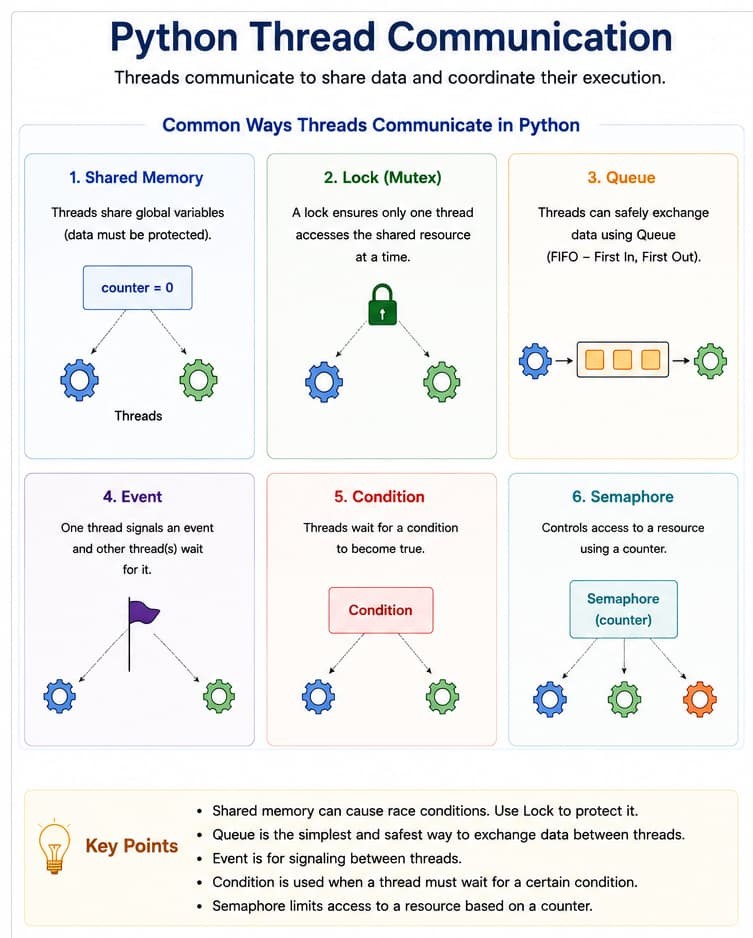
Core threading patterns
Walk through shared memory pitfalls, locks, queues, events, conditions, and semaphores—the building blocks used throughout this guide.
1. Shared memory (without lock — race condition)
Multiple threads updating the same global counter without synchronization; the final sum is often wrong because counter += 1 is not atomic.
import threading

counter = 0

def worker():
    global counter
    for _ in range(100000):
        counter += 1

threads = []
for _ in range(5):
    t = threading.Thread(target=worker)
    t.start()
    threads.append(t)

for t in threads:
    t.join()

print("Counter:", counter)
# Output will be incorrect due to race condition (expected: 500000)
2. Lock (mutex) — proper synchronization
A threading.Lock ensures only one thread mutates counter at a time.
import threading

counter = 0
lock = threading.Lock()

def worker():
    global counter
    for _ in range(100000):
        with lock:  # Only one thread can enter this block at a time
            counter += 1

threads = []
for _ in range(5):
    t = threading.Thread(target=worker)
    t.start()
    threads.append(t)

for t in threads:
    t.join()

print("Counter:", counter)
# Output: Counter: 500000 (correct)
3. Queue — safe data exchange
queue.Queue is thread-safe: producers and consumers coordinate without manual lock bookkeeping for each item.
import threading
from queue import Queue

q = Queue()

def producer():
    for i in range(5):
        q.put(i)
        print(f"Produced: {i}")

def consumer():
    while True:
        item = q.get()
        if item is None:
            break
        print(f"Consumed: {item}")
        q.task_done()

p = threading.Thread(target=producer)
c = threading.Thread(target=consumer)

p.start()
c.start()

p.join()
q.put(None)  # Signal consumer to stop
c.join()

print("Done!")
4. Event — signalling between threads
An threading.Event lets one thread wake others when something becomes ready.
import threading
import time

event = threading.Event()

def waiting_thread():
    print("Waiting for event...")
    event.wait()  # Blocks until event is set
    print("Event received!")

def signal_thread():
    time.sleep(2)
    print("Setting event")
    event.set()

t1 = threading.Thread(target=waiting_thread)
t2 = threading.Thread(target=signal_thread)

t1.start()
t2.start()

t1.join()
t2.join()

# Output:
# Waiting for event...
# Setting event
# Event received!
5. Condition — advanced coordination
threading.Condition combines a lock with a wait/notify pattern for producer–consumer style handoffs.
import threading
import time

condition = threading.Condition()
data_ready = False

def producer():
    global data_ready
    time.sleep(2)
    with condition:
        data_ready = True
        print("Data produced")
        condition.notify()  # Wake up waiting thread

def consumer():
    global data_ready
    with condition:
        while not data_ready:
            print("Waiting for data...")
            condition.wait()  # Release lock and wait
        print("Data consumed")

t1 = threading.Thread(target=producer)
t2 = threading.Thread(target=consumer)

t2.start()  # Start consumer first (it will wait)
t1.start()

t1.join()
t2.join()

# Output:
# Waiting for data...
# Data produced
# Data consumed
6. Semaphore — limiting resource access
A Semaphore(n) allows at most n threads into the critical section at once—useful for pool-style limits.
import threading
import time

# Semaphore allows at most 2 threads to access simultaneously
sem = threading.Semaphore(2)

def worker(thread_id):
    with sem:
        print(f"Thread {thread_id} entering (acquired semaphore)")
        time.sleep(2)
        print(f"Thread {thread_id} leaving (releasing semaphore)")

threads = []
for i in range(5):
    t = threading.Thread(target=worker, args=(i,))
    t.start()
    threads.append(t)

for t in threads:
    t.join()

print("All threads complete!")

# Output (example):
# Thread 0 entering
# Thread 1 entering
# (2 second delay)
# Thread 0 leaving
# Thread 1 leaving
# Thread 2 entering
# Thread 3 entering
# ...
Concurrent Execution
Run tasks in parallel
25+ Examples
Practical threading patterns
Synchronization
Thread-safe operations
Real Applications
Web scraping, APIs, I/O
What is thread communication?
Thread communication is the process of:
- sharing data
- exchanging information
- coordinating execution
between multiple threads.
Python provides several ways for thread communication:
- Queue
- Event
- Lock
- Condition
- Semaphore
Why thread communication is needed
When multiple threads work together:
- one thread may produce data
- another thread may consume data
Communication ensures:
- synchronization
- proper execution
- safe data sharing
Common problems without communication
Without synchronization:
- race conditions occur
- data corruption happens
- threads interfere with each other
Python threading module
Python provides the built-in module:
import threading1. Communication using queue.Queue
The safest way to communicate between threads is using queue.Queue.
Why use Queue?
- Queue is thread-safe
- handles synchronization automatically
- avoids race conditions
Producer–consumer example
import threading
import queue
import time

q = queue.Queue()

def producer():

    for i in range(5):

        print("Produced:", i)

        q.put(i)

        time.sleep(1)

def consumer():

    for i in range(5):

        item = q.get()

        print("Consumed:", item)

        q.task_done()

t1 = threading.Thread(target=producer)
t2 = threading.Thread(target=consumer)

t1.start()
t2.start()

t1.join()
t2.join()
How Queue works
- Producer adds data using
put() - Consumer receives data using
get() - Queue handles synchronization internally
Important Queue methods
| Method | Purpose |
|---|---|
| put() | Insert item |
| get() | Remove item |
| empty() | Check if queue empty |
| full() | Check if queue full |
| task_done() | Mark task completed |
Queue with maximum size
import queue

q = queue.Queue(maxsize=3)

q.put(1)
q.put(2)

print(q.qsize())
Output:
2
2. Communication using Event
threading.Event is used to signal between threads. One thread waits; another thread sends the signal.
import threading
import time

event = threading.Event()

def waiter():

    print("Waiting for signal...")

    event.wait()

    print("Signal received")

def sender():

    time.sleep(3)

    print("Sending signal")

    event.set()

t1 = threading.Thread(target=waiter)
t2 = threading.Thread(target=sender)

t1.start()
t2.start()
Important Event methods
| Method | Purpose |
|---|---|
| wait() | Wait for signal |
| set() | Send signal |
| clear() | Reset signal |
3. Communication using Lock
A Lock prevents multiple threads from accessing shared data at the same time.
Race condition example
import threading

counter = 0

def increase():

    global counter

    for i in range(100000):
        counter += 1

t1 = threading.Thread(target=increase)
t2 = threading.Thread(target=increase)

t1.start()
t2.start()

t1.join()
t2.join()

print(counter)
Output may be less than 200000 due to a race condition.
Solving with Lock
import threading

counter = 0

lock = threading.Lock()

def increase():

    global counter

    for i in range(100000):

        lock.acquire()

        counter += 1

        lock.release()

t1 = threading.Thread(target=increase)
t2 = threading.Thread(target=increase)

t1.start()
t2.start()

t1.join()
t2.join()

print(counter)
Output:
200000
Using the with statement
import threading

lock = threading.Lock()

with lock:
    print("Critical section")
Important Lock methods
| Method | Purpose |
|---|---|
| acquire() | Lock resource |
| release() | Unlock resource |
4. Communication using Condition
A Condition lets one thread wait until another thread notifies it.
import threading

condition = threading.Condition()

items = []

def consumer():

    with condition:

        print("Waiting for item")

        condition.wait()

        print("Consumed:", items.pop())

def producer():

    with condition:

        items.append(100)

        print("Produced item")

        condition.notify()

t1 = threading.Thread(target=consumer)
t2 = threading.Thread(target=producer)

t1.start()
t2.start()
Important Condition methods
| Method | Purpose |
|---|---|
| wait() | Wait for notification |
| notify() | Notify one thread |
| notify_all() | Notify all threads |
5. Communication using Semaphore
A Semaphore limits how many threads can access a resource at once.
import threading
import time

sem = threading.Semaphore(2)

def worker(name):

    with sem:

        print(name, "accessing resource")

        time.sleep(2)

threads = []

for i in range(5):

    t = threading.Thread(target=worker, args=(f"Thread-{i}",))

    threads.append(t)

    t.start()
Daemon threads
Daemon threads run in the background and do not block the program from exiting.
import threading
import time

def background():

    while True:
        print("Running...")
        time.sleep(1)

t = threading.Thread(target=background)

t.daemon = True

t.start()

time.sleep(3)
Thread synchronization
Synchronization ensures:
- only safe thread execution
- proper data consistency
- ordered communication
Queue vs Lock
| Queue | Lock |
|---|---|
| Data communication | Resource protection |
| Thread-safe | Manual synchronization |
Event vs Condition
| Event | Condition |
|---|---|
| Simple signaling | Complex synchronization |
| One-way signal | Wait + notify mechanism |
Advantages of thread communication
- Safe data sharing
- Prevents race conditions
- Better coordination
- Efficient multitasking
Disadvantages
- Increased complexity
- Deadlock possibility
- Hard debugging
- Synchronization overhead
Real-life examples
| Example | Communication type |
|---|---|
| Food delivery system | Producer–consumer |
| Traffic signal | Event |
| Bank transaction | Lock |
| Printer access | Semaphore |
Before you continue
- Use
queue.Queuefor safe handoff of work between threads. - Use
Lock(orwith lock:) for shared mutable state. - Use
Event/Conditionwhen threads must wait for signals. - Use
Semaphoreto cap concurrent access to a limited resource.
Understanding GIL (Global Interpreter Lock)
The Global Interpreter Lock (GIL) is a mutex that protects access to Python objects, preventing multiple native threads from executing Python bytecodes at once.
GIL Impact: CPU-bound vs I/O-bound Tasks
CPU-bound Tasks
- Mathematical computations
- Image processing
- Data compression
- Machine learning training
Threading NOT effective due to GIL
Use multiprocessing instead
I/O-bound Tasks
- Network requests
- File operations
- Database queries
- Web scraping
Threading IS effective
Threads release GIL during I/O waits
import threading
import time
import multiprocessing

# Demo 1: CPU-bound task - threading doesn't help
def cpu_bound_task(n):
    """Heavy computation task"""
    count = 0
    for i in range(n):
        count += i * i
    return count

def test_cpu_bound():
    """Test CPU-bound performance with threading"""
    print("=== CPU-bound Task Test ===")
    n = 10_000_000

    # Single thread
    start = time.time()
    cpu_bound_task(n)
    single_time = time.time() - start
    print(f"Single thread: {single_time:.2f} seconds")

    # Multiple threads (won't help due to GIL)
    start = time.time()
    threads = []
    for _ in range(4):
        thread = threading.Thread(target=cpu_bound_task, args=(n//4,))
        threads.append(thread)
        thread.start()

    for thread in threads:
        thread.join()

    multi_time = time.time() - start
    print(f"4 threads: {multi_time:.2f} seconds")
    print(f"Speedup: {single_time/multi_time:.2f}x")
    print("Note: Threading doesn't help CPU-bound tasks due to GIL!")

# Demo 2: I/O-bound task - threading helps
def io_bound_task(duration):
    """Simulate I/O wait"""
    time.sleep(duration)
    return f"Slept for {duration}s"

def test_io_bound():
    """Test I/O-bound performance with threading"""
    print("\n=== I/O-bound Task Test ===")
    sleep_time = 1

    # Single thread
    start = time.time()
    for _ in range(4):
        io_bound_task(sleep_time)
    single_time = time.time() - start
    print(f"Single thread (4 tasks): {single_time:.2f} seconds")

    # Multiple threads
    start = time.time()
    threads = []
    for _ in range(4):
        thread = threading.Thread(target=io_bound_task, args=(sleep_time,))
        threads.append(thread)
        thread.start()

    for thread in threads:
        thread.join()

    multi_time = time.time() - start
    print(f"4 threads (4 tasks): {multi_time:.2f} seconds")
    print(f"Speedup: {single_time/multi_time:.2f}x")
    print("Note: Threading helps I/O-bound tasks!")

# Demo 3: Multiprocessing for CPU-bound tasks
def test_multiprocessing():
    """Use multiprocessing for CPU-bound tasks"""
    print("\n=== Multiprocessing for CPU-bound ===")
    n = 10_000_000

    # Single process
    start = time.time()
    cpu_bound_task(n)
    single_time = time.time() - start
    print(f"Single process: {single_time:.2f} seconds")

    # Multiple processes
    start = time.time()
    with multiprocessing.Pool(4) as pool:
        # Split work among processes
        results = pool.map(cpu_bound_task, [n//4] * 4)

    multi_time = time.time() - start
    print(f"4 processes: {multi_time:.2f} seconds")
    print(f"Speedup: {single_time/multi_time:.2f}x")
    print("Note: Multiprocessing helps CPU-bound tasks!")

if __name__ == "__main__":
    test_cpu_bound()
    test_io_bound()
    test_multiprocessing()