Python Sets Complete Guide
Learn Python sets - creation, methods, set operations, set theory with practical examples and real-world applications for efficient unique data handling.
Unordered
No indexing
Unique
No duplicates
Set Operations
Union, Intersection
Fast Lookups
O(1) membership
Table of Contents
1. Introduction to Sets
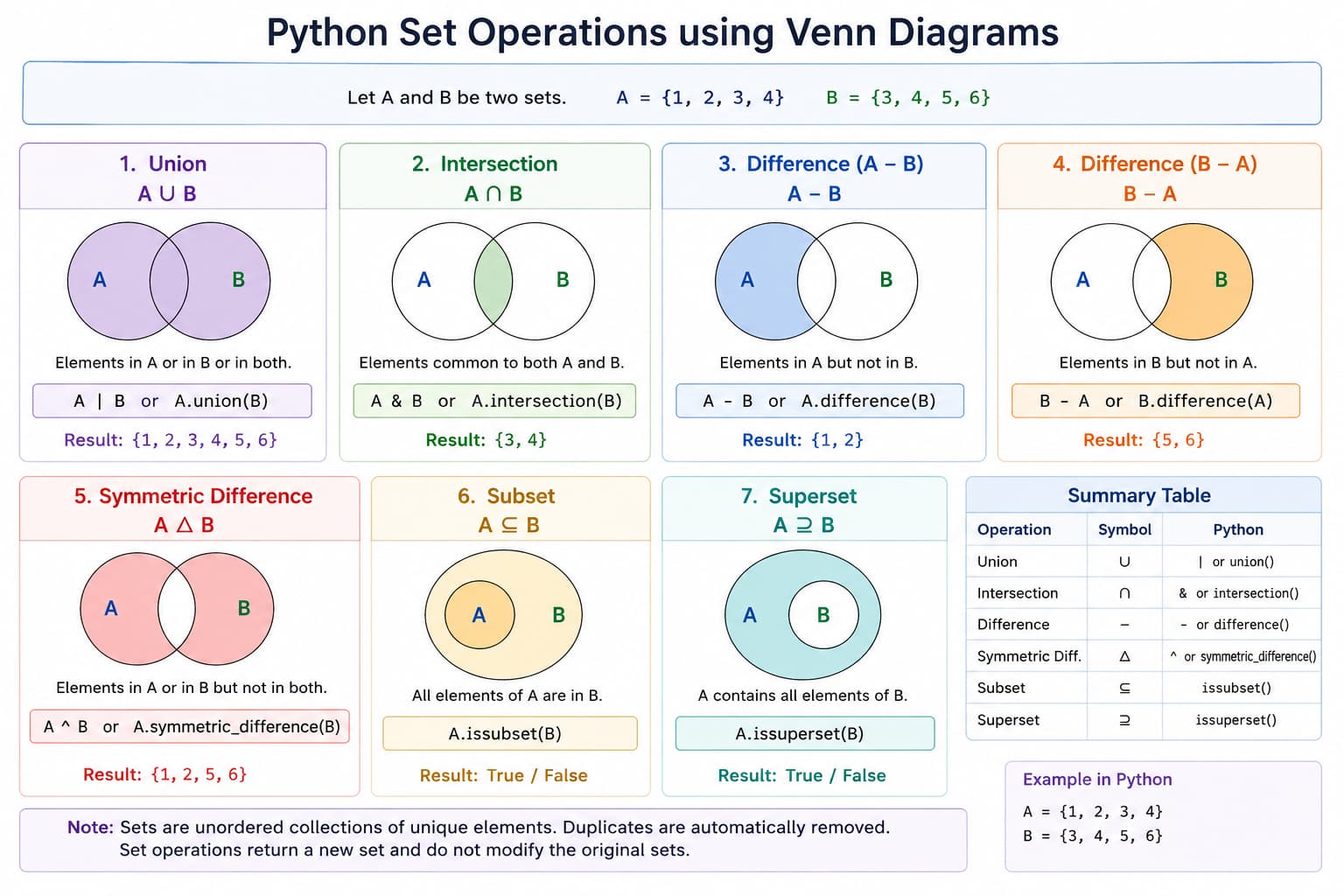
Sets are unordered, mutable collections of unique, hashable elements. They are optimized for membership testing and mathematical set operations.
Key Properties
- Unordered — No index-based access
- Unique elements — No duplicates allowed
- Mutable — Can add/remove elements
- Hashable elements — Elements must be immutable/hashable
- Fast membership — Very fast membership testing (O(1) average)
- Set algebra — Union, intersection, difference, symmetric difference
2. Creating Sets
# Empty set (note: {} creates empty dict)
empty_set = set()
print(type(empty_set))  # <class 'set'>

# Wrong way - this creates a dict
wrong = {}
print(type(wrong))  # <class 'dict'>

# Set with elements
fruits = {'apple', 'banana', 'orange', 'apple'}
print(fruits)  # {'banana', 'orange', 'apple'} (duplicates removed, order arbitrary)

# Using set() constructor
numbers = set([1, 2, 3, 3, 4, 4, 5])
print(numbers)  # {1, 2, 3, 4, 5}

# From string
chars = set("hello")
print(chars)  # {'h', 'e', 'l', 'o'} (unique characters)

# From range
range_set = set(range(5))
print(range_set)  # {0, 1, 2, 3, 4}

# Set with mixed types (must be hashable)
mixed = {1, 'hello', (1, 2), True}
print(mixed)  # {1, 'hello', (1, 2)} (True=1, so no duplicate)

# Invalid - unhashable types
# invalid = {[1, 2], {3, 4}}  # TypeError: unhashable type: 'list'
3. Accessing Set Elements
Sets are unordered, so you cannot access by index. Instead, you check membership or iterate.
fruits = {'apple', 'banana', 'orange', 'mango'}

# Membership testing
print('banana' in fruits)    # True
print('grape' in fruits)     # False
print('apple' not in fruits) # False

# Iterating through set
for fruit in fruits:
    print(fruit)

# Check if set is empty
if fruits:
    print("Set has elements")

# Get length
print(len(fruits))  # 4

# Min and max (if elements are comparable)
numbers = {1, 5, 2, 8, 3}
print(min(numbers))  # 1
print(max(numbers))  # 8
print(sum(numbers))  # 19
4. Adding and Removing Elements
Adding Elements
colors = {'red', 'green'}

# Add single element
colors.add('blue')
print(colors)  # {'red', 'green', 'blue'}

# Adding duplicate has no effect
colors.add('red')
print(colors)  # {'red', 'green', 'blue'} (unchanged)

# Update with multiple elements (from iterable)
colors.update(['yellow', 'purple', 'orange'])
print(colors)  # {'red', 'green', 'blue', 'yellow', 'purple', 'orange'}

# Update with another set
more_colors = {'cyan', 'magenta'}
colors.update(more_colors)
print(colors)
Removing Elements
colors = {'red', 'green', 'blue', 'yellow', 'purple'}

# remove() - raises KeyError if element not found
colors.remove('green')
print(colors)  # {'red', 'blue', 'yellow', 'purple'}
# colors.remove('black')  # KeyError!

# discard() - no error if element not found
colors.discard('blue')
print(colors)  # {'red', 'yellow', 'purple'}
colors.discard('black')  # No error, does nothing

# pop() - removes and returns arbitrary element
popped = colors.pop()
print(f"Removed: {popped}")
print(colors)

# clear() - remove all elements
colors.clear()
print(colors)  # set()
5. Set Operations
Union (|)
set_a = {1, 2, 3, 4, 5}
set_b = {4, 5, 6, 7, 8}

# Union - elements in either set
union1 = set_a.union(set_b)
union2 = set_a | set_b
print(union1)  # {1, 2, 3, 4, 5, 6, 7, 8}
print(union2)  # {1, 2, 3, 4, 5, 6, 7, 8}

# Multiple sets
set_c = {8, 9, 10}
union_all = set_a | set_b | set_c
print(union_all)  # {1, 2, 3, 4, 5, 6, 7, 8, 9, 10}
Intersection (&)
set_a = {1, 2, 3, 4, 5}
set_b = {4, 5, 6, 7, 8}

# Intersection - elements in both sets
intersection1 = set_a.intersection(set_b)
intersection2 = set_a & set_b
print(intersection1)  # {4, 5}
print(intersection2)  # {4, 5}

# Multiple sets
set_c = {3, 4, 5, 9}
intersection_all = set_a & set_b & set_c
print(intersection_all)  # {4, 5}
Difference (-)
set_a = {1, 2, 3, 4, 5}
set_b = {4, 5, 6, 7, 8}

# Difference - elements in set_a but not in set_b
diff1 = set_a.difference(set_b)
diff2 = set_a - set_b
print(diff1)  # {1, 2, 3}
print(diff2)  # {1, 2, 3}

# Difference in reverse - elements in set_b but not in set_a
diff3 = set_b - set_a
print(diff3)  # {6, 7, 8}
Symmetric Difference (^)
set_a = {1, 2, 3, 4, 5}
set_b = {4, 5, 6, 7, 8}

# Symmetric difference - elements in either but not both
sym_diff1 = set_a.symmetric_difference(set_b)
sym_diff2 = set_a ^ set_b
print(sym_diff1)  # {1, 2, 3, 6, 7, 8}
print(sym_diff2)  # {1, 2, 3, 6, 7, 8}
6. Set Methods
Subset and Superset
set_a = {1, 2, 3, 4, 5}
set_b = {2, 3, 4}
set_c = {1, 2, 3, 4, 5}

# issubset - all elements of set_b are in set_a
print(set_b.issubset(set_a))  # True
print(set_b <= set_a)         # True
print(set_b <= set_c)         # True

# Proper subset (strict)
print(set_b < set_a)   # True (set_b is proper subset)
print(set_c < set_a)   # False (equal)

# issuperset - set_a contains all elements of set_b
print(set_a.issuperset(set_b))  # True
print(set_a >= set_b)           # True

# Proper superset
print(set_a > set_b)   # True
print(set_a > set_c)   # False (equal)

# Disjoint - no common elements
set1 = {1, 2, 3}
set2 = {4, 5, 6}
set3 = {3, 4, 5}
print(set1.isdisjoint(set2))  # True
print(set1.isdisjoint(set3))  # False
Set Modification Methods
set_a = {1, 2, 3, 4, 5}
set_b = {4, 5, 6, 7, 8}

# Update with union (adds elements)
set_a.update(set_b)
print(set_a)  # {1, 2, 3, 4, 5, 6, 7, 8}
set_a = {1, 2, 3, 4, 5}  # reset

# Intersection update (keeps only common elements)
set_a.intersection_update(set_b)
print(set_a)  # {4, 5}
set_a = {1, 2, 3, 4, 5}  # reset

# Difference update (removes elements in set_b)
set_a.difference_update(set_b)
print(set_a)  # {1, 2, 3}
set_a = {1, 2, 3, 4, 5}  # reset

# Symmetric difference update
set_a.symmetric_difference_update(set_b)
print(set_a) # {1, 2, 3, 6, 7, 8}7. Set Comprehension
Set comprehensions provide a concise way to create sets.
Basic Syntax
# Squares of numbers 1-5
squares = {x**2 for x in range(1, 6)}
print(squares)  # {1, 4, 9, 16, 25}

# Unique characters from string
chars = {char for char in "hello world" if char != ' '}
print(chars)  # {'h', 'e', 'l', 'o', 'w', 'r', 'd'}

# Even numbers from range
evens = {x for x in range(10) if x % 2 == 0}
print(evens)  # {0, 2, 4, 6, 8}
Advanced Examples
# From list with condition
numbers = [1, 2, 2, 3, 3, 3, 4, 4, 4, 4]
unique_evens = {x for x in numbers if x % 2 == 0}
print(unique_evens)  # {2, 4}

# With function calls
def is_prime(n):
    if n < 2:
        return False
    for i in range(2, int(n**0.5) + 1):
        if n % i == 0:
            return False
    return True

primes = {x for x in range(2, 50) if is_prime(x)}
print(primes)  # {2, 3, 5, 7, 11, ...}

# Nested comprehension
cartesian = {(x, y) for x in range(3) for y in range(3)}
print(cartesian)  # {(0, 0), (0, 1), ...}
8. Frozenset
frozenset is an immutable version of set. It can be used as a dictionary key.
Creating Frozensets
# Empty frozenset
empty_frozen = frozenset()

# From iterable
frozen1 = frozenset([1, 2, 3, 3, 4])
print(frozen1)  # frozenset({1, 2, 3, 4})

# From set
regular_set = {1, 2, 3}
frozen2 = frozenset(regular_set)
print(frozen2)  # frozenset({1, 2, 3})
Frozenset Operations
fs1 = frozenset([1, 2, 3, 4])
fs2 = frozenset([3, 4, 5, 6])

# All set operations work (return new frozensets)
print(fs1 | fs2)   # frozenset({1, 2, 3, 4, 5, 6})
print(fs1 & fs2)   # frozenset({3, 4})
print(fs1 - fs2)   # frozenset({1, 2})
print(fs1 ^ fs2)   # frozenset({1, 2, 5, 6})

# Membership testing
print(1 in fs1)    # True

# Can't modify (immutable)
# fs1.add(5)  # AttributeError: 'frozenset' object has no attribute 'add'

# Can be used as dictionary keys
set_dict = {
    frozenset([1, 2]): "value1",
    frozenset([3, 4]): "value2"
}
print(set_dict[frozenset([1, 2])])  # value1
Python Sets Classification
Sets support various operations, methods, and set theory operations. Understanding these features helps you use sets effectively in your programs.
Complete Sets Reference Table
| Category | Syntax/Keyword | Description | Example | Output |
|---|---|---|---|---|
| Creation | {} / set() | Create empty set | s = set() |
set() |
| Creation | {1, 2, 3} | Create set with elements | s = {1, 2, 3} |
{1, 2, 3} |
| Methods | add() | Add single element | s.add(4) |
Adds 4 to set |
| Methods | remove() | Remove element (error if missing) | s.remove(3) |
Removes 3 |
| Methods | discard() | Remove element (no error) | s.discard(3) |
Removes 3 if present |
| Methods | pop() | Remove & return arbitrary element | s.pop() |
Random element |
| Methods | clear() | Remove all elements | s.clear() |
set() |
| Operations | | / union() | Union of sets | a | b |
Elements in a or b |
| Operations | & / intersection() | Intersection of sets | a & b |
Elements in both a and b |
| Operations | - / difference() | Difference of sets | a - b |
Elements in a but not b |
| Operations | ^ / symmetric_difference() | Symmetric difference | a ^ b |
Elements in a or b but not both |
| Set Theory | issubset() / <= | Check if subset | a <= b |
True/False |
| Set Theory | issuperset() / >= | Check if superset | a >= b |
True/False |
| Set Theory | isdisjoint() | Check if no common elements | a.isdisjoint(b) |
True/False |
- Sets are unordered - elements have no index
- Sets contain unique elements - duplicates automatically removed
- Sets are mutable but elements must be hashable
- Use
frozenset()for immutable sets (can be dictionary keys) - Sets provide O(1) average time for membership tests (
inoperator)
Sets vs Lists vs Tuples Comparison
Understanding the differences between sets, lists, and tuples helps you choose the right data structure for your needs.
| Aspect | Sets Unique | Lists Mutable | Tuples Immutable |
|---|---|---|---|
| Order | Unordered | Ordered | Ordered |
| Mutability | Mutable (except frozenset) | Mutable | Immutable |
| Duplicates | Not allowed | Allowed | Allowed |
| Indexing | Not supported | Supported (zero-based) | Supported (zero-based) |
| Syntax | {} or set() |
[] |
() |
| Hashable | No (frozenset is hashable) | No | Yes |
| Use Cases | Unique elements, membership tests, set operations | Ordered collections, stacks, queues, sequences | Immutable sequences, dictionary keys, function returns |
| Performance | O(1) for membership test | O(n) for membership test | O(n) for membership test |
- Use Sets when you need unique elements, fast membership tests, or set operations
- Use Lists when you need ordered collections that can be modified
- Use Tuples when you need immutable ordered collections or hashable sequences
- Use Frozen Sets when you need immutable sets or sets as dictionary keys
Real-World Applications
Sets are used in many practical programming scenarios. Here are common applications:
Removing Duplicates
Quickly remove duplicates from any sequence:
# Remove duplicates from list
numbers = [1, 2, 2, 3, 3, 3, 4, 4, 4, 4]
unique_numbers = list(set(numbers))
print(unique_numbers)  # [1, 2, 3, 4]

# Preserve order (Python 3.7+)
from collections import OrderedDict
ordered_unique = list(OrderedDict.fromkeys(numbers))
Membership Testing
Fast O(1) membership tests:
# Fast keyword checking
keywords = {'if', 'else', 'for', 'while', 'def'}
user_input = "if x > 5: print(x)"

# Check if any keyword in input
has_keyword = any(word in keywords
                  for word in user_input.split())
print(f"Contains keyword: {has_keyword}")
Set Operations for Data
Find common elements, differences, etc.:
# Social media friends analysis
alice_friends = {'Bob', 'Charlie', 'Diana'}
bob_friends = {'Alice', 'Charlie', 'Eve'}

common = alice_friends & bob_friends
only_alice = alice_friends - bob_friends
all_friends = alice_friends | bob_friends
E-commerce Applications
Product categories, tags, filters:
# Product tags system
product_tags = {
    'laptop': {'electronics', 'computers', 'portable'},
    'book': {'education', 'entertainment'},
    'headphones': {'electronics', 'audio'}
}

# Find all electronic products
electronic_products = [
    product for product, tags in product_tags.items()
    if 'electronics' in tags
]
Key Takeaways
- Sets store unique, hashable elements with no indexing—use
set()for an empty set, not{} - Membership and set algebra (union, intersection, difference, symmetric difference) are core strengths
frozensetis immutable and can be used as keys or elements where a hashable set is required- In-place updates:
update,intersection_update,difference_update,symmetric_difference_update - Relations:
issubset/<=,issuperset/>=,isdisjoint - Set comprehensions build sets concisely:
{x for x in iterable if cond}