C Loops - Complete Guide
Master C loops including while, do-while, and for loops with detailed syntax, practical examples, loop control, and programming best practices.
3 Loop Types
Complete coverage
Practical Examples
Real-world usage
Nested Loops
Complex patterns
Introduction to C Loops
Loops are fundamental programming constructs that allow executing a block of code repeatedly until a specified condition is met. They are essential for tasks that require repetition, such as processing arrays, reading files, or implementing algorithms.
Why Use Loops?
- Code Reusability: Write once, execute multiple times
- Efficiency: Reduce code duplication
- Automation: Process large datasets automatically
- Flexibility: Handle dynamic data sizes
- Control: Precise control over program flow
Loop Types in C
- while Loop: Condition checked before iteration
- do-while Loop: Condition checked after iteration
- for Loop: Compact initialization, condition, increment
- Nested Loops: Loop inside another loop
- Control Statements: break, continue, goto
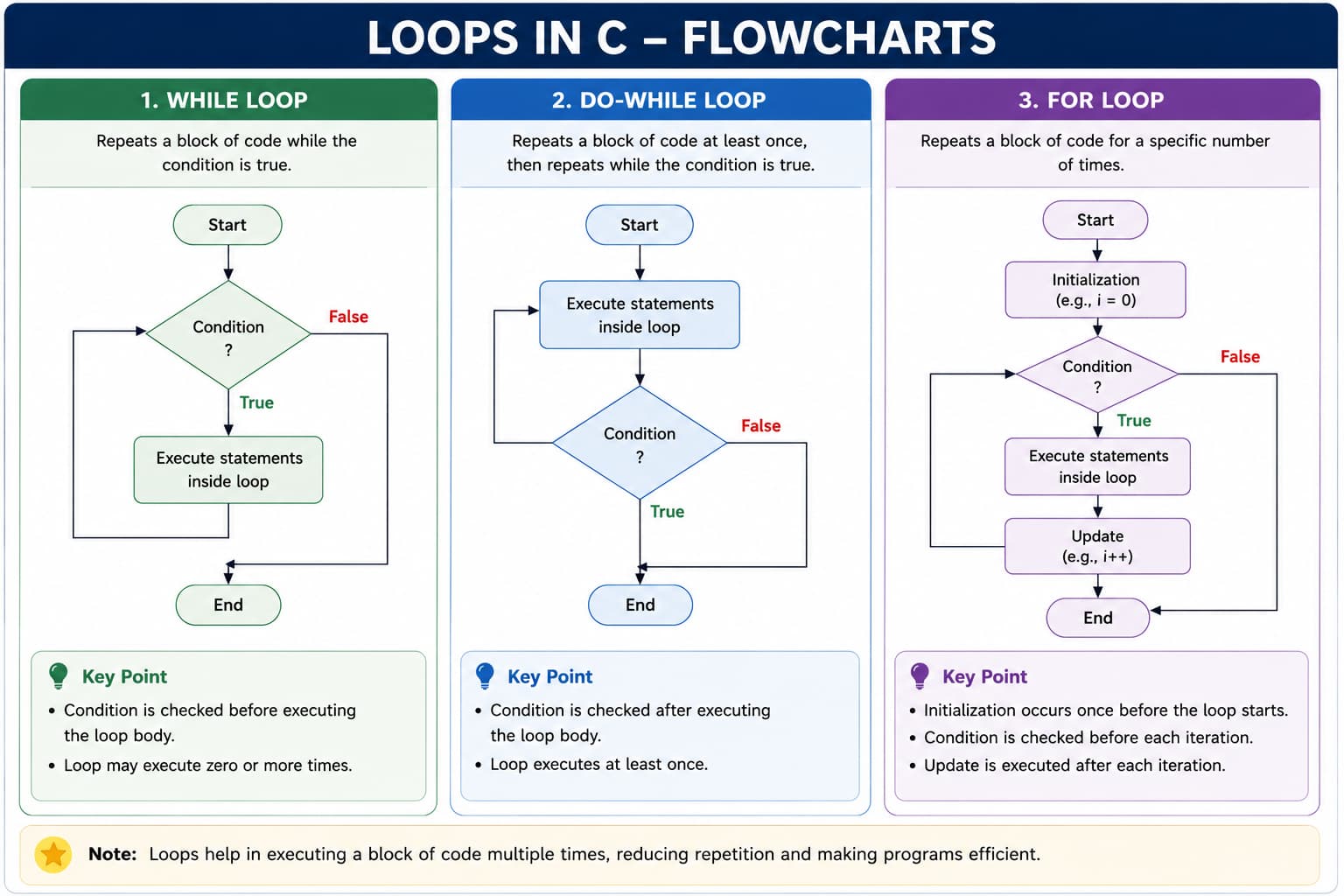
while, do-while, and for repeat code—checking the condition before or after the body, and using init / condition / update in a for loop.Important Loop Components
Every loop consists of: Initialization (starting point), Condition (continuation check), Body (code to repeat), and Update (modification for next iteration). Missing any component can lead to infinite loops.
C Loop Types Comparison
Here is a comprehensive comparison of all loop types in C with their key characteristics:
| Loop Type | Syntax | When to Use | Key Features |
|---|---|---|---|
|
while Loop
Entry-controlled loop
|
|
|
Pre-test
Zero or more times
Checks condition first, then executes
|
|
do-while Loop
Exit-controlled loop
|
|
|
Post-test
At least once
Executes first, then checks condition
|
|
for Loop
Counter-controlled loop
|
|
|
Pre-test
Compact syntax
All loop control in one line
|
|
Nested Loops
Loop inside another loop
|
|
|
Complex patterns
O(n²) complexity
Outer loop controls inner loop
|
The while Loop - Complete Guide
The while loop is an entry-controlled loop that repeats a block of code as long as a specified condition is true. The condition is checked before each iteration.
Syntax:
while (condition) {
    // statements to execute
    // update condition variable
}
Key Characteristics:
- Entry-controlled: Condition checked before entering loop body
- Zero or more executions: May not execute if condition is initially false
- Manual update: Loop variable must be updated inside loop body
- Infinite loop risk: If condition never becomes false
while Loop Examples:
#include <stdio.h>

int main() {
    int count = 1;

    printf("Counting from 1 to 5:\n");

    // while loop with counter
    while (count <= 5) {
        printf("Count: %d\n", count);
        count++;  // Update condition variable
    }

    printf("Loop finished!\n");
    return 0;
}Counting from 1 to 5:
Count: 1
Count: 2
Count: 3
Count: 4
Count: 5
Loop finished!
#include <stdio.h>

int main() {
    int number;

    printf("Enter a positive number: ");
    scanf("%d", &number);

    // Validate input using while loop
    while (number <= 0) {
        printf("Invalid input! Number must be positive.\n");
        printf("Enter a positive number: ");
        scanf("%d", &number);
    }

    printf("You entered: %d\n", number);

    // Calculate sum of digits
    int sum = 0;
    int temp = number;

    while (temp != 0) {
        sum += temp % 10;  // Add last digit
        temp /= 10;        // Remove last digit
    }

    printf("Sum of digits: %d\n", sum);

    return 0;
}#include <stdio.h>
int main() {
// CORRECT: Loop with proper termination
int i = 0;
while (i < 10) {
printf("i = %d\n", i);
i++; // CRITICAL: Update loop variable
}
// DANGEROUS: Infinite loop (missing update)
/*
int j = 0;
while (j < 10) {
printf("j = %d\n", j);
// Missing j++ causes infinite loop!
}
*/
// Controlled infinite loop with break
int counter = 0;
while (1) { // Infinite loop condition
printf("Counter: %d\n", counter);
counter++;
if (counter >= 5) {
printf("Breaking the infinite loop!\n");
break; // Exit loop
}
}
return 0;
}The do-while Loop - Complete Guide
The do-while loop is an exit-controlled loop that executes the loop body at least once, then repeats as long as the specified condition is true. The condition is checked after each iteration.
Syntax:
do {
    // statements to execute
    // update condition variable
} while (condition);
Key Characteristics:
- Exit-controlled: Condition checked after executing loop body
- At least one execution: Loop body always executes once
- Semicolon required: Note the semicolon after while(condition)
- Ideal for menus: Perfect for menu-driven programs
do-while Loop Examples:
#include <stdio.h>

int main() {
    int choice;
    int number, result = 1;

    do {
        // Display menu
        printf("\n=== MENU ===\n");
        printf("1. Calculate Factorial\n");
        printf("2. Check Even/Odd\n");
        printf("3. Print Table\n");
        printf("4. Exit\n");
        printf("Enter your choice (1-4): ");
        scanf("%d", &choice);

        switch(choice) {
            case 1:
                printf("Enter a number: ");
                scanf("%d", &number);

                if(number < 0) {
                    printf("Factorial not defined for negative numbers.\n");
                } else {
                    result = 1;
                    for(int i = 1; i <= number; i++) {
                        result *= i;
                    }
                    printf("Factorial of %d is %d\n", number, result);
                }
                break;

            case 2:
                printf("Enter a number: ");
                scanf("%d", &number);

                if(number % 2 == 0) {
                    printf("%d is Even\n", number);
                } else {
                    printf("%d is Odd\n", number);
                }
                break;

            case 3:
                printf("Enter a number: ");
                scanf("%d", &number);

                printf("Multiplication table of %d:\n", number);
                for(int i = 1; i <= 10; i++) {
                    printf("%d x %d = %d\n", number, i, number * i);
                }
                break;

            case 4:
                printf("Exiting program...\n");
                break;

            default:
                printf("Invalid choice! Please enter 1-4.\n");
        }

    } while(choice != 4);  // Continue until user chooses exit

    printf("Thank you for using the program!\n");
    return 0;
}#include <stdio.h>
int main() {
int score;
char grade;
char repeat;
do {
// Get valid score (0-100)
do {
printf("Enter student score (0-100): ");
scanf("%d", &score);
if(score < 0 || score > 100) {
printf("Invalid score! Please enter between 0 and 100.\n");
}
} while(score < 0 || score > 100);
// Determine grade
if(score >= 90) grade = 'A';
else if(score >= 80) grade = 'B';
else if(score >= 70) grade = 'C';
else if(score >= 60) grade = 'D';
else grade = 'F';
printf("Score: %d, Grade: %c\n", score, grade);
// Ask if user wants to continue
printf("Do you want to enter another score? (y/n): ");
scanf(" %c", &repeat); // Space before %c to skip newline
} while(repeat == 'y' || repeat == 'Y');
printf("Program ended.\n");
return 0;
}#include <stdio.h>
#include <stdlib.h>
#include <time.h>
int main() {
int secretNumber, guess, attempts = 0;
char playAgain;
// Seed random number generator
srand(time(0));
do {
// Generate random number between 1 and 100
secretNumber = (rand() % 100) + 1;
attempts = 0;
printf("\n=== NUMBER GUESSING GAME ===\n");
printf("I'm thinking of a number between 1 and 100.\n");
do {
printf("Enter your guess: ");
scanf("%d", &guess);
attempts++;
if(guess < secretNumber) {
printf("Too low! Try again.\n");
} else if(guess > secretNumber) {
printf("Too high! Try again.\n");
} else {
printf("Congratulations! You guessed it in %d attempts.\n", attempts);
}
} while(guess != secretNumber);
printf("Do you want to play again? (y/n): ");
scanf(" %c", &playAgain);
} while(playAgain == 'y' || playAgain == 'Y');
printf("Thanks for playing!\n");
return 0;
}The for Loop - Complete Guide
The for loop is a counter-controlled loop that combines initialization, condition checking, and increment/decrement in a single line. It's ideal when the number of iterations is known in advance.
Syntax:
for (initialization; condition; increment/decrement) {
    // statements to execute
}
Key Characteristics:
- Compact syntax: Initialization, condition, and update in one line
- Entry-controlled: Condition checked before each iteration
- Flexible components: Any/all components can be omitted
- Ideal for arrays: Perfect for iterating through arrays and strings
for Loop Examples:
#include <stdio.h>
int main() {
    for (int i = 1; i <= 5; i++)
        printf("%d ", i);
    printf("\n");
    return 0;
}#include <stdio.h>
int main() {
for (int i = 5; i >= 1; i--)
printf("%d ", i);
printf("\n");
return 0;
}#include <stdio.h>
int main() {
for (int i = 2; i <= 10; i += 2)
printf("%d ", i);
printf("\n");
return 0;
}#include <stdio.h>
int main() {
int a[] = {10, 20, 30}, sum = 0;
for (int i = 0; i < 3; i++)
sum += a[i];
printf("Sum: %d\n", sum);
return 0;
}#include <stdio.h>
int main() {
for (int i = 0, j = 4; i < 5; i++, j--)
printf("i=%d j=%d\n", i, j);
return 0;
}#include <stdio.h>
int main() {
int n = 1;
for (; n <= 5; n++) {
printf("%d ", n);
if (n == 5) break;
}
printf("\n");
return 0;
}Infinite Loop, break, and continue
These tools change how a loop runs: an infinite loop repeats until you choose to stop it; break exits the loop early; continue skips the rest of the current iteration and goes to the next one.
When is an infinite loop useful?
An infinite loop runs forever unless something stops it — usually break or a condition that eventually becomes false. It is useful when you do not know in advance how many times to repeat:
- Menu-driven programs — show options until the user chooses Exit
- Input validation — ask again until input is valid
- Event / server loops — process work until shutdown
Use while (1) or for (;;) for an intentional infinite loop, and always provide a clear exit with break.
#include <stdio.h>

int main() {
    int choice;
    while (1) {  /* runs until break */
        printf("1. Say hello  2. Exit\nChoice: ");
        scanf("%d", &choice);
        if (choice == 2) {
            printf("Goodbye!\n");
            break;
        }
        if (choice == 1)
            printf("Hello!\n");
    }
    return 0;
}break leaves the loop.Why use break?
break stops the loop immediately and jumps to the first statement after the loop. Use it when further iterations are unnecessary.
- Stop searching once a value is found
- Exit on error or invalid data
- Leave an intentional infinite loop
#include <stdio.h>

int main() {
    int nums[] = {3, 7, 2, 9, 4};
    int target = 9;
    int i;
    for (i = 0; i < 5; i++) {
        if (nums[i] == target) {
            printf("Found %d at index %d\n", target, i);
            break;
        }
    }
    return 0;
}Why use continue?
continue skips the rest of the current iteration and jumps to the next condition check. The loop keeps running.
- Skip invalid or unwanted values
- Process only even numbers
- Avoid deep nesting with an early skip
#include <stdio.h>

int main() {
    int i;
    printf("Even numbers 1-10: ");
    for (i = 1; i <= 10; i++) {
        if (i % 2 != 0)
            continue;
        printf("%d ", i);
    }
    printf("\n");
    return 0;
}break vs continue
break — leave the loop completely. continue — skip to the next iteration. Accidental infinite loops happen when the condition never becomes false; always update loop variables or plan an exit with break.
goto and Control Summary
See Infinite Loop, break, and continue above for detailed examples. The table compares all three; goto is rarely needed in modern C.
| Statement | Purpose | Effect | Example |
|---|---|---|---|
break |
Terminates the loop immediately | Exits the loop and continues with next statement after loop | break; |
continue |
Skips current iteration | Jumps to next iteration, skipping remaining code in loop body | continue; |
goto |
Jumps to labeled statement | Transfers control to specified label (use sparingly) | goto label; |
break and continue. Use goto only for rare cases like centralized cleanup in embedded C.
Nested Loops
A nested loop is a loop inside another loop. The inner loop executes completely for each iteration of the outer loop. Nested loops are essential for working with multi-dimensional data.
General Syntax:
for(outer_initialization; outer_condition; outer_update) {
    for(inner_initialization; inner_condition; inner_update) {
        // statements
    }
}
Key Characteristics:
- Time Complexity: O(n²) for two nested loops
- Total Iterations: Outer iterations × Inner iterations
- Common Uses: 2D arrays, matrices, pattern printing, combinations
- Different Loop Types: Can mix while, do-while, and for loops
Simple Nested Loop Examples:
#include <stdio.h>

int main() {
    int i, j;

    /* Outer i: 3 times; inner j: 2 times each → 6 prints total */
    for (i = 1; i <= 3; i++) {
        for (j = 1; j <= 2; j++) {
            printf("(%d,%d) ", i, j);
        }
        printf("\n");
    }
    return 0;
}#include <stdio.h>
int main() {
int row, col;
for (row = 1; row <= 3; row++) {
for (col = 1; col <= 4; col++) {
printf("* ");
}
printf("\n");
}
return 0;
}#include <stdio.h>
int main() {
int a[2][2] = {{1, 2}, {3, 4}};
int i, j, sum = 0;
for (i = 0; i < 2; i++) {
for (j = 0; j < 2; j++) {
sum += a[i][j];
}
}
printf("Sum = %d\n", sum); /* 10 */
return 0;
}Common Mistakes and Best Practices
Loop Best Practices:
- Choose the right loop: Use for for known iterations, while for unknown, do-while for at-least-once
- Initialize properly: Always initialize loop control variables
- Use meaningful names: Use i, j, k for simple counters; row, col for matrices
- Avoid complex conditions: Keep loop conditions simple and clear
- Limit loop body size: Keep loop bodies small; move complex logic to functions
- Use braces always: Even for single-statement loop bodies
- Test edge cases: Test with zero iterations, one iteration, and maximum iterations
- Document complex loops: Add comments for nested or complex loop logic
Key Takeaways
- C provides three loop types: while (entry-controlled), do-while (exit-controlled), and for (counter-controlled)
- while loops check condition first (0 or more executions)
- do-while loops execute at least once, then check condition
- for loops combine initialization, condition, and update in one line
- Use break to exit a loop immediately, continue to skip to next iteration
- Nested loops are loops inside other loops, essential for 2D data
- Avoid infinite loops by ensuring loop condition eventually becomes false
- Use meaningful variable names and proper indentation for readability
- Test loops with edge cases: empty, single, and maximum iterations
- Choose loop type based on problem requirements, not personal preference