What happens if I access a[10] on a 5-element array?
Undefined behavior—may crash or corrupt memory. Always stay within bounds.
Master C++ arrays with comprehensive examples of 1D arrays, 2D arrays, operations, memory representation, and practical applications. Learn efficient array manipulation techniques.
Linear data structures
Matrix/tabular data
Contiguous storage
Traversal, search, sort
Arrays store fixed-size sequences. Learn C-style arrays, multidimensional layout, common pitfalls, and when to prefer std::array or std::vector in modern code.
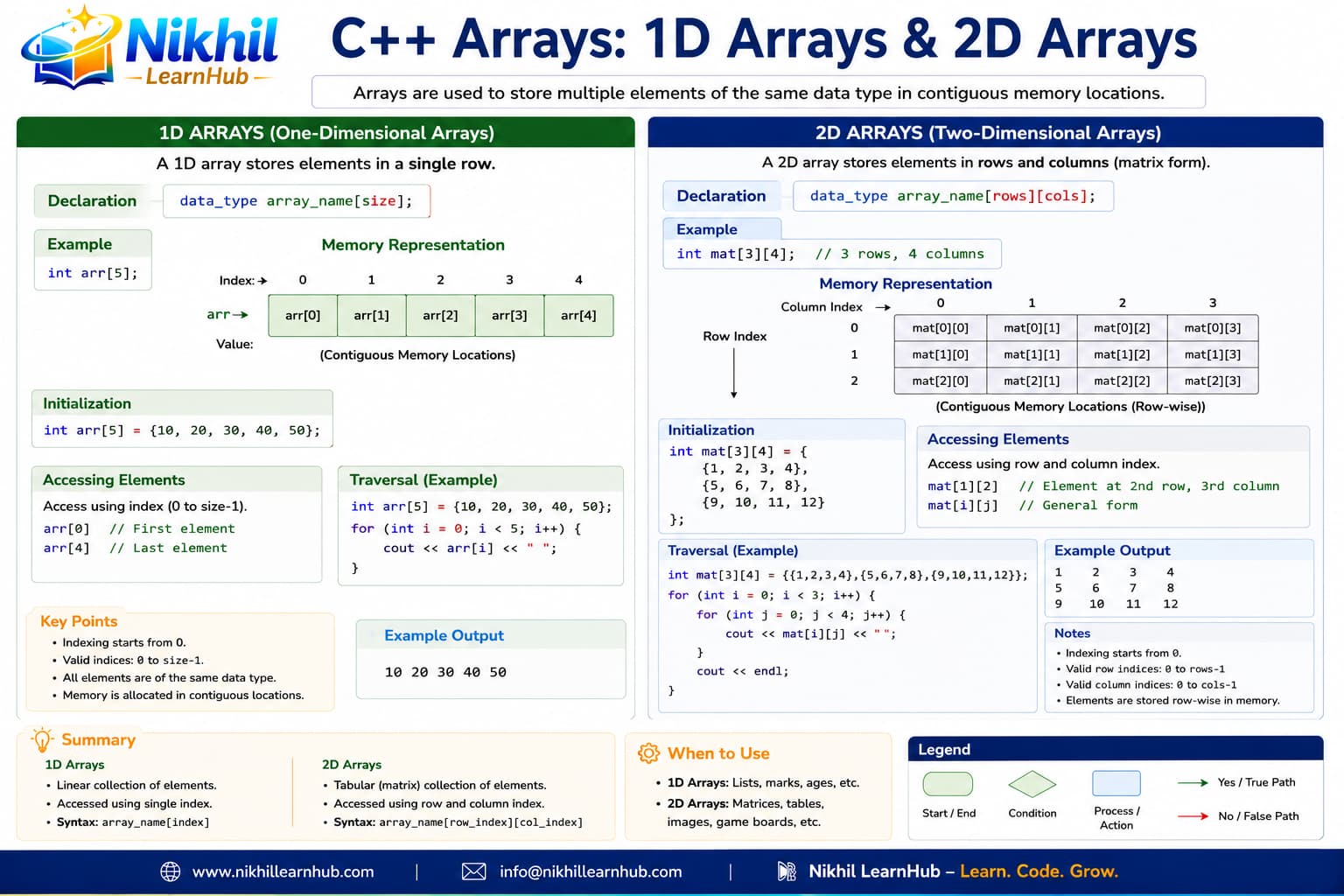
Arrays underpin algorithms, dynamic programming, and buffer handling. Interview questions often test indexing and memory layout.
Arrays are fundamental data structures in C++ that store a fixed-size sequential collection of elements of the same type. They provide efficient access to elements using indices and are stored in contiguous memory locations.
Single row of elements accessed by a single index. Perfect for lists and sequences.
Rows and columns matrix accessed by two indices. Ideal for grids and tables.
Elements stored sequentially in memory for fast access via pointer arithmetic.
Size must be known at compile time (unless using dynamic arrays).
int nums[5];
nums[0] = 10; nums[1] = 20;int primes[] = {2,3,5,7,11};int sc[10] = {95, 88, 76}; // rest 0int zeros[10] = {0};int sq[5];
for (int i = 0; i < 5; i++)
sq[i] = (i+1)*(i+1);char name[] = "John";Contiguous memory addresses: &arr[0], &arr[1], &arr[2], &arr[3], &arr[4]
int max = arr[0];
for (int i = 1; i < SIZE; i++)
if (arr[i] > max) max = arr[i];int sum = 0;
for (int i = 0; i < SIZE; i++) sum += arr[i];for (int i = 0; i < SIZE; i++)
if (arr[i] == target) { pos = i; break; }for (int i = SIZE-1; i >= 0; i--)
cout << arr[i];sort(arr, arr + SIZE);if (arr[i] % 2 == 0) even++;
else odd++;int m[2][3] = {{1,2,3},{4,5,6}};int m[2][3] = {1,2,3,4,5,6};int m[3][3] = {{1,2},{4,5,6},{7}};int z[4][4] = {0};int t[10][10];
for (int i = 0; i < 10; i++)
for (int j = 0; j < 10; j++)
t[i][j] = (i+1)*(j+1);char names[][20] = {"Alice","Bob"};Row-major order: Elements stored row by row in contiguous memory
C[i][j] = A[i][j] + B[i][j];cout << A[j][i]; // swap indicesfor (int j = 0; j < COLS; j++)
rowSum += A[i][j];cout << A[i][i];if (A[i][j] == target)
foundRow = i, foundCol = j;if (A[i][j] > max) max = A[i][j];string names[MAX];
int marks[MAX][5];float avg = (float)total / MAX_SUBJECTS;if (avg >= 90) grade = 'A';
else if (avg >= 80) grade = 'B';classAvg += averages[i];
classAvg /= numStudents;if (averages[i] > averages[top])
top = i;while (marks[i][j] < 0 || marks[i][j] > 100)
cin >> marks[i][j];char board[3][3];
for (int i = 0; i < 3; i++)
for (int j = 0; j < 3; j++)
board[i][j] = ' ';board[row][col] = currentPlayer;if (board[i][0]==p && board[i][1]==p && board[i][2]==p)
return true;if (board[0][0]==p && board[1][1]==p && board[2][2]==p)
return true;if (board[i][j] == ' ') return false;currentPlayer = (currentPlayer=='X') ? 'O' : 'X';int arr[5] = {10,20,30,40,50};
cout << arr; // address
cout << &arr[0]; // sameint *p = arr;
cout << *(p + 2); // arr[2]int n = sizeof(arr)/sizeof(arr[0]);cout << &arr[i];int m[2][3] = {{1,2,3},{4,5,6}};
cout << &m[0][1];// m[i][j] stored row by rowvoid printArray(int arr[], int size) {
for (int i = 0; i < size; i++)
cout << arr[i];
}void doubleArray(int arr[], int size) {
for (int i = 0; i < size; i++) arr[i] *= 2;
}int arraySum(int arr[], int size) {
int s = 0;
for (int i = 0; i < size; i++) s += arr[i];
return s;
}void printMatrix(int m[][3], int rows);// arrays always passed by referenceint size = sizeof(nums)/sizeof(nums[0]);
printArray(nums, size);| Common Error | Example | Solution |
|---|---|---|
| Array Index Out of Bounds | int arr[5]; arr[5] = 10; |
Always check indices: 0 to size-1 |
| Forgetting Array Size | int arr[]; (no size specified) |
Specify size or initialize with values |
| Uninitialized Array | int arr[10]; (contains garbage) |
Always initialize: int arr[10] = {0}; |
| Wrong Loop Bounds | for(i=1; i<=size; i++) |
Use: for(i=0; i |
| Passing Wrong Size to Functions | void func(int arr[]) {...} |
Always pass size parameter: void func(int arr[], int size) |
| Assuming Arrays are Passed by Value | Modifying array in function affects original | Arrays are always passed by reference |
const for array sizes that shouldn't changestd::array (C++11) for fixed-size arraysstd::vector for dynamic arraysstd::vector), need advanced operations (use std::array in C++11)Mastering arrays is crucial for advancing in C++ programming. Practice with array-based algorithms, explore dynamic arrays with pointers, and learn about Standard Template Library (STL) containers like vector, array, and valarray for more advanced use cases.
Undefined behavior—may crash or corrupt memory. Always stay within bounds.
Array names often decay to pointers; sizeof(array) differs from sizeof(pointer)—covered in the pointers lesson.
Prefer std::array when size is known at compile time—it knows its length and works with STL algorithms.