Which loop runs at least once?
do-while checks the condition after the body, so it always executes once.
Master all C++ loops: for, while, do-while, and range-based for loops. Learn loop control statements, nested loops, infinite loops, and best practices for efficient iteration.
Definite Iteration
Condition-based
Post-test Loop
C++11 Feature
Loops repeat work until a condition ends them. This guide covers every loop form in modern C++, loop control statements, and patterns that avoid infinite loops and off-by-one mistakes.
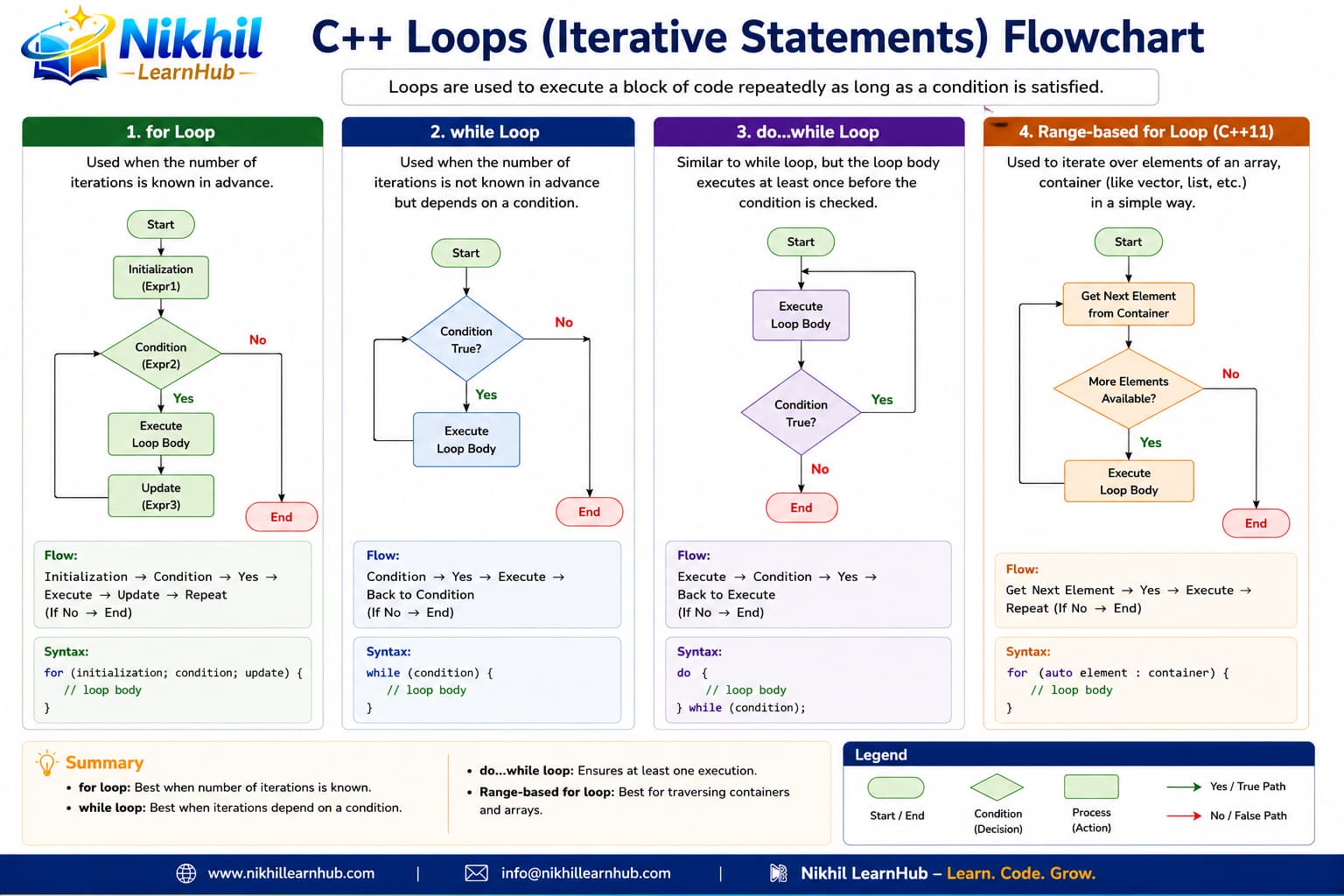
Iteration dominates algorithms and interview tasks (arrays, strings, patterns). Loop fluency speeds up everything after this chapter.
Loops are fundamental control structures that allow executing a block of code repeatedly. They are essential for processing collections of data, implementing algorithms, and creating interactive programs.
The following table compares all loop types in C++ with their syntax, use cases, and characteristics:
| Loop Type | Syntax | When to Use | Characteristics |
|---|---|---|---|
| for Loop | for(init; condition; update) { } | Definite iteration, known number of repetitions | Entry-controlled, compact initialization/update |
| while Loop | while(condition) { } | Condition-based, unknown repetitions | Entry-controlled, condition checked first |
| do-while Loop | do { } while(condition); | Execute at least once, then check condition | Exit-controlled, body executes first |
| Range-based for (C++11) | for(type var : collection) { } | Iterate over containers (arrays, vectors, etc.) | Simplified syntax, no index management |
| Nested Loops | loop { loop { } } | Multi-dimensional data, matrix operations | Loop inside another loop, careful with complexity |
| Infinite Loop | for(;;) or while(true) | Server loops, event-driven programming | Runs forever until break or return |
The for loop is used when the number of iterations is known beforehand. It combines initialization, condition checking, and update in one line.
for (initialization; condition; update) {
    // Code to execute repeatedly
}for (int i = 1; i <= 10; i++)
cout << i << " ";for (int i = 2; i <= 20; i += 2)
cout << i << " ";for (int i = 10; i > 0; i--)
cout << i << " ";int n = 5, f = 1;
for (int i = 1; i <= n; i++) f *= i;int sum = 0;
for (int i = 1; i <= 100; i++) sum += i;for (;;) { break; }for(int i=0, j=10; i<j; i++, j--)for(; i<10; i++)for(;;)for(...); { }The while loop repeats as long as the condition is true. It's ideal when the number of iterations is unknown.
while (condition) {
    // Code to execute while condition is true
}int c = 5;
while (c > 0) cout << c--;int n; cin >> n;
while (n <= 0) cin >> n;int s = 0, v = 0;
while (v != -1) { s += v; cin >> v; }int sec = 7, g = 0;
while (g != sec) cin >> g;string t = "Hi"; int i = 0;
while (i < t.length()) cout << t[i++];while (true) { if (done) break; }Use for when you know how many times to iterate. Use while when iteration depends on a condition that may change during execution.
The do-while loop executes the body first, then checks the condition. It guarantees at least one execution.
do {
    // Code to execute at least once
} while (condition);char ch;
do {
cout << "Menu...";
cin >> ch;
} while (ch != '3');string pwd;
do { cin >> pwd; }
while (pwd.length() < 8);int n;
do { cin >> n; }
while (n <= 0);char again;
do { /* game */ cin >> again; }
while (again == 'Y');int x = 0;
do { x++; } while (x < 1);do { /* body */ }
while (condition);The range-based for loop (introduced in C++11) simplifies iteration over containers like arrays, vectors, and other collections.
for (type variable : collection) {
    // Use variable for each element
}int a[] = {1,2,3,4,5};
for (int n : a) cout << n;vector<string> v = {"A","B"};
for (const string& s : v)
cout << s;int sc[] = {80,90};
for (int& x : sc) x += 5;string msg = "Hi";
for (char c : msg) cout << c;vector<double> p = {9.9, 19.9};
for (auto price : p) cout << price;for (int n : {1,2,3,4,5})
cout << n * n;const auto& for read-only access to avoid copyingauto& when you need to modify elementsauto for simple types (int, char, etc.)begin() and end() methodsC++ provides special statements to control loop execution: break, continue, and goto (use sparingly).
Immediately exits the loop, regardless of condition.
for(int i=0; i<10; i++) {
    if(i == 5) break;
    cout << i << " ";
}
// Output: 0 1 2 3 4Skips current iteration and proceeds to next.
for(int i=0; i<5; i++) {
    if(i == 2) continue;
    cout << i << " ";
}
// Output: 0 1 3 4Jumps to labeled statement (avoid in modern C++).
int i=0;
start:
cout << i << " ";
i++;
if(i < 3) goto start;for (int i = 1; i <= 10; i++)
if (i == 7) break;for (int i = 1; i <= 10; i++) {
if (i % 2 == 0) continue;
cout << i;
}for (int i = 1; i <= 3; i++)
for (int j = 1; j <= 3; j++)
if (i*j == 6) break;bool found = false;
for (int i = 1; i <= 3 && !found; i++)
for (int j = 1; j <= 3; j++)
if (i*j == 6) found = true;for (int i = 0; i < 5; i++) {
int n; cin >> n;
if (n <= 0) continue;
sum += n;
}while (true) {
if (attempts >= 3) break;
}goto statement can make code difficult to read and maintain. Use structured control flow (break, continue, functions) instead. goto is rarely needed in modern C++.
A loop inside another loop is called a nested loop. Useful for multi-dimensional data, matrices, and complex patterns.
for (int i = 1; i <= 10; i++)
    for (int j = 1; j <= 10; j++)
cout << i*j << " ";for (int i = 1; i <= 5; i++)
for (int j = 1; j <= i; j++)
cout << "* ";int m[3][4];
for (int i = 0; i < 3; i++)
for (int j = 0; j < 4; j++)
cout << m[i][j];for (int i = 0; i < ROWS; i++) {
int rs = 0;
for (int j = 0; j < COLS; j++) rs += m[i][j];
}int i = 1;
while (i <= 3) {
for (int j = 1; j <= 2; j++) cout << j;
i++;
}// O(n^2) for double nested loopInfinite loops run forever unless explicitly terminated. They're useful for servers, games, and event-driven programs.
// Method 1: for loop
for (;;) {
    // Infinite loop
}

// Method 2: while loop
while (true) {
    // Infinite loop
}

// Method 3: do-while loop
do {
    // Infinite loop
} while (true);while (true) {
// Get user input
char command;
cin >> command;
if (command == 'q') {
break; // Exit loop
}
// Process command
}int c = 0;
while (true) {
if (++c > 5) break;
}while (true) {
char cmd; cin >> cmd;
if (cmd == 'q') break;
}bool running = true;
while (running) { /* game */ }for (;;) {
if (exit) break;
}do { /* body */ } while (true);for (int i = 1; i <= 10; i++)
cout << "Cycle " << i;int arr[5];
for (int i = 0; i < 5; i++)
cout << arr[i];// BAD: i <= 5 for size 5
for (int i = 0; i <= 5; i++)for (int i = 0; i < 10; i++) {
if (i == 5) continue;
cout << i;
}for (int i = 0; i <= 10; i++)
cout << i * 0.1;vector<int> v = {10,20,30};
for (int n : v) cout << n;double area = PI * r * r;
for (int i = 0; i < 10; i++)
cout << area;do-while checks the condition after the body, so it always executes once.
for (auto x : container) iterates elements without manual index—preferred for STL containers.
Be explicit about < vs <=, start indices at 0, and use container.size() carefully in loop bounds.