When should I use switch instead of if?
When comparing one expression to many constant integral values; switch can be clearer and sometimes faster.
Learn C++ conditional statements through many short, focused examples—if, if-else, else-if, nested if, switch, and ternary—so you can read one idea at a time and practice quickly.
Simple condition check
Two-way branching
Multiple conditions
Multi-way selection
Branching lets programs react to data. Learn every major decision structure in C++—when to use if-chains versus switch, and how to keep conditions readable and bug-free.
Control flow is tested in every coding interview. switch vs if, fall-through, and dangling else are classic discussion topics.
Conditional statements allow your program to make decisions and execute different code blocks based on certain conditions. They are fundamental to creating dynamic, responsive programs in C++.
Executes code only if condition is true. Single path decision making.
Executes one block if true, another if false. Binary decision making.
Chain of conditions for multiple decision paths. Sequential checking.
Efficient multi-way branching based on a single expression value.
==, !=, <, >, <=, >=&& (AND), || (OR), ! (NOT){ } define scope for variablesint n = 10;
if (n > 0)
cout << "Positive";int age = 20;
if (age >= 18)
cout << "Can vote";int marks = 55;
if (marks >= 40)
cout << "Pass";int a = 5, b = 5;
if (a == b)
cout << "Equal";int n = 8;
if (n % 2 == 0)
cout << "Even";int m = 70;
if (m >= 40 && m <= 100)
cout << "Valid marks";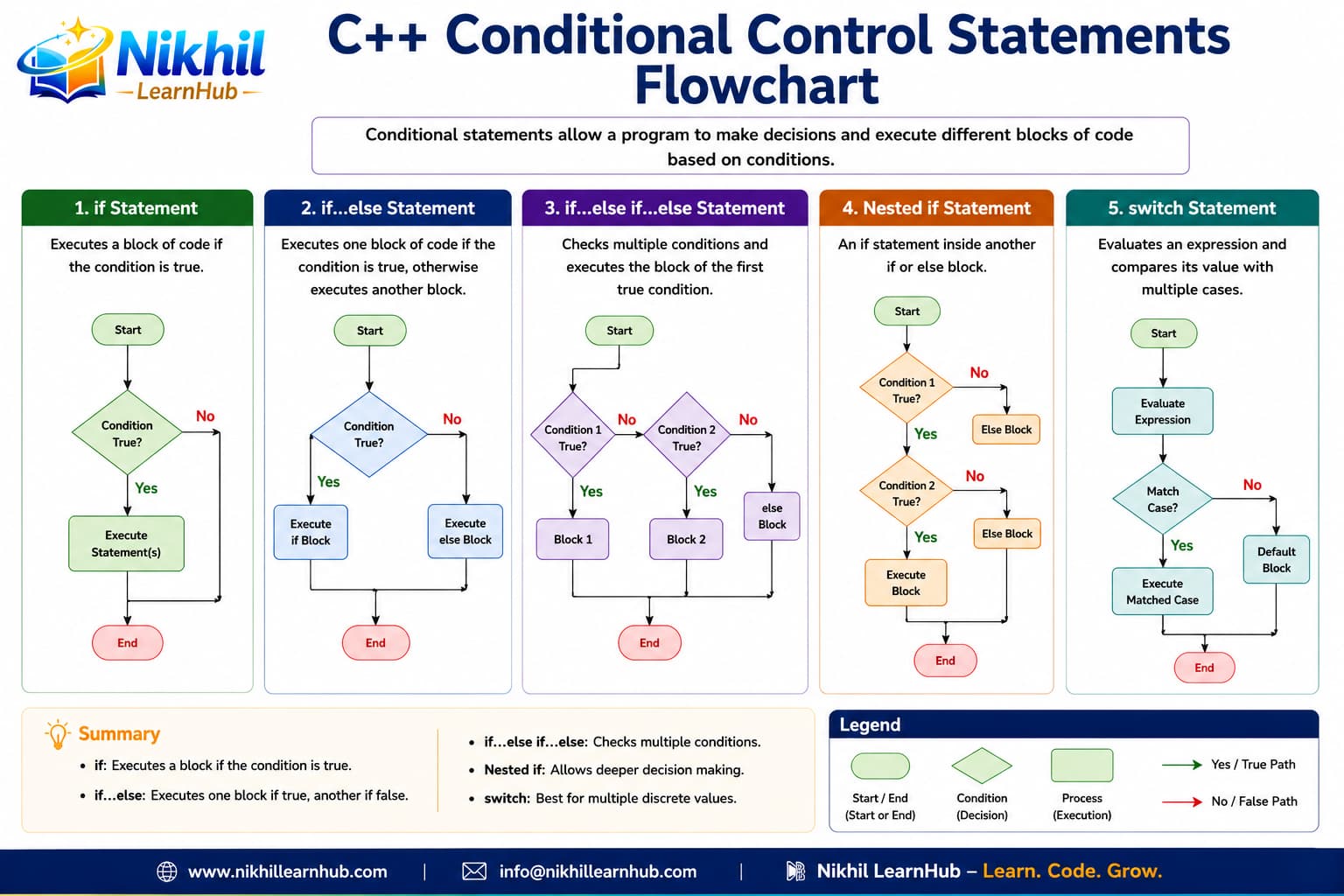
int n = -3;
if (n >= 0)
    cout << "Non-negative";
else
cout << "Negative";int n = 7;
if (n % 2 == 0)
cout << "Even";
else
cout << "Odd";int marks = 35;
if (marks >= 40)
cout << "Pass";
else
cout << "Fail";int a = 12, b = 9;
if (a > b)
cout << a;
else
cout << b;string pwd = "abc";
if (pwd == "admin")
cout << "Welcome";
else
cout << "Denied";int age = 65;
if (age >= 60)
cout << "Senior discount";
else
cout << "Regular price";{ } even for single statementsint marks = 72;
if (marks >= 90) cout << "A";
else if (marks >= 75) cout << "B";
else if (marks >= 60) cout << "C";
else if (marks >= 40) cout << "D";
else cout << "F";int t = 28;
if (t < 0) cout << "Freezing";
else if (t < 15) cout << "Cold";
else if (t < 30) cout << "Pleasant";
else cout << "Hot";char light = 'R';
if (light == 'G') cout << "Go";
else if (light == 'Y') cout << "Slow";
else cout << "Stop";int age = 14;
if (age < 13) cout << "Child";
else if (age < 20) cout << "Teen";
else if (age < 60) cout << "Adult";
else cout << "Senior";float bmi = 22.5;
if (bmi < 18.5) cout << "Under";
else if (bmi < 25) cout << "Normal";
else if (bmi < 30) cout << "Over";
else cout << "Obese";int day = 6;
if (day == 1) cout << "Monday";
else if (day <= 5) cout << "Weekday";
else cout << "Weekend";else at the end for default casestring user = "admin";
string pwd = "1234";
if (user == "admin") {
if (pwd == "1234")
cout << "Login OK";
else
cout << "Wrong password";
}int age = 25;
int income = 40000;
if (age >= 21) {
if (income >= 30000)
cout << "Eligible";
else
cout << "Low income";
}int n = 12;
if (n > 0) {
if (n % 2 == 0) cout << "Pos even";
else cout << "Pos odd";
}int marks = 55, att = 80;
if (marks >= 40) {
if (att >= 75)
cout << "Promoted";
else
cout << "Low attendance";
}int n = 0;
if (n != 0) {
if (n > 0) cout << "Positive";
else cout << "Negative";
} else {
cout << "Zero";
}&&, ||) to combine conditionschar op = '+';
int a = 10, b = 3;
switch (op) {
case '+': cout << a + b; break;
case '-': cout << a - b; break;
case '*': cout << a * b; break;
case '/': cout << a / b; break;
default: cout << "Invalid";
}int choice = 2;
switch (choice) {
case 1: cout << "Pizza"; break;
case 2: cout << "Burger"; break;
case 3: cout << "Pasta"; break;
default: cout << "Invalid";
}int day = 5;
switch (day) {
case 1: cout << "Mon"; break;
case 2: cout << "Tue"; break;
case 7: cout << "Sun"; break;
default: cout << "Other day";
}char g = 'B';
switch (g) {
case 'A': cout << "Excellent"; break;
case 'B': cout << "Good"; break;
case 'C': cout << "Average"; break;
default: cout << "Needs work";
}int m = 7;
switch (m) {
case 12: case 1: case 2:
cout << "Winter"; break;
case 6: case 7: case 8:
cout << "Summer"; break;
default: cout << "Other";
}int code = 404;
switch (code) {
case 200: cout << "OK"; break;
case 404: cout << "Not Found"; break;
case 500: cout << "Server Error"; break;
default: cout << "Unknown";
}break is optional but usually needed to prevent fall-throughdefault case is optional but recommendedint a = 10, b = 20;
int max = (a > b) ? a : b;int n = 7;
string s = (n % 2 == 0) ? "even" : "odd";int x = -15;
int absVal = (x < 0) ? -x : x;int marks = 55;
string st = (marks >= 40) ? "Pass" : "Fail";bool member = true;
double d = member ? 0.2 : 0.1;int h = 14;
string msg = (h < 12) ? "Morning" :
(h < 18) ? "Afternoon" : "Evening";| Statement | Best For | Limitations | Example Use Case |
|---|---|---|---|
| if | Single condition check | Only handles true case | Input validation, checking preconditions |
| if-else | Binary decisions (true/false) | Only two outcomes | Pass/fail, even/odd, login success/failure |
| else-if ladder | Multiple exclusive conditions | Can become long and complex | Grade systems, temperature ranges, age groups |
| nested if | Hierarchical decisions | Can become deeply nested (hard to read) | Multi-level menus, complex validation rules |
| switch | Equality checks on single expression | Only works with integral/enum types | Menu systems, day/month names, calculator operations |
| ternary operator | Simple one-liner assignments | Only two outcomes, can be hard to read | Simple value assignments, inline conditions |
{ } even for single statementsShort programs that combine if, else-if, switch, and ternary in real mini tasks.
int marks = 68;
char grade;
if (marks >= 90) grade = 'A';
else if (marks >= 75) grade = 'B';
else if (marks >= 60) grade = 'C';
else grade = 'F';
string st = (marks >= 40) ? "Pass" : "Fail";int ch = 2;
switch (ch) {
case 1: cout << "Balance"; break;
case 2: cout << "Withdraw"; break;
case 3: cout << "Deposit"; break;
default: cout << "Exit";
}int age = 10;
if (age < 5) cout << "Free";
else if (age < 18) cout << "Child fare";
else cout << "Adult fare";int y = 2024;
if ((y % 4 == 0 && y % 100 != 0) || (y % 400 == 0))
cout << "Leap year";
else
cout << "Not leap";
                        int x = 5, y = 10;

                        if (x > y) {

                          cout << "X is greater";

                        } else if (x == y) {

                          cout << "Equal";

                        } else {

                          cout << "Y is greater";

                        }
Conditional statements are the backbone of decision-making in C++ programming. Mastering if, else-if, nested if, and switch statements is essential for writing dynamic and responsive programs. Remember that clarity and readability are more important than clever one-liners. Practice with different scenarios to build your intuition for choosing the right conditional structure for each situation.
When comparing one expression to many constant integral values; switch can be clearer and sometimes faster.
Ambiguous pairing of else with nested ifs—use braces {} to make intent explicit.
Not directly in classic C++; use if-else or map/hash for string branching (C++17 may offer constexpr alternatives).