Python Loops Complete Guide
Learn Python loops - for loops, while loops, nested loops with practical examples, patterns, loop control statements, and real-world applications for efficient repetition in programming.
for Loop
Iterate over sequences
while Loop
Condition-based repetition
Nested Loops
Loops within loops
Loop Control
break, continue, pass
What are Loops in Python?
Loops are programming constructs that allow you to execute a block of code repeatedly. They are essential for automating repetitive tasks and processing collections of data.
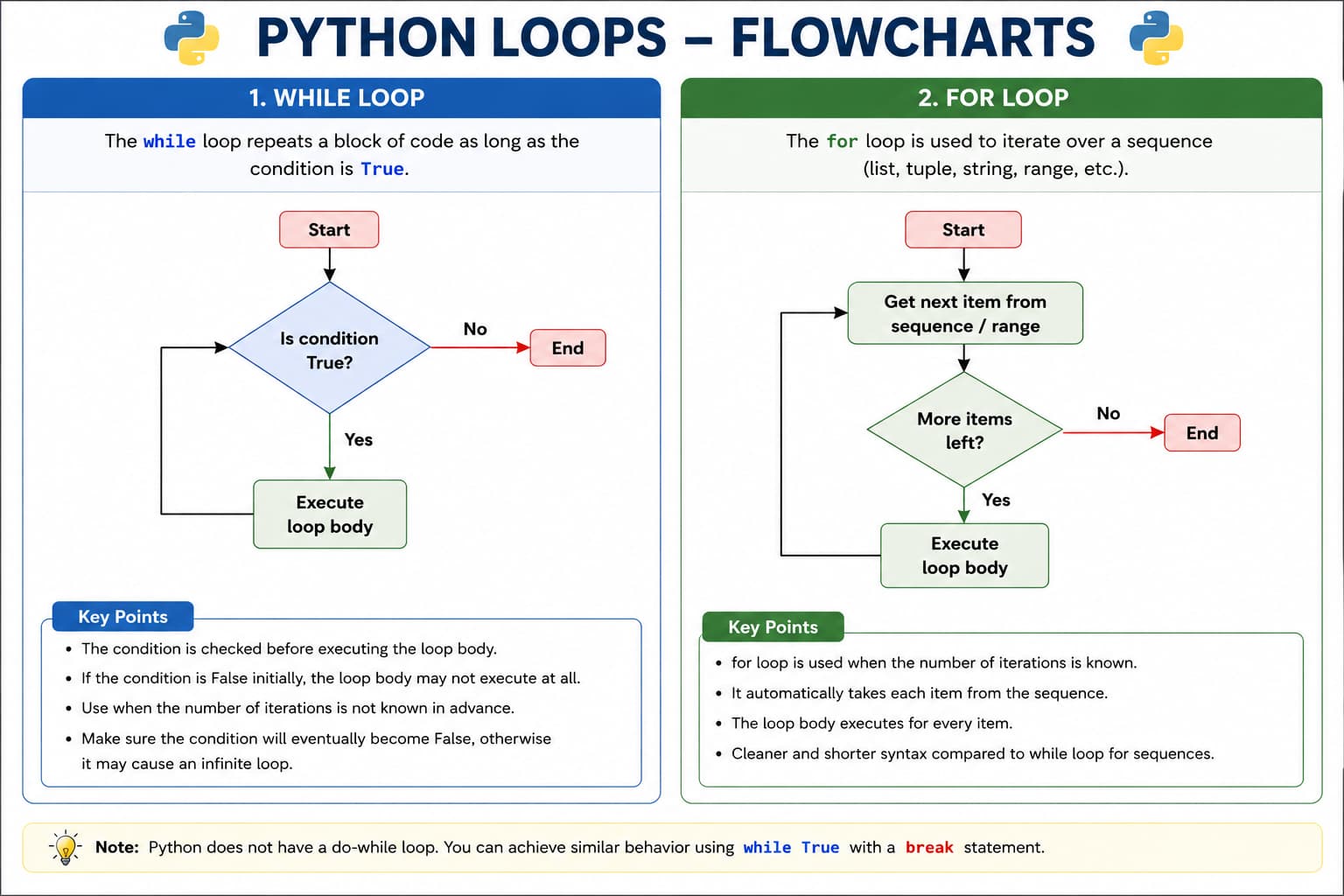
for (definite iteration) or while (condition-based)—plus range(), break, and continue.Key Concept
Loops help avoid code duplication and make programs more efficient. Python has two main loop types: for loops (definite iteration) and while loops (indefinite iteration).
# for loop - iterate over a sequence
fruits = ["apple", "banana", "cherry"]
for fruit in fruits:
    print(f"I like {fruit}")

# while loop - repeat while condition is true
count = 1
while count <= 5:
    print(f"Count: {count}")
    count += 1  # Increment counter

# Using range() function for iteration
for i in range(5):  # 0, 1, 2, 3, 4
    print(f"Number: {i}")

# Loop with else clause
for num in range(3):
    print(num)
else:
    print("Loop completed successfully!")
Python Loops Classification
Python loops are classified into main types with additional control statements. Each type serves specific purposes in programming.
Complete Loops Reference Table
| Loop Type | Syntax/Keyword | Description | Best For | Example |
|---|---|---|---|---|
| for Loop | for item in sequence: | Iterates over items in a sequence (list, string, range) | Definite iteration, known number of iterations | for i in range(5): print(i) |
| while Loop | while condition: | Repeats while condition is True | Indefinite iteration, condition-based repetition | while x < 10: x += 1 |
| Nested Loops | loop inside loop | Loop inside another loop | Multi-dimensional data, patterns, matrices | for i in range(3): for j in range(3): |
| Loop Control | break, continue, pass | Control the flow of loops | Early exit, skip iterations, placeholders | break, continue, pass |
- Use for loops when you know how many times to iterate
- Use while loops when iterations depend on a condition
- Use nested loops for multi-dimensional data or patterns
- Use loop control statements to manage loop flow
Loop Examples with Output
Let's explore practical examples of each loop type with actual Python code and output.
# for Loop Examples
print("=== for Loop Examples ===")

# Example 1: Iterating over a list
fruits = ["apple", "banana", "cherry", "date", "elderberry"]
print("My favorite fruits:")
for fruit in fruits:
    print(f"- {fruit.capitalize()}")

# Example 2: Using range() function
print("\nNumbers from 1 to 5:")
for i in range(1, 6):  # range(start, stop) stop is exclusive
    print(i, end=" ")  # Output: 1 2 3 4 5

print("\n\nEven numbers from 2 to 10:")
for i in range(2, 11, 2):  # range(start, stop, step)
    print(i, end=" ")  # Output: 2 4 6 8 10

# Example 3: Iterating over string
word = "Python"
print(f"\n\nCharacters in '{word}':")
for char in word:
    print(char, end="-")  # Output: P-y-t-h-o-n-

# Example 4: Iterating with enumerate()
colors = ["red", "green", "blue"]
print("\n\nColors with index:")
for index, color in enumerate(colors):
    print(f"{index}: {color}")
    # Output: 0: red, 1: green, 2: blue

# Example 5: Iterating over dictionary
student = {"name": "Alice", "age": 21, "grade": "A"}
print("\nStudent information:")
for key, value in student.items():
print(f"{key}: {value}")# while Loop Examples
print("=== while Loop Examples ===")
# Example 1: Basic counter
count = 1
print("Counting from 1 to 5:")
while count <= 5:
print(f"Count: {count}")
count += 1 # Increment to avoid infinite loop
print("Counting complete!\n")
# Example 2: Sum of numbers
total = 0
number = 1
print("Calculating sum of numbers from 1 to 10:")
while number <= 10:
total += number
print(f"Adding {number}, total: {total}")
number += 1
print(f"Final sum: {total}")
# Example 3: while loop with else
counter = 0
print("\nWhile loop with else example:")
while counter < 3:
print(f"Counter: {counter}")
counter += 1
else:
print("Loop completed normally")
# Example 4: Infinite loop with break
print("\nGuessing game (infinite loop with break):")
secret_number = 7
while True: # Infinite loop
guess = int(input("Guess a number between 1-10: "))
if guess == secret_number:
print("Congratulations! You guessed it!")
break # Exit the infinite loop
elif guess < secret_number:
print("Too low! Try again.")
else:
print("Too high! Try again.")
print("Game over!")# Loop Control Statements Examples
print("=== Loop Control Statements ===")
# Example 1: break - Find first negative number
numbers = [10, 5, 8, -3, 7, 2]
print("Finding first negative number:")
for num in numbers:
if num < 0:
print(f"Found negative number: {num}")
break
print(f"Checking: {num}")
else:
print("No negative numbers found")
# Example 2: continue - Skip even numbers
print("\nOdd numbers from 1 to 10:")
for i in range(1, 11):
if i % 2 == 0: # Even number
continue # Skip even numbers
print(i, end=" ")
# Output: 1 3 5 7 9
# Example 3: pass - Placeholder for future code
print("\n\nProcessing numbers (with pass placeholder):")
for num in [1, 2, 3, 4, 5]:
if num == 3:
pass # TODO: Add special handling for number 3
else:
print(f"Processing: {num}")# Nested Loop Examples
print("=== Nested Loop Examples ===")
# Example 1: Multiplication table
print("Multiplication Table (1-5):")
print(" ", end="")
for i in range(1, 6):
print(f"{i:4}", end="") # Header row
print("\n" + "-" * 25)
for i in range(1, 6): # Outer loop for rows
print(f"{i:2} |", end="")
for j in range(1, 6): # Inner loop for columns
print(f"{i*j:4}", end="")
print() # New line after each row
# Example 2: Pattern printing - Right triangle
print("\nRight Triangle Pattern:")
rows = 5
for i in range(1, rows + 1):
for j in range(1, i + 1):
print("*", end=" ")
print() # New line
# Example 3: Two-dimensional list processing
print("\nMatrix Operations:")
matrix = [
[1, 2, 3],
[4, 5, 6],
[7, 8, 9]
]
print("Original Matrix:")
for row in matrix: # Outer loop for rows
for element in row: # Inner loop for columns
print(element, end=" ")
print()Time Complexity of Loops
Single Loop
for i in range(n):
    pass
Complexity: O(n)
Nested Loop
for i in range(n):
    for j in range(n):
        pass
Complexity: O(n²)
Important Points
- Python does not support a do-while loop directly.
- Indentation is mandatory in loops.
range()is commonly used withforloops.- Avoid infinite loops unless required.
Loop Control Statements
Python provides special statements to control the flow of loops: break, continue, and pass.
break Statement
Immediately terminates the loop, even if the loop condition is still True.
for i in range(10):
    if i == 5:
        break  # Exit loop
    print(i)
# Output: 0 1 2 3 4
continue Statement
Skips the current iteration and continues with the next one.
for i in range(5):
    if i == 2:
        continue  # Skip this iteration
    print(i)
# Output: 0 1 3 4
pass Statement
A null operation - does nothing. Used as a placeholder.
for i in range(3):
    if i == 1:
        pass  # Do nothing
    else:
        print(i)
# Output: 0 2
for vs while Loops Comparison
Understanding when to use for loops vs while loops is crucial for writing efficient code.
| Aspect | for Loop | while Loop |
|---|---|---|
| When to Use | When you know how many iterations are needed | When iterations depend on a condition |
| Iteration Control | Automatically iterates over sequence | Manual condition update required |
| Initialization | Built into the loop syntax | Must be done before the loop |
| Infinite Loop Risk | Low (finite sequences) | High (if condition never becomes False) |
| Common Uses | Iterating lists, strings, range, dictionaries | User input validation, game loops, waiting for events |
| Syntax Complexity | Simpler, more concise | Requires explicit condition management |
- Use
forloops for iterating over sequences (lists, strings, range) - Use
whileloops when you don't know how many iterations are needed - Always update loop variables in
whileloops to avoid infinite loops - Use
breakfor early exit from loops when a condition is met - Use
continueto skip specific iterations without breaking the loop - Use
passas a placeholder when you need syntactically correct but empty code
Real-World Applications
Loops are used in virtually every Python program. Here are practical applications:
Data Processing
Process large datasets, calculate statistics:
# Calculate average score
scores = [85, 92, 78, 90, 88]
total = 0
for score in scores:
    total += score
average = total / len(scores)
print(f"Average: {average}")
Search Algorithms
Linear search through collections:
# Search for item in list
items = [10, 25, 30, 45, 50]
target = 30
found = False

for item in items:
    if item == target:
        found = True
        break
print(f"Item found: {found}")
Game Development
Game loops, animation, collision detection:
# Simple game loop
game_running = True
score = 0

while game_running:
    # Game logic here
    score += 1
    if score >= 100:
        game_running = False
print(f"Final score: {score}")
File Processing
Read and process files line by line:
# Process file lines
with open('data.txt', 'r') as file:
    line_count = 0
    for line in file:
        line_count += 1
        # Process each line
print(f"Total lines: {line_count}")
Common Loop Patterns
Accumulator Pattern
# Sum of numbers
total = 0
for i in range(1, 6):
    total += i
print(f"Sum: {total}")
Filter Pattern
# Filter even numbers
numbers = [1, 2, 3, 4, 5, 6, 7, 8, 9, 10]
evens = []
for num in numbers:
    if num % 2 == 0:
        evens.append(num)
print(f"Even numbers: {evens}")
Search Pattern
# Linear search
items = [10, 20, 30, 40, 50]
target = 30
for i, item in enumerate(items):
    if item == target:
        print(f"Found at index: {i}")
        break
Transformation Pattern
# Square all numbers
numbers = [1, 2, 3, 4, 5]
squared = []
for num in numbers:
    squared.append(num ** 2)
print(f"Squared: {squared}")
Practice Questions
1) Simple Loop Questions
- Print numbers from 1 to 50.
- Print even numbers from 1 to 100.
- Find the sum of first
nnatural numbers. - Find factorial of a given number using a loop.
- Reverse a number using
whileloop.
2) Questions Using break
- Print numbers from 1 to 100, but stop when number is divisible by 17.
- Take numbers from a list and stop the loop when a negative number appears.
- Find the first factor of a number greater than 1 and break immediately.
3) Questions Using continue
- Print numbers from 1 to 50, skipping multiples of 3.
- Print odd numbers from 1 to 100 using
continue. - From a list of numbers, skip negative values and print only non-negative numbers.
4) Nested Loop Questions
- Print multiplication tables from 1 to 10.
- Count total pairs
(i, j)foriin 1..5 andjin 1..5. - Print all coordinate pairs for a 3x3 grid.
5) Pattern Questions (Nested Loops)
- Print right triangle star pattern.
- Print inverted right triangle star pattern.
- Print number triangle (1, 12, 123, ...).
- Print square pattern of stars (e.g., 5x5).
- Print pyramid star pattern.
Key Takeaways
- for loops are for definite iteration over sequences (lists, strings, range)
- while loops are for indefinite iteration based on conditions
- Use break to exit a loop immediately
- Use continue to skip to the next iteration
- Use pass as a placeholder for future code
- Nested loops are loops inside other loops - useful for patterns and matrices
- Always update loop variables in while loops to avoid infinite loops
- The
range()function generates number sequences for iteration - Loops can have
elseclauses that execute when loops complete normally - Use list comprehensions as a concise alternative to simple for loops
- Choose
forwhen you know iteration count,whilewhen it depends on conditions - Common loop patterns: Accumulator, Filter, Search, and Transformation